
Many thanks to our donors, sponsors and to all the people who support our project.
Cinnamon Menu
Work continued on the Cinnamon menu applet.
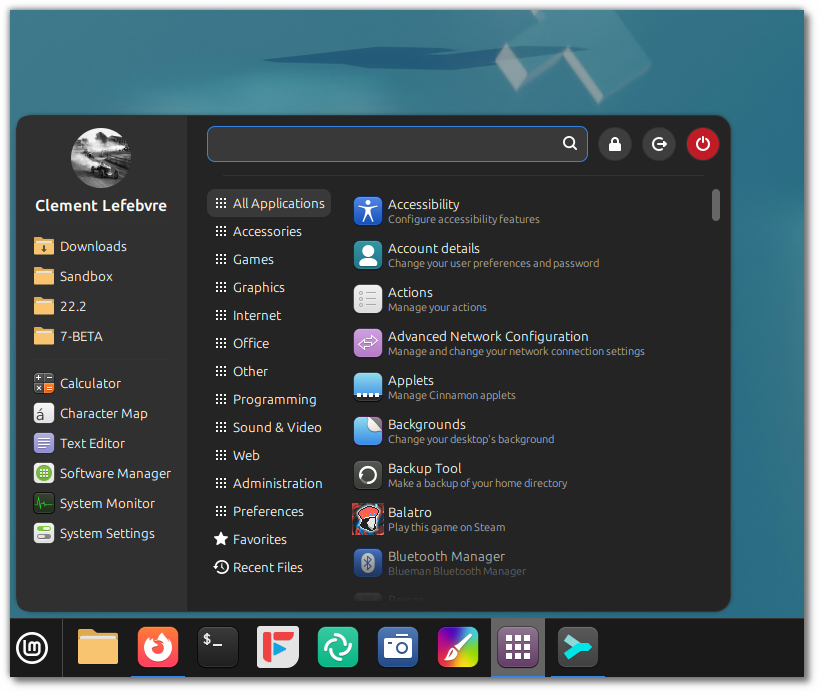
Configuration options were added to be able to move the search bar to the bottom:
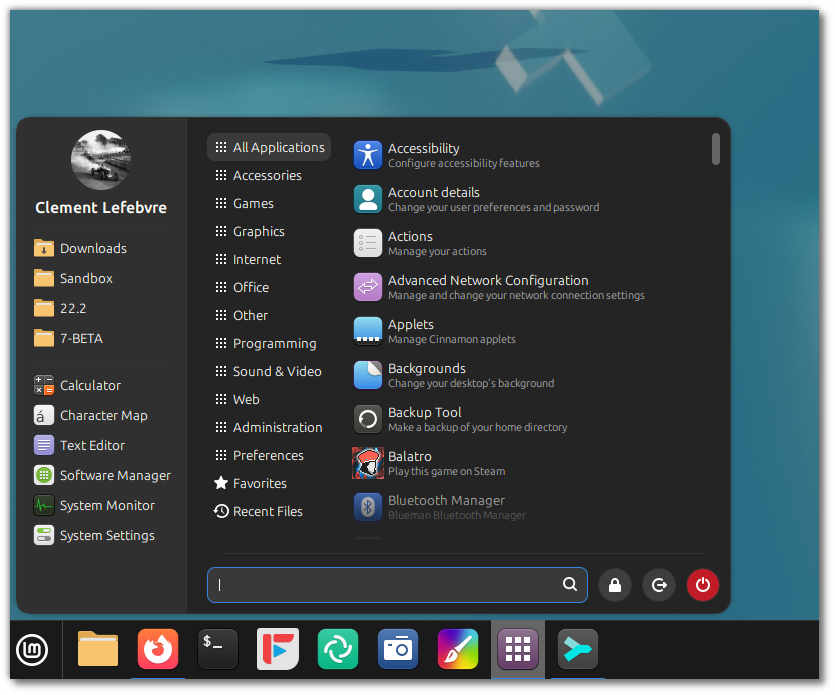
And to be able to position the system buttons in the sidebar:
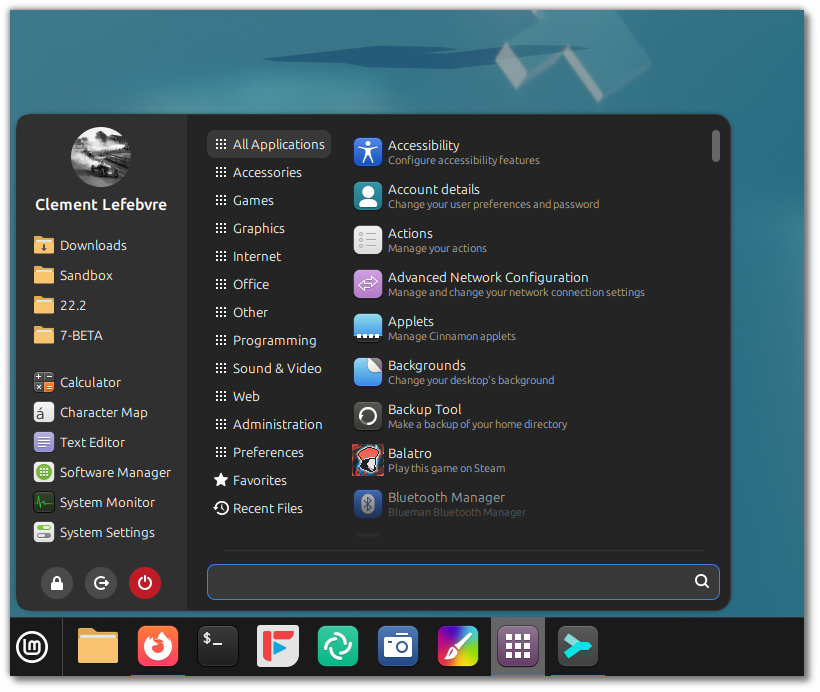
Troubleshooting Tools
Despite our best efforts, things don’t always work out of the box, right? 🙂
When troubleshooting issues and finding solutions you don’t only need to find people who are able to help you, you need to be able to give them the information they need to understand your problem and give you the right solution.
The steps involved in troubleshooting a hardware-related issue usually are:
- Finding the cause of the problem
- Precisely identifying the device, component or driver
- Finding out what to do
- Applying the recommended solution
The community (forums, chat, tutorials, etc..) helps with step 3, but you’re usually on your own with the command line for steps 1, 2 and 4.
We worked on making these steps a little bit easier.
The “System Reports” tool was given a plethora of new features and it was rebranded as “System Information”.
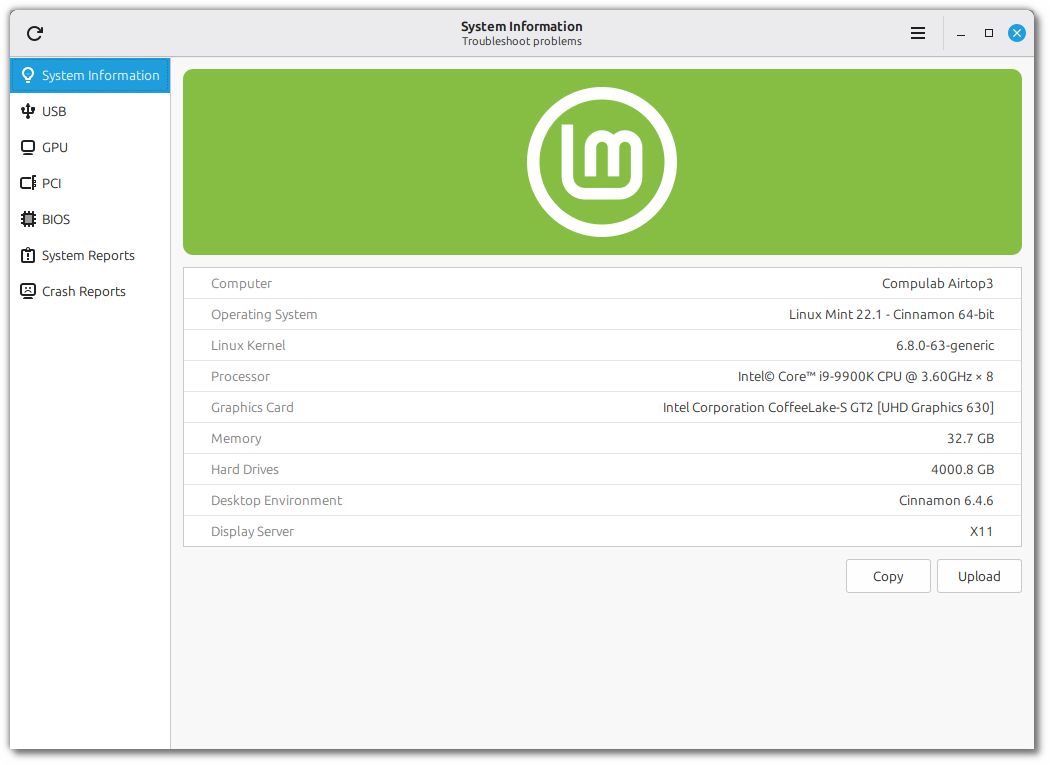
In addition to its “System Information”, “System Reports” and “Crash Reports” pages, the tool received 4 new pages to show you more information and help you troubleshoot common issues.
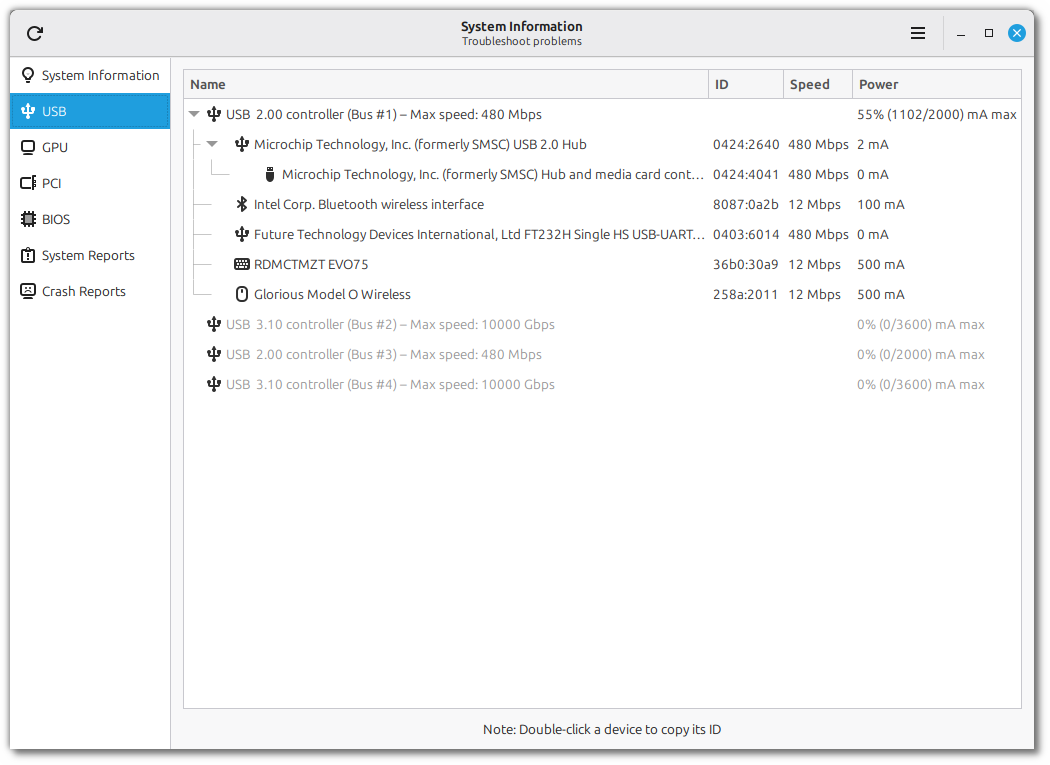
The “USB” page shows a detailed view of all your plugged-in devices. You can see their type, name and ID (which uniquely identifies the device and its manufacturer).
Devices are grouped by USB controller, so you can see where each device is plugged and compare its connection speed and power usage with the controller’s max connection speed and total power capacity. This makes it easy to troubleshoot common USB issues such as slow transfers or random disconnections.
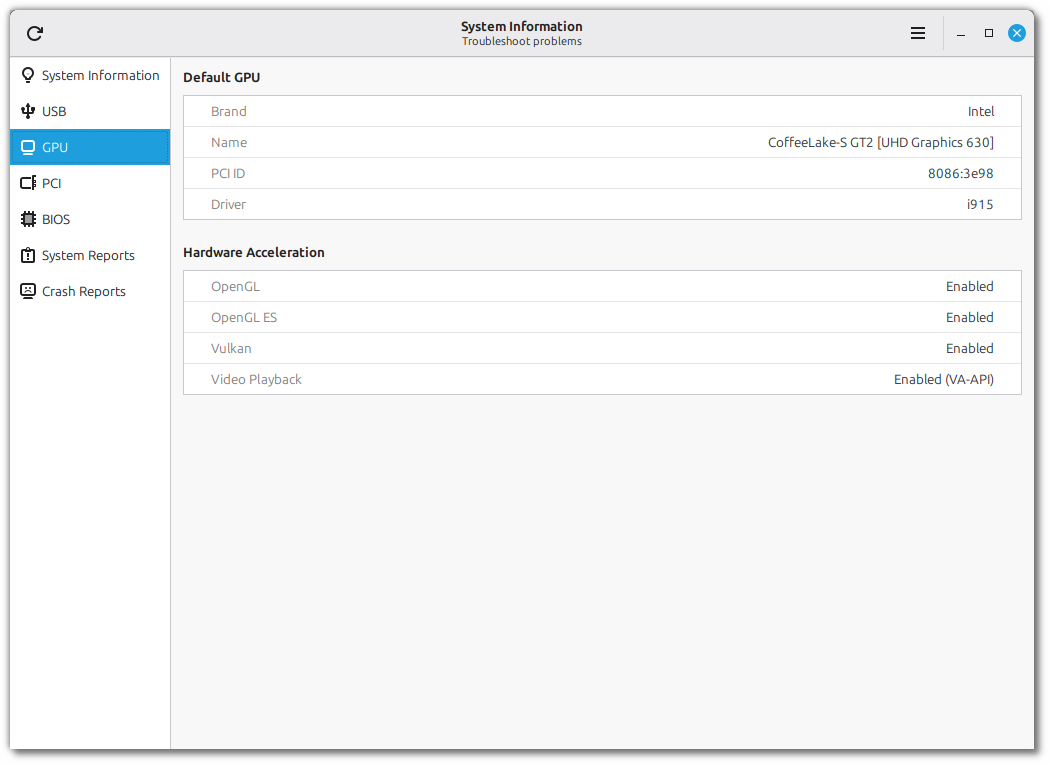
The “GPU” page shows information about your default graphics card and its support for hardware acceleration:
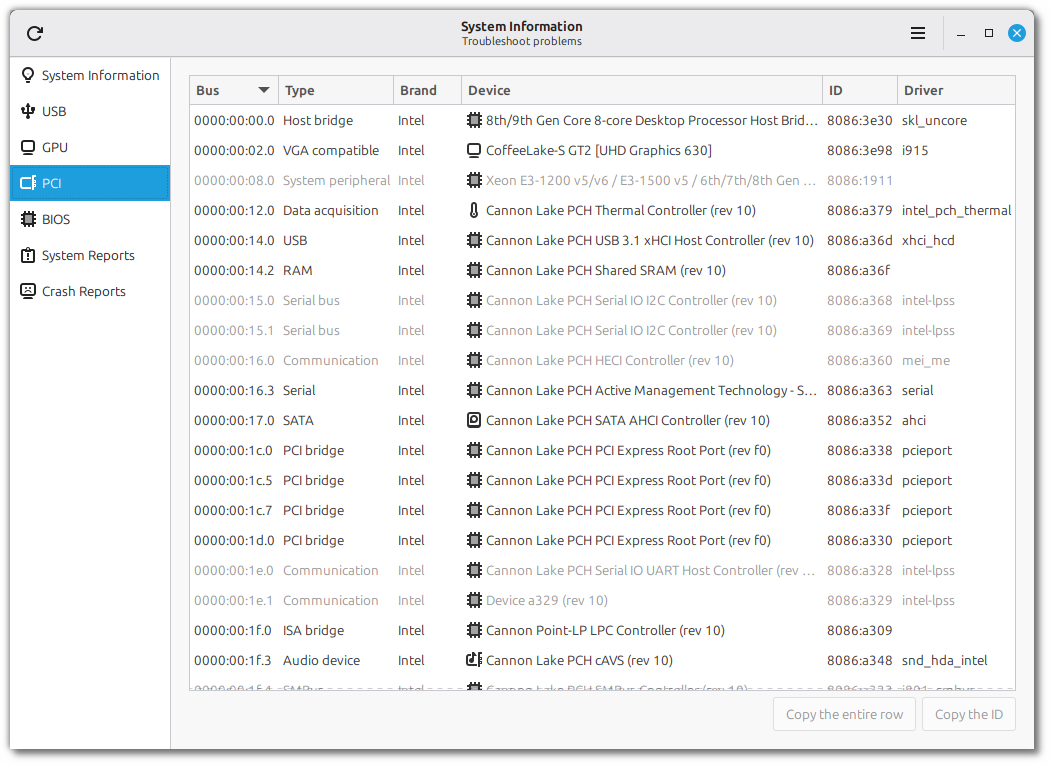
The “PCI” page gives you a detailed look at the internal components of the computer. The PCI ID and the driver in use are very useful when troubleshooting PCI devices.
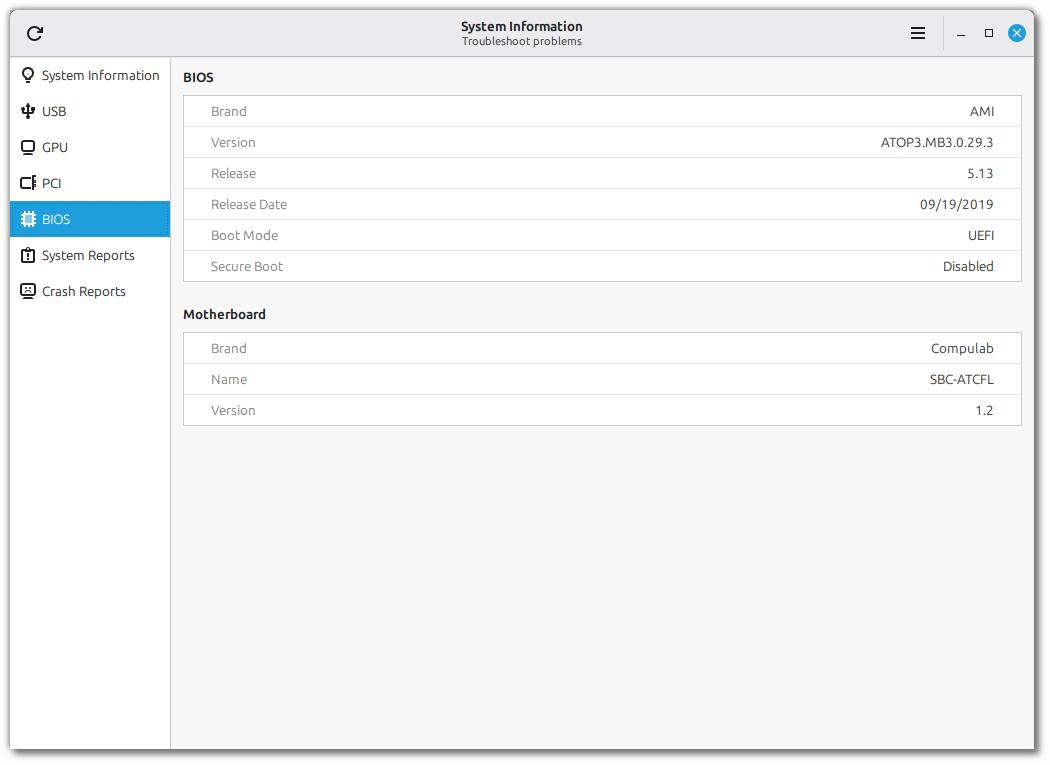
In the “BIOS” page you can find information about your motherboard, BIOS version, boot mode and secure-boot.
A new tool called “System Administration” was implemented. Although its UI looks similar to the “System Information” tool, its goal is slightly different. This tool runs with admin privileges and focuses on administration.
For the moment it only has one page called “Boot menu”:
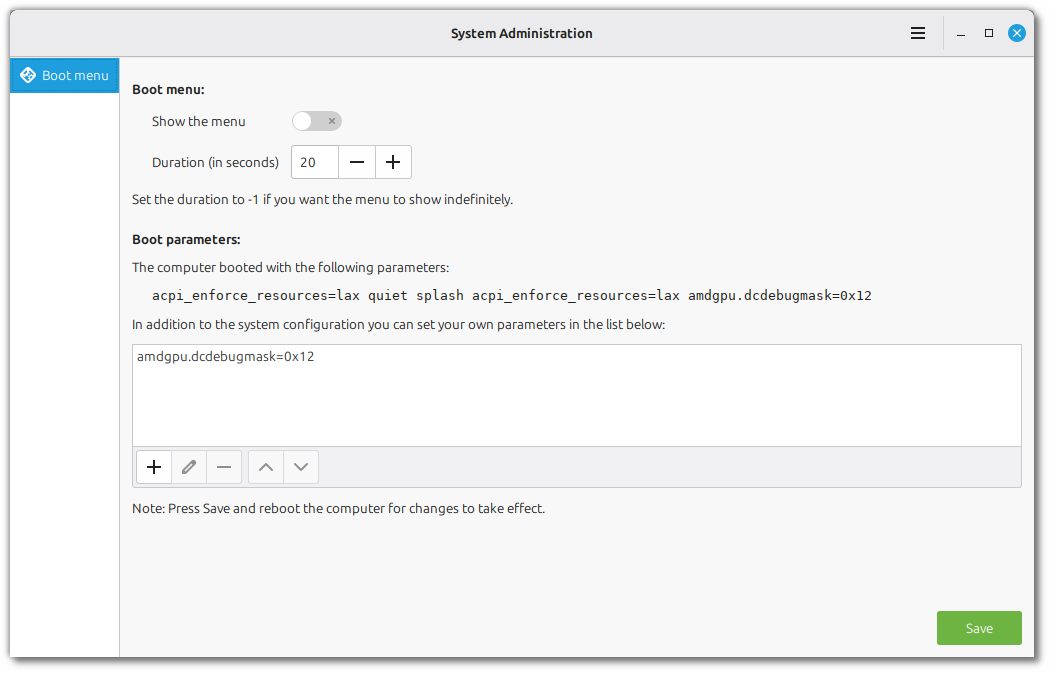
At the top you can show or hide the boot menu and set how long it stays visible before booting the default option. This is very useful if you’re dual-booting or if you’re using multiple kernel series.
In the second section you can add boot parameters. This is sometimes needed when dealing with hardware/driver issues.
LMDE 6 EOL
LMDE 6 will reach End of Life on January 1st 2026.
Past that date the repositories will continue to work but the release will no longer receive bug fixes or security updates.
To upgrade the 64-bit version of LMDE 6 to LMDE 7 visit https://blog.linuxmint.com/?p=4571.
The 32-bit version will unfortunately not be upgradable. Proper support for 32-bit was dropped by many upstream projects (Debian, Ubuntu, Mozilla, Chromium) so we cannot continue to support this architecture anymore.
XSI (XApp Symbolic Icons)
Although adwaita-icon-theme is still a dependency on libgtk, it no longer supports applications outside of GNOME. Some of the symbolic icons it provided were simply removed, leading to regressions in many projects who relied on them. For instance if you are running Cinnamon in LMDE 7 or Arch Linux right now, you can right-click your panel and see missing symbolic icons.
To replace the Adwaita symbolic icons a new XApp project was started called XSI (XApp Symbolic Icons): https://github.com/xapp-project/xapp-symbolic-icons.
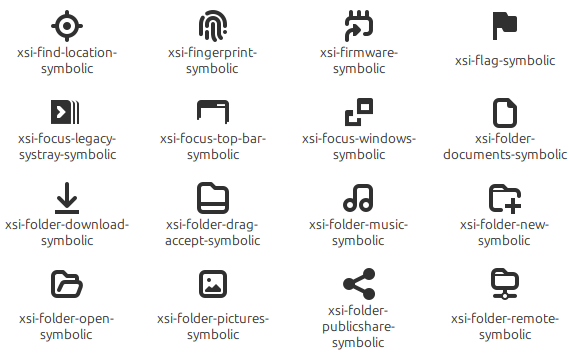
All the XApp, Cinnamon and Mint projects switched to XSI.
Sponsorships:
Linux Mint is proudly sponsored by:
Gold Sponsors:  Silver Sponsors:    |
Bronze Sponsors:        |
Donations in September:
A total of $21,001 were raised thanks to the generous contributions of 718 donors:
 $1062, David R. $531, Hans-Peter V.
 $500 (3rd donation), stevengarland $500, John J. $500, Kevin F.
 $212 (11th donation), Jiří B. $212 (2nd donation), Hans-peter S. $200, Gary B.
 $127 (10th donation), Richard H.
 $125, Hans R. S.
 $106 (13th donation), Christian G. aka “Chrissy” $106 (4th donation), Marek Stapff
 $106 (3rd donation), Tero J. $106 (2nd donation), Ingo B. $106, Adrian D. $106, Carsten K. $106, Jürgen G. $106, Mark W.
 $106, MR J. O.
 $106, Tancrède D. R. $100 (26th donation), John Mc aka “Land Research Project“ $100 (23rd donation), Philip W. $100 (12th donation), James F. $100 (8th donation), John B. $100 (8th donation), Susan T
 $100 (4th donation), Faisal Yousuf $100 (4th donation), Jay V. $100 (3rd donation), David D. $100 (2nd donation), aka “The O.G.” $100 (2nd donation), Garrett S. $100 (2nd donation), Soeren $100, Brenna M. $100, David R. $100, Derek B. $100, John O. $100, Kawashima $100, Ken N. $100, Kenneth W. N. $100, LJ&M, LLC $100, Mark H. $100, Matthew J. P.
 $100, Monica M. $100, Paul P. $80, Terry Ya! $75 (11th donation), Kyle S.
 $70 (11th donation), John B.
  $63, Luc H.
 $55, JAEHO C.
 $53 (15th donation), Goran A.
 $53 (15th donation), Roland H. $53 (10th donation), Uwe P.
 $53 (9th donation), Giovanni D. S. aka “ChibiOS“ $53 (8th donation), Daniel K. $53 (8th donation), Pavel P.
 $53 (6th donation), Marco van den Berg $53 (5th donation), Boris I. $53 (5th donation), Danilo Cesari aka “Dany” $53 (5th donation), Ludwig K.
 $53 (4th donation), António Salsinha – Graphic Designer
 $53 (4th donation), Christian S. $53 (4th donation), Leo P. $53 (4th donation), Marion
 $53 (4th donation), Rainer B. $53 (2nd donation), Alexander E. $53 (2nd donation), Arend Stemerding $53 (2nd donation), Kurt Ballmer-Hofer $53 (2nd donation), Terence P. aka “Terryphi” $53 (2nd donation), Timothy E. $53, Alain P. $53, Benjamin R. $53, Christian H. $53, Christoph S. $53, Daniel T. $53, Daniele R. $53, David B. $53, Detlev S. $53, Dr S. M. W. $53, Dr. T. B. $53, Francesco S. $53, Gebhard S. $53, Herbert E. $53, Juergen W. $53, Manuel R. $53, Mustapha W. $53, Nicholas G. $53, romain B. $53, Shane H. $53, Thilo G. $53, Thomas S. $53, Toni F. $53, Torsten W. $53, TS $53, Ulrich Schmiedel aka “Ueli-BSL” $53, Urs F. $50 (12th donation), Mothy $50 (9th donation), Anthony C. aka “Ciak” $50 (9th donation), Terrence P. $50 (7th donation), Larry B. $50 (6th donation), Tom D. $50 (5th donation), Brian H. $50 (5th donation), Lee Frakes $50 (5th donation), Robert M. $50 (4th donation), Edmund B. $50 (4th donation), Mark H. $50 (4th donation), Omar T. $50 (3rd donation), Michael T. $50 (2nd donation), John B. $50 (2nd donation), John M. $50 (2nd donation), Randy S. $50 (2nd donation), Richard W. $50 (2nd donation), Winston M. $50, Andy K. $50, arCandide consulting $50, Arthur J. $50, BHARATKUMAR N.
 $50, Bruno Santiago $50, Bryan N. $50, Charlie P. $50, Chris R. $50, Christopher G. $50, Dan D. $50, Daniel D. $50, David D. $50, DAVID R. $50, Douglas H.
 $50, Eduardo A. V. $50, Jason M. $50, Joe F. $50, Keith Toy $50, KENNETH W. T. $50, Louis G. $50, Manot S. $50, MARCEL R. $50, Mark S. $50, Matthew P. $50, maykel F. S. $50, Mike M. $50, Noelle L. $50, Paul P. $50, Philip B. $50, Pierce L. $50, Ray R. $50, Robert H. $50, Rusty D. $50, Scott O. $50, Wallace O. $48 (2nd donation), K V $44 (2nd donation), Bernd W. aka “Weze“ $42, Paul G. $40 (5th donation), Colin S. $40, Clay C. $40, Jake L. $40, Ronald B. $40, Todd M. $38, Frank D. $37 (3rd donation), Paul B. $37, Stefan G. $36, Lawrence W. $35 (18th donation), B. H. . $31 (15th donation), Luca D.
 $31 (11th donation), Alexander M. $31 (7th donation), John P. $31 (7th donation), Jürgen H. $31 (6th donation), Matthias S. $31 (5th donation), Jean-claude M. $31 (3rd donation), Antony L. $31 (3rd donation), John C. $31 (2nd donation), M. T. $31 (2nd donation), Michael K. $31 (2nd donation), Philippe J. $31 (2nd donation), Reiner L. $31 (2nd donation), Thomas P. $31, Andreas O. $31, Olivier G.
 $31, Yury M. $30 (6th donation), silver_whiskers $30 (4th donation), mitch K. $30 (2nd donation), Lewis E. D. $30, Dennis M. $30, Jeffrey B. $30, John J. $30, Kenneth K.
 $30, KIKUJIROU M.
 $30, Leon S. $30, PATRICK H. S. $29, Isabella N. $26 (8th donation), Matteo aka “Mac7veN“ $26 (4th donation), Willem vdK aka “WvdK” $26 (2nd donation), Gerbert B. $26 (2nd donation), Richard W. $26, Briseida L. G. $26, John K. $26, Peter J. $25 (55th donation), Linux Mint Sverige $25 (15th donation), Andrew Currie
 $25 (14th donation), Mihnea Rădulescu $25 (14th donation), Timothy C. $25 (13th donation), Alexander M. $25 (8th donation), John N. $25 (7th donation), Gary D. $25 (6th donation), Marion P. $25 (4th donation), David P. $25 (3rd donation), Frank F. $25 (3rd donation), Philippe W. $25 (3rd donation), Thomas E. $25 (2nd donation), Kenneth S. $25, Lawrence F. J. $25, Magnus F. $23 (3rd donation), Gerardus J. W. C. $22, Francois P. $21 (111st donation), Johann J. $21 (63rd donation), Peter E. $21 (30th donation), Denis D. $21 (30th donation), Stefan W. $21 (25th donation), Benjamin W. aka “UncleBens”
 $21 (24th donation), Marek S. $21 (16th donation), Frank J. $21 (9th donation), Divoto $21 (9th donation), Rolf-Jürgen G. $21 (7th donation), Dirk B.
 $21 (7th donation), Ezequiel O. $21 (7th donation), Gareth L. $21 (7th donation), Günther H. $21 (7th donation), Thorsten H. $21 (6th donation), Kai D. $21 (6th donation), Martin O. $21 (6th donation), Massimo R. $21 (5th donation), David P. $21 (5th donation), Erkki J. $21 (5th donation), Frank W. $21 (5th donation), Karl-heinz R. $21 (4th donation), Arnis D. $21 (4th donation), Curt S.
 $21 (4th donation), Mateusz M. $21 (4th donation), Mili D. $21 (4th donation), Odie P.
 $21 (4th donation), Rimas V. $21 (3rd donation), Mack $21 (3rd donation), Alexandros D. $21 (3rd donation), Andreas G. $21 (3rd donation), Claire P. $21 (3rd donation), Hans-werner J. $21 (3rd donation), Jochen M. $21 (3rd donation), Matthias Versen aka “Matti”
 $21 (3rd donation), Petur K. $21 (3rd donation), Siva S. aka “S.S” $21 (3rd donation), Zdzislaw P. $21 (2nd donation), Denis F. $21 (2nd donation), Dieter Schemmelmann aka “Die0691” $21 (2nd donation), Frank B. $21 (2nd donation), Frank H. $21 (2nd donation), George M. $21 (2nd donation), Graham D. $21 (2nd donation), Jens R. $21 (2nd donation), Joerg A. $21 (2nd donation), Karl – Heinz P. $21 (2nd donation), Rainer M. $21 (2nd donation), Roland H. $21 (2nd donation), Wim R.
 $21, AHMET C. Ö. $21, Albert G. $21, Alexander E. $21, Amir A. D. $21, Andreas W. $21, Bart E. $21, Bernard F. $21, Bernd K. $21, Chris H. $21, christophe O. $21, Christopher D. $21, Claus H. $21, Curd R. $21, Demetrio M. $21, Engelbert E. $21, Eric B. $21, Federico S. $21, Felix C. $21, Florian G. $21, GMB V. $21, Guy I. $21, Helga W. $21, Henrik S. $21, Jacek B. $21, JACKY T. $21, JEAN-LUC F. $21, Jeanette B. $21, Joachim J. $21, Jorge S. J. T. $21, Karel V. R. $21, Kevin S. $21, Klaus G. $21, Livio G. $21, Manuel L. G. $21, Marcel S. $21, Markus L. $21, Martin R. $21, Massimo P. $21, Matthias B. $21, Michael Meisner aka “Michael“ $21, Michaela S. $21, Mr Cee $21, paul M. $21, Pedro A. $21, Peter B. $21, Peter N. $21, Peter P. $21, Peter V. R. $21, Piet V. D. E. $21, Raees M. $21, Ralph D. $21, Reiner P. $21, Rolf N. $21, Roman A. $21, Scott M. $21, Stéven P. $21, Stephane T. aka “Soixante4” $21, Thomas F. $21, Thorsten M. $21, Timo aka “TfromG” $21, Tobias D. $21, Weihel M. $21, Werner L. $20 (71st donation), Bryan F. $20 (34th donation), vagrantcow $20 (33rd donation), Hemant Patel $20 (29th donation), Aimee W. $20 (15th donation), Terry B. $20 (13th donation), Eric W. $20 (10th donation), Tom S. $20 (9th donation), Jeffery G. $20 (8th donation), Mario M. $20 (8th donation), Waldemar P. aka “valldek” $20 (7th donation), Paul K. $20 (6th donation), Dimitrios G. $20 (6th donation), Eric H. $20 (5th donation), Alonzo J. $20 (5th donation), Christian O. $20 (5th donation), Gregory M. $20 (5th donation), Luc C. $20 (5th donation), Martin F. $20 (4th donation), Daniel M. L. $20 (4th donation), Robert H. $20 (3rd donation), Donald S. $20 (3rd donation), Edward M K. $20 (3rd donation), Kevin D.
 $20 (3rd donation), KONSTANTINOS I. B. $20 (2nd donation), Craig K. $20 (2nd donation), Joel B. $20 (2nd donation), José Juan M. $20 (2nd donation), Steven L. $20, Albert C. $20, Alex V. P. $20, Art By Justin $20, AUSTIN H. $20, Daniel D. $20, Daniel M. $20, Darrell S. $20, Daryl A. $20, David A. $20, Donald S. $20, Dylan G. $20, Gerald G. $20, herbert B. $20, James M. $20, Jeffrey J. $20, Joe C. $20, John W. $20, Joseph M. $20, Keith S. $20, Ken M. $20, Kyle D. $20, Louis G. J. $20, Martin B. $20, Mike T. $20, MILAN U.
 $20, Pablo A. %. $20, Radek D. $20, Randall W. $20, Robert C. $20, Robert P. $20, Roger H.
 $20, S P. $20, Uwe M. $20, WillIam S. $19, Anonymous $16 (7th donation), Harold H. $15 (6th donation), Rimon K. $15 (4th donation), Alessandro P. $15 (3rd donation), $15 (3rd donation), Laura S. $15 (3rd donation), Tonny K.
 $15 (2nd donation), apistos $15 (2nd donation), Emmanouil K. $15 (2nd donation), Hamish M.
 $15, Admir K. $15, B.A. L. $15, Heather W. $15, Klaus-Dieter K. $15, Maurice E. $15, Paul R. $15, Ruth M.
 $15, ZHE A. $12 (3rd donation), Yavor N.
 $12, Leong J. S. $12, William Z. $11 (16th donation), Bengt Falke aka “BIOMOIB“ $11 (10th donation), Alessandro S. $11, Claas S. $10 (114th donation), Thomas C. $10 (58th donation), Philip Woodward $10 (41st donation), Tugaleres.com
 $10 (38th donation), Denys G. aka “GD Next“
 $10 (22nd donation), Piotr L $10 (21st donation), Abdulkadir H. aka “Askari” $10 (19th donation), Michael P. aka “www.perron.de“ $10 (17th donation), Adian K. $10 (17th donation), TONY aka “STRUZZIN ELECTRONICS“ $10 (15th donation), Alan B. $10 (15th donation), Philip E. $10 (15th donation), Tomi P. $10 (14th donation), Antonio aka “pengu73” $10 (13th donation), Rupert B. $10 (10th donation), Gene E. $10 (10th donation), Joerg B. $10 (10th donation), Patrick C. $10 (9th donation), Abe Z. $10 (8th donation), Artem Ignatyev aka “ZaZooBred” $10 (8th donation), Tomasz K. $10 (7th donation), K. T. . $10 (7th donation), A. R. $10 (7th donation), Craig D. $10 (7th donation), H.V. L. $10 (7th donation), Marcos P. G. $10 (7th donation), Thomas G. aka “thg14” $10 (6th donation), Nabil aka “Billy” $10 (6th donation), Pietro Giaccoli aka “Prof.pg” $10 (5th donation), Arvidas S. $10 (5th donation), Björn H. $10 (5th donation), Cedric B. $10 (5th donation), Erich G. $10 (5th donation), Ferruccio R. $10 (5th donation), Gerard B. $10 (5th donation), Günter S.
 $10 (5th donation), jfoxwoosh $10 (5th donation), Mariusz B. $10 (5th donation), Stefan V. B. aka “stefanvb” $10 (5th donation), Želimir S. $10 (4th donation), Jeffrey S. $10 (4th donation), John T. $10 (4th donation), Marco D. $10 (4th donation), Martin G. $10 (4th donation), Matthias H. $10 (4th donation), Sascha S. $10 (4th donation), Sebastian S. $10 (4th donation), Serge S.
 $10 (4th donation), Sergei Petrov $10 (3rd donation), Andre Toussaint aka “AndreT” $10 (3rd donation), Hans A. $10 (3rd donation), Leonardo M. $10 (3rd donation), Matheus E. $10 (3rd donation), Rainer R. $10 (3rd donation), Roger S. $10 (3rd donation), Vesa A. $10 (3rd donation), Walter W. $10 (3rd donation), Z $10 (2nd donation), António M. $10 (2nd donation), Bryce S. $10 (2nd donation), Charles R. $10 (2nd donation), Christian S. $10 (2nd donation), Dominique M.
 $10 (2nd donation), Dušan B. $10 (2nd donation), Geoffrey N. $10 (2nd donation), Giuseppe Francesco Aldo R. $10 (2nd donation), James P. $10 (2nd donation), James T. $10 (2nd donation), Jaroslaw R. $10 (2nd donation), Joe K. $10 (2nd donation), John M. $10 (2nd donation), Michael Casanova $10 (2nd donation), Michael W. aka “MichaTux”
 $10 (2nd donation), Natanael Cruz $10 (2nd donation), Oleg L. $10 (2nd donation), Rainer B. $10 (2nd donation), Ravindu W. $10 (2nd donation), Raymond B. $10 (2nd donation), Saro E. $10 (2nd donation), Steffen K.
 $10 (2nd donation), Sydney C. $10 (2nd donation), T.H. $10 (2nd donation), TAKAO Y. $10 (2nd donation), Ted H. $10 (2nd donation), Thomas Schramm aka “TomTom “ $10 (2nd donation), Víctor G. M. $10 (2nd donation), Wolfgang V. $10, $10, AHA R. $10, Alexander T. $10, Andres G. $10, Andrey G. $10, Anthony G. $10, antonino C. $10, Arno E. $10, Ashley S. $10, Bernd D. $10, Bojan M. $10, Brian C. $10, Brian M. $10, Charandeep M. $10, Chris G. aka “JustGoey” $10, Christian F. $10, CLAIRVEAUX B. $10, Corrado T. (Palermo) $10, Daniel B. $10, Danilo M. $10, DENIS D. $10, Engelbert N. $10, Eric S. $10, Erik H. $10, Estefanía I. F. $10, Evan D. B. $10, Félicien L. $10, Francesco P. $10, Francois L. $10, Franz G.
 $10, Freediving Coron $10, Gianfranco G. $10, Giel V. L. $10, Giovanni A. $10, Giraldo D.
 $10, Glenn H. $10, Grant S. M. $10, Hans-Dieter K. $10, Hans-Jürgen S. $10, Helmut R. $10, Holden M. $10, Horst G. $10, Jürgen L. $10, Jaime O. S. $10, Jan V. $10, Jannik H. $10, Jean-Claude V. $10, Jean-Pierre L. $10, Jochen P. $10, John G. $10, John Q. $10, Jose A. A. B. $10, Joshua J. $10, Jukka T. $10, Just Jason $10, Karolis K. $10, Klaus I. $10, Korora Solutions $10, Kyle P. $10, Lane L. $10, Manfred S. $10, Manuel %. Z. B. $10, Marcin S. $10, Mario D. P. $10, Maroš Ď. $10, Martin G. $10, Martin J. $10, Martinez L. $10, Maxiu $10, Michael C. L. $10, Michael L. $10, Michael M. $10, Michael T. $10, Michel A. $10, Ministério Vida Sobrenatural – Nova Aliança Igreja Cristã $10, Mr M. M. $10, N G. H. $10, Nektarios T. $10, Nico $10, Oleg S. $10, Oleksandr N. $10, Ollie Norman-Ramm $10, Otto K. $10, Patricio L. $10, Philippe C. $10, R.G.M. R. $10, Rafael R. $10, Raymond S. $10, Rene K. $10, Robert B. $10, Roger E. $10, Royce G. $10, Rudolf S. $10, saman K. $10, Samuel T. T. $10, Sandra N. $10, Sebastian H. $10, Sergio R. $10, Sharon A Bunting $10, Simon V. H. $10, Sven K. $10, Thomas P. $10, Thomas S. $10, TIW
 $10, Uis Z. $10, valerio S. $10, Victoria A. J. $10, Vlad M. $10, Volker F. $10, W G. $10, Walburga K. $10, Werner B. $10, Winfried K. $10, Wolfgang S. $10, Yax $10, YourGameTV $9, Chris Paul $7 (31st donation), Blazej P. aka “bleyzer” $7 (8th donation), Lorne F. $7 (2nd donation), $7, Joaquin C. C. $6 (97th donation), Eugene T. $6 (6th donation), Darin K. aka “D.e132” $6 (3rd donation), A user and fan $6, Geoffrey O. $6, nicholas J. $6, Timothy H.
 $349 from 91 smaller donations
If you want to help Linux Mint with a donation, please visit https://www.linuxmint.com/donors.php
Patrons:
Linux Mint is proudly supported by 1,798 patrons, for a sum of $4,446 per month.
To become a Linux Mint patron, please visit https://www.patreon.com/linux_mint
Excellent work with the new tools, this is why Linux Mint is simply the best.
The update to System Reports/Information sound great and will be really helpful.
Is there an optional column to display the disc space of listed USB devices? I find that’s much more helpful for identifying particular devices that device speed.
No, but that’s not really a characteristic specific to USB. Although you can add storage via USB, what would be useful here is a global view of the various storage devices and mounts. To be fair there’s a lot more we can add, and with three approaches in mind: Information, Administration, Monitoring (which right now is still largely delegated to GNOME applications).
Monitoring the available space on all devices is possible in System Monitor -> File Systems. I would rather rely on that, since it does a good job at automatically detecting and updating the info when (un)plugging USB storage devices.
Thank you for all your work on LM!
Va a quedar bien bonito, muchas gracias linux mint por hacer mucho por la comunidad!
Thank you very much for focussing on hardware related reporting. That’s going to be very helpful.
Slightly off-topic, could we add a feature that allows auto-switching power profiles when a certain battery percentage is hit. Also, a way to detect change in timezone and optionally apply it automatically. Thanks again for your excellent work!
The new apps are welcome addition. I suggest to add a companion app to KDE connect for mint. I could add the KDE connect itself, but it brings all the QT stuff, which is unnecessary.
Yes, a GTK port of KDE Connect would be a welcome addition to Mint. I’m not a fan of having KDE-centric apps and the huge litany of libraries they require mixed into my Cinnamon. I’m not sure this is something the Mint team should do, or if it might be better for a separate programmer to tackle, but it would certainly be a great thing to see!
Now… where was that big big heart emoji…? 🤔 .. ah, here!: 💚💚💚💚💚
Been using Linux mint for a couple of month and I’m getting into how things work… Thank you soo much to the team who’s constantly working to improve it further… Soo much love ❣️
Will the changes to System Information be brought to the Mate edition?
Yes
Amazing work all around! I’m looking forward to LM 22.3!
I’ve been told by JosephM that with the new libadwaita fork, apps that use libadwaita app should be fully themeable (not just colors and the – + x widgets), but that the current Mint themes haven’t been designed to theme them yet. Do you have plans to do so for upcoming LM versions? I’m especially hoping that Mint-X receives that upgrade, as it’s my favorite theme, and libadwaita is absolutely jarring and odd-looking against my normal Mint-X windows, to the point that I’ve added the Xia repository to Zara so that I can still use the GTK 3 versions of some programs (System Monitor, Calendar, Celluloid, etc.) that look out of place in their libadwaita forms.
Also, are there any plans to make a full dark version of Mint-X? I know it’s pretty much there for GTK-3, but not for GTK-2/QT, like Mint-Y has. I’d love the option to fully use a Mint-X dark theme for all windows, not just the terminal and Celluloid.
Thank you for all the amazing work you and your team do! THIS is why Mint is the best!
Technically Joseph is right, it is fully themeable. In practice though, it’s a bad idea to invest too much time into this. Libadwaita looks different on purpose (not just in terms of colors/looks but also in terms of layout and widgets) so even with a lot of work it would not look the same. It’s also a library which isn’t ready/stable, it’s still actively developed and it keeps changing, so the more work you put into this the more maintenance you have to carry. Adapting colors to make apps fit in with the themes was necessary and easy, but we’re careful to keep this light in terms of maintenance and patching. It doesn’t change the fact, long-term, that libAdwaita is a compatibility issue. Anything that doesn’t support our users really, is an issue long-term, it’s something we need to avoid rather than something we need to invest in.
I’m not opposed to the idea of a dark version for Mint-X but it’s not something we’re planning to do ourselves.
Ok. That makes sense.
I love the new “System Information” app and tools!!
Hi Clem
Great work by you and the team. Very glad to see you are giving the option to move the system buttons to the sidebar, much appreciated. Thanks so much for listening to, and acting on, the feedback; that is one of the many things that makes Mint such a fantastic distro.The new “System reports” tool will be very useful indeed. Regarding XSI, there is a missing “crop” icon in the “Document Scanner” Application, I had a quick look at the long list of icons on github page you referenced, but I am not sure if it is there or not. Looking forward to the next release 🙂
We can add the crop icon to XSI but it won’t magically fix the missing icon in simple-scan. We’ll have to patch it. Are you seeing this in Mint 22.x or LMDE 7?
I would also add my appreciation for the team listening to feedback regarding the system buttons.
Hi Clem
Mint 22.2 Cinnamon – it was fine in 22.1 as I recall. Document scanner is version 46. There is a github bug I raised 13097 on 15th sept which has the screenshots. Thanks
Hi Clem,
As always, nice work, this is why LM is the best Linux Distro !!!
I have one question, will the next major LM version (23) come from experimental to beta regarding wayland session?
Thanks,
Želimir
Wayland Cinnamon is still missing one major feature: a screen locker. It’s a complex feature to implement. I can’t guarantee it will be ready on time for Mint 23 next year but it’s possible.
What a lovely idea with that new tool! I will look forward to see what else you plan to fit in.The info-admin-monitor approach is super productive. If it’s going to be packed with functions like update manager is, that is going to be another banger.
Obviously the holy grail of troubleshooting would be a system that automatically collects and presents needed data in a forum friendly way, but there are so many different information needed for different cases. Anyways amazing work!
Very nice work as always! 😎 All the new features are great, but personally I like the administration menu best. Especially since it can still be expanded and there are sure to be more options available. Thank you so much for all of your work.
I’m very happy and excited to see the new Cinnamon menu! I think it’s a significant improvement. Thanks for that!
One remark on usability for the actual login: At the moment, there is no button when logging in; you can “only” log in by pressing the Enter key (?). It would be more self-explanatory if there were a button next to the password text box. For me pressing the enter key on the keyboard is fine, but for a new user, it might not be the case.
Thanks a lot for making it possible to customize the menu with the 3 buttons (Lock screen, Log out, Shutdown) close to the Mint menu button. 🙂
It looks like “System Info” and “System Reports” got merged into “System Information”, right? Some network-related info would be great as well: connection info (ip, netmask, DNS, gateway), wifi and bluetooth status (rfkill), along with wifi regulatory domain.
When it comes to any info that may change while the program is running, does System Information update it automatically (interval?), or using the refresh button is the only to do it?
It updates automatically.
I love all this new stuff coming. I won’t use Mintmenu as I run the Xfce edition, but must admit that the menu is better indeed. The new apps seem great. Perhaps you would consider adding GUI for apparmour or app permission control centre in the system administration tool. Or even a simple cleaner for basic tasks. On the other hand, that must be a lot of work, I guess. I hope both new apps maje their way to Xfce. Anyway, I highly aopreciate what you do
I imagine LMDE 6 will continue to get Debian updates, correct?
Also, have you seen the interview that Ubuntu’s chief engineer Jon Seager gave to The Register at the recent Ubuntu Summit conference? In it he said they are striving to replace the existing pipewire implementation with a SNAP version as soon as 26.04 LTS. If that happens, I’m curious how that will affect your plans for a Linux Mint version based on 26.04 LTS?
Yes, it will continue to get Debian updates.
If Ubuntu no longer uses pipewire natively, we’ll keep an eye on it and make sure it works. It won’t be the first component we don’t have in common and it won’t the last.
The new Cinnamon Menu looks great!
Nice to know about the changes and new features on System Reports, it will give users a easy way to check these info out of the box. Looking forward to the final version.
Thank you a lot, Team, for your commitment to delivery so many features along the latest LM versions and for the ones to become in the next ones!
Here is a plea to do with the Wayland screen-locker (that locker having been mentioned in a reply, above, to Clem).
Please try hard to make that locker secure. The creator of XScreenSaver, who complains about the lack of security of other lockers, has a point; and, as a bug report filed against Mint records, even his locker – and the Mint one is worse in this regard – shows the desktop briefly on a supposedly locked machine. The report at issue says that Wayland can fix this. I really hope that it does fix it!
It doesn’t “fix” it per se, the issue just wouldn’t happen in Wayland. It’s both a good and a bad thing.
In Xorg, there are three components at play: Xorg itself, the window manager and the screensaver. They need to juggle with each other to make this work and it’s not without its problems. In Wayland, one process does it all… window-management, screenlocking, compositing, it’s all done by Cinnamon. Is that a good thing? Well, it means it will be much smoother looking. Is that also a terrible thing? I would argue it is yes. Think about it.. the same process which is responsible for the screen locker takes care of thousands of other things. Think of the many ways it can crash or respond to things the wrong way. It’s definitely going to be challenging to get everything right. There’s another thing to consider though.. and it’s also both good and bad. Since Cinnamon actually does everything it also acts as the session owner. If it crashes in Wayland everything is gone, as if you logged out. In Xorg, you keep your work and your windows, in Wayland you won’t. Your locked session is more private but less stable. There’s a lot of room for improvement in everything I said here, but that’s the big picture.
An alternative to the screen locker which is still missing in wayland session is the suspend option in lock out.
Thank you soo much for all the hardwork towards improving the experience… Personally I’m in love with mint everytime I use it… Lots of love ❣️
Awesome news as always and good to knowof all the progress made so far, just one question regarding the XSI: Let’s say that I develop either a GTK3 or a GTK4/libAdwaita/libAdapta app, so far I have been using several icons on the apps that are currently in GTK (I guess) but I’m not sure if this icon exists either on the fork you are creating or the current theme as it is, will there be an option to actually check this to make the change and implement it, or do I need to rewrite things entirely since the icon won’t show up at all?
The only option I have in mind is an icon named “blueman-serial”, that icon doesn’t exist as a symbolic one (as I have checked so far, I might be wrong) but I’m not sure how can I replace, if I should use something else, or if that’s specific to an specific icon theme and I might need to add it as dependency; also; if I want to change it to XSI, what do I need to do to not disrupt the usage but making it usable elsewhere (let’s say that I am taking LMDE 7 as reference but I want to use it in Debian 13)
Hi,
blueman-serial is a fullcolor icon which is part of blueman. If you use this you need to depend on blueman.
If you want to use a symbolic serial icon and there aren’t any in GTK/Adwaita/XSI then you can ship your own. Make sure you prefix your icon name with the name of your app (myapp-serial-symbolic), put that in hicolor and refer to it by name.
The role of icon themes is to change the look of icons, not to guarantee their presence. They can override the look of GTK/Adwaita/XSI icons or even of app-provided icons such as blueman ones of the ones you ship with your app.
If you think a particular icon, such as a serial connection icon, could benefit other apps, you can make a PR to add it to XSI. It would then be called something like “xsi-serial-symbolic”.
XSI itself will be a dependency of libxapp. To use xsi in older releases you just need to backport/install the latest xapp-symbolic-icons package. You don’t need to upgrade libxapp itself.
Last but not least there are tools to help you along the way:
– xapp-icon-chooser is really handy at picking icons. In Nemo, right-click any file, choose Properties, and click on its icon. This will launch an XAPP icon chooser. In there just start typing xsi- and you’ll see all of them.
– xsi-replace-adwaita-symbolic helps you find icon names in your code and replaces them with XSI names.
Really like the new Tools setup, Thank you Clem and Team for the hard work.
One Complaint, I upgraded my Donations to a higher amount, and then my name was dropped from the Donations list, been donating since 2021.
Thanks John,
I can have a look. Can you send me an email with the details and your paypal email address?
I think the new “System Information” app should be able to export a single big report file so that we can upload it to ChatGpt when consulting it for troubleshooting purposes.
It does. There are buttons to copy to buffer and to upload. Both buttons generate a full inxi report.
I really appreciate the ongoing work on improving the default Cinnamon menu. However, I wonder if it might be more practical to consider adopting Cinnamenu instead.
Cinnamenu is already one of the most popular and feature-rich menu applets in the community — fast, customizable, and well-tested by thousands of users. In many ways, it still offers a smoother experience than the current default menu.
Rather than spending more time refining the existing one, maybe integrating or officially supporting Cinnamenu could save development effort while giving users a better, modern menu right away.
Just a thought from a long-time Mint user who values efficiency and user experience.
Exactly! I’m using Cinnamenu for over a year and its still head above than whats shown on this page!
+1
when will the new menu arrive on lmde7, installed lmde7 few weeks ago just for that.
In about 2 months. New features are backported into LMDE after each Mint release.
For categories in cinnamon menu, can be pretty to use symbolic icons and not the “nine dots” icon…
Could XApp’s symbolic icons contribute to https://github.com/ForkAwesome/Fork-Awesome?
In the Cinnamon menu, categories no longer have icons. Adding a square with dots in front of each category is neither aesthetically pleasing nor practical. The “All Applications” category should be displayed in a different color from the others.
By default, the following folders are created, as in Microsoft Windows: /home/user/Video/, /home/user/ Images/, /home/user/Music/, /home/user/Download/. However, nobody sorts its documents by category; everyone sorts them in their own way. Why not removing these folders that clutter everyone’s organization?
We’re adding symbolic icons for categories. It just took a bit of time and it wasn’t ready when this blog post was written: https://i.imgur.com/AunEYZ8.png.
We can definitely learn from ForkAwesome and use it as an inspiration or even a resource. Our naming, target audience and existing icons are different though.
I’ve no news on XDG dirs yet but it’s something we’ve been thinking about. The menu already lets you choose which ones you want and which ones you don’t want, and they’re also easily customizable in Nemo.
👍 but “favorites” and “recent files” must be separated (a line?) from sw categories.
Perhaps is better “favorite files” to distinguish better.
Thank you very much Clement for your answers. New categories icons are very beautiful. It would be helpful to add colors to All Applications, Favorites, Recent files.
Regarding the XDG folders, you could keep the folders linked to a specific function (Desktop, Downloads, Public?, Templates?) but remove Music, Pictures, Videos and keep Documents.
I currently edit the script to remove (comment out) Lock Screen and Logout. With the new menu, it sounds like I’ll be able to do this more easily, yes? The only button I need/use is Shut Down. Great work, by the way. I’m loving LMDE7!
The code is a little bit cleaner/smaller. You’ll be able to edit it just the same way as before.
Nice that we can place the shutdown button,where it belongs and my mom doesn’t have to call me for help every time she wants to turn off her PC. The new menu layout is still a disappointing step back in usability for numerous reasons I detailed in the comments last month.
The new System information is great however. One thing I was missing in Linux always has been the Windows hardware manager and this revamped tool finally seems to come close to it. Good job! Please keep on improving in areas which are in need of it instead of reiterating stuff that is perfectly fine already
Sorry but “usability step back” is your opinion. E.g., I like link to standard folders (where you can link your separate partion).
Instead, I think integration with recent files can be further improved separating files by applications (like in mswin from win7): link to xed can show (in a submenu?) recent text files, link to LOcalc can show recent ods files etc.
Thank you for your constant efforts to improve Linux Mint! A question about the new menu… will it be possible to make it transparent or give it a blur effect?
Another thing you could consider in the future is updating the default wallpapers (or increasing the number), as they look very outdated.
Transparency is possible, it’s the theme which decides that. Blur effect affects performance and it only works well when the theme isn’t rounded. Although it looks nice this is something we’re trying to avoid in the default themes.
Clem, will this new menu allow users to find files from the search bar?. This would definitely be a very useful feature.
No, the search results are the same as the ones you already have.
This new menu is very nicely made, and most importantly, it is very customizable. I can’t wait for the 22.3 version.
I’ve been using Linux Mint for a year and haven’t explored everything yet, but I saw some mint wallpapers from previous versions (19,20,21, etc.) in the Software Manager, so I’m wondering if installing these wallpapers will disrupt the operation of the Linux Mint 22.2 version?
No go ahead, you can install them all.
Wow the system tools are going to be so useful! Yay!
I am glad the start menu finally becomes customizable now. I’ve been waiting for this ever since I started distro hopping in April and immediately liked Mint from the 1st time I installed it (after some boot pain). Unfortunately I can’t dump Microsoft completely because most distros I tried including Mint have a persistent problem with HDMI sound. In the forums they tell me to get rid of my big Samsung 4k monitor and my amplifier/DAC because it needs a USB driver (both work in W11 though!). I’m not sure if that helps! Nevertheless Mint was the only distro which installed the network printer silently and immediately found my NAS. Keep up the good work you do and many thanks to all of you at Linux Mint 🙂
For Christmas I’d like to ask that Mint should use a pinch of AI just for using USB drives like Windows does. I couldn’t believe Mint also has annoying USB drive problems like many others Gnome or KDE or Xfce-based.
AI (of any amount) would make me dump an OS instantly. You want it, stick to W11 (aka WAI).
I agree with Tony Wise and Tony UK, please keep AI out of Mint, there are alternatives (WIndows 11) for those who want it embedded in their operating systems
I can confirm that the HDMI sound bug is bugging me too. It shows an ever increasing errors in pw-top along with crackling sound no matter which application i use, and it gets worse when moving mouse. I have to find a position of mouse where issue is not that proeminent. It might be an upstream issue… On LM 22.1 it manifests only after locking and unlocking PC or restart Cinnamon after upgrading an applet. I tried several kernels, modifying various settings in pipewire, none worked. Manifesting on live boot too. Manifesting on Kubuntu 22.04 also. On LM 22.2 it is manifesting from the beginning. I tried in Fedora-KDE 43 live and the bug is not manifesting. I have an Asus VP228 monitor with HDMI. Maybe this helps someone.
I really don,t want AI in my system! Please keep Linux Mint free from AI !
You mention “USB drive problems” as if someone has a clue what you’re talking about. We can’t read minds, so this seems like nonsense to me, as USB drives work exactly how I’d expect them to, in any desktop including the ones you’ve mentioned. And if you’re suggesting Microsoft needs “AI” to mount a USB drive in their OS, that sounds absurd, I wouldn’t think of that as a good thing.
How can I get that menu if I’m on 22.2? Thank you
The current version of Mint is 22.1 (Xia).
The new menu will be part of Mint 22.2 which is not available yet, you will have to wait for its release.
It will be available with 22.3 as far as I understand.
Great work, the system power buttons down in the sidebar are far more quickly reachable, and the new system information pages are great!
One question: will the Wayland session have a fallback mode like on X11, if it crashes?
No, I don’t think so.
I agree with Tony Wise.
Linux (and any OS) should always be free of the nonsense known as “Artificial Intelligence”.
We need honest and skilled people to provide us with a decent and honest OS. People like Clem and the Mint Team.
This is called NI (Natural Intelligence).
You can always install ChatGPT on your PC if you wish and get in a few minutes detailed step by step terminal guide to do anything in your linux OS.
By exemple with the question : “How to launch a file.run ?” The ChatGPT answer was not the simplest for my LMDE 7 but it did work.
It could still be AI as in Actual Intelligence
I can’t begin to state how much this rework of System Information window and the new System Administration window would helped me and a friend with an older Nvidia GPU, that migrated to Mint recently and is having problem with gaming. It might even help us after release, because we are being quite unlucky with new problems appearing after everything seems fine for a while.
From my part I’m eager to try the improved Cinnamon experience in Wayland on 22.3, hoping that it may be stable enough to become my daily driver.
I have enabled “remove kernels and their outdated dependency” but it does not work because they are still installed. Thank you for solving problems.
@Birklé:
You have to read the fine print. This option never removes manually installed kernels.
If I remember correctly, prior to LM22.1, new kernels were marked as automatically installed, now they are marked as manually installed.
Using apt-mark you can change manually installed kernels to automatically installed. Then this option works as advertised.
Try “sudo apt autoremove” in a terminal, but take note that at least two kernels are kept installed at all time.
@Birklé + @François Blais
“sudo apt autoremove” removes only kernels that are marked as “automatically installed”. Unfortunally, Linux Mint started to mark newly installed kernels (using the Update Manager) as “manually installed”. I don’t remember exactly when this happened for the first time (maybe LM22.1).
Cheers
Interesting, i just had a look and I have 6 kernels installed despite the automatically remove being enabled. I had not noticed this change, thank you
These are really great GUI improvements and app improvements. Love it.
People telling that “I’ll never use AI” are quite similar IMHO to people telling they’ll never rely on internet twenty years earlier. That the way History goes, and Linux Mint will go the way, for sure, starting with basic functions like OCR, voice-to-text (and reverse), etc. In coming years, a distro not offering such services, at least relying on open source and stand-alone models and free of weird connectivity will first become common, then a must-have. No change to “honest and skilled people to provide us with a decent and honest OS” 🙂
Using Linux Mint for 2 years now, mainly for gaming, and really happy with Cinnamon and all improvements. Congrats and many thanks to the team!
can you guys add the mesa version in the gpu info submenu? a lot of gpu problems are related to drivers and their version, also i can imagine some gamers trying to see what mesa drivers version they are using by looking at that field
I’ve been a Linux Mint user for 15 years, but I consider this change to be the most controversial in the distribution’s history. The current menu is elegant and lightweight. The new one, however, introduces unnecessary changes in the form of directories. Why are they needed? Who would navigate to them from the menu? That’s the function a file manager should perform. Why are there app names on the left side of the new menu? The best thing they could have done would have been to simply add an avatar and username to the old menu.
Why would I want an avatar and username on a menu!@?#!@?# That is not the best thing, that sounds like a horrible idea to me.
Thank you for the monthly update – these features are very welcome! How do you envision these apps living in the distro? Will the System Information app replace the System Info module in Cinnamon Settings? Will the different Cinnamon Settings modules in “Administration” eventually work their way into the System Administration app?
Maybe I should just wish more polish in the way Linux handles USB drives. I’m sure we can get that. With or without AI doesn’t matter. For now I’m sticking to LMDE 7 and keep a W11 laptop just to listen to music. But let’s not forget the problem with HDMI sound. I hope that’s not asking too much.
Cheers
Fantastic update as always, Mint team!
I was just curious if you’ve ever considered adding a way to limit battery charging on laptops — that would be super useful!
why font inconsistent? for example in mintupdate during installation, when you pressed “details”, the font there different than the font that was set in font setting, also is there a way to change login screen font? i dont like ubuntu font.
Thanks for the improvements! I’m also waiting for proper Wayland support in Linux Mint.
It really helps with Multiple Monitors and Fractional scaling.
I use a Projector with Mint, and Wayland gives better performance and lower latency, so it would be very useful.
Can’t wait to try this menu. Thanks mint team for keeping it sane.
I know wayland screen locker is a difficult thing to implement and it will most likely not be ready for LM 23, but if fixes for the cinnamon desktop panels vanishing on wayland session along with fixes for scaling issues, it would be very much usable in my opinion.
HDR and VRR would be cool implementations aswell, but i don’t know how difficult they are compared to a lock screen implementation
I had to reinstall LMDE7 this weekend because of a harddrive crash. While the installation is always smooth, I seem to spend a lot of time removing apps I don’t use (Hypnotix, Thunderbird, Transmission, Warpinator, Sticky notes etc.). I’m wondering if the installation process could have a checklist so we could uncheck anything we don’t need. Not only would it save time instead of removing things but it would likely reduce installation time as well. Any chance of this?
Not to hijack Robert’s comment which is a fine suggestion, but if we’re doing installer improvements, automating the installation of full-disk encryption with btrfs is my reinstallation pain point. Using the OR of these options is fine, but both requires a bunch of manual steps to get it to boot properly.
Just leave things installed that you don’t use.
There is no overhead in doing so.
I am a new Linux user and using LMDE 7 since one month. Have been a Mac / windows all my life so this is a first for me. Will these new updates arrive on LMDE 7?
The menu looks really good imo, however you should make icons on categories the default as i think it looks better than just a grid of dots
Yes hello, I posted earlier but my post was not there. Any was wanted to ask if these new changes will arrive on LMDE 7 at some point. Thanks
I am seeing a new I am on the old menu. How can upgrade to the new menu?
I am new on Mint. I have the 22.2 Zara version with the 6.4.8 Cinnamon.
Regards
Easy way to improve the security, supports by standard:
* NTS by pe. chrony against unsecure NTP
* also stopp useing unencrypted DNS, pe. by support DOT or DOH
Does the code in Inspector help with “System Information”?
https://flathub.org/apps/io.github.nokse22.inspector
Thank you
This may be kind of an odd question, but will there an option to hide categories in the new Cinnamon menu and instead just show all installed/unhidden software instead? I use an applet called cinnamenu which allows me to do this. Categories never really clicked with me, and I much prefer being able to see all of my machine’s programs at a glance instead of looking through categories.
There’s a category called “All Applications”. You can see all the installed software at a glance in there, you just have to move your mouse to the category.
This looks awesome! Is there a way to try out this new menu early, sort of like a “beta”?
Also one thing I would love for it to “fix” compared to current menu:
When placed in the middle sector of the panel, it would be nice if the menu opened centered on the screen, not on the icon (Windows 11 style). The current implementation centers the menu on the icon, which makes its position dependent on the amount of pinned/opened applications. This is possible, as Cinnamenu behaves exactly like described – when placed in the middle sector it centers on the screen.
Thanks guys! Keep up the great work!
Excellent additions. It would be nice to have also a way to work with udev rules in the System Administration tool (view, add, remove).
In the new menu, will it be possible to configure it to resemble the current menu?
I second this! I got so much used to the current menu, it is easier to use for novice users, and find the new one rather too complex and over-cluttered.
system menu: PLEASE make the third screenshot the default.
Mint should have sane defaults.
The mouse movement necessary to reach sleep/shutdown buttons should be minimal. It used to be like that for a very long time. Please don’t make it worse by putting the buttons in the opposite side of the window now.
Getting back the classic menu:
* https://unix.stackexchange.com/questions/803119/new-start-menu-in-lm22-3-cinnamon-6-6-reverting-to-the-previous-classic-view