
The team is proud to announce the release of Linux Mint 22.2 “Zara”.
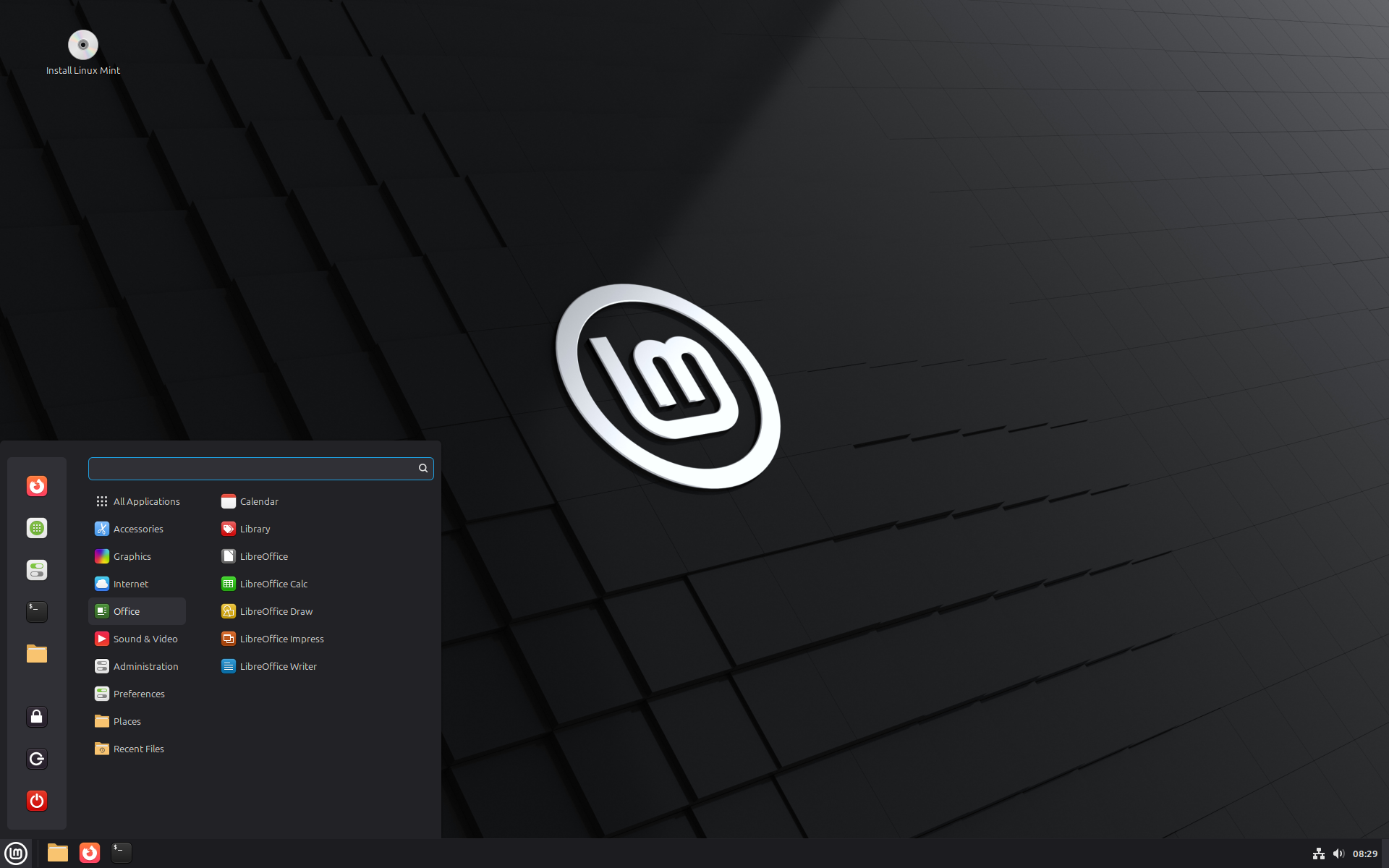
Linux Mint 22.2 is a long term support release which will be supported until 2029. It comes with updated software and brings refinements and many new features to make your desktop even more comfortable to use.
New features:
This new version of Linux Mint contains many improvements.
For an overview of the new features please visit:
“What’s new in Linux Mint 22.2“.
Important info:
The release notes provide important information about known issues, as well as explanations, workarounds and solutions.
To read the release notes, please visit:
System requirements:
- 2GB RAM (4GB recommended for a comfortable usage).
- 20GB of disk space (100GB recommended).
- 1024×768 resolution (on lower resolutions, press ALT to drag windows with the mouse if they don’t fit in the screen).
Upgrade instructions:
- If you are running the BETA you don’t need to upgrade, use the Update Manager to apply available updates.
- Upgrade instructions for Linux Mint 22 and 22.1: https://blog.linuxmint.com/?p=4882
Download links:
Cinnamon Edition:
- Torrent https://linuxmint.com/torrents/linuxmint-22.2-cinnamon-64bit.iso.torrent
- World Cicku
- World Linux Mint
- World Rackers
- Canada Manitoba Unix User Group
- Canada University of Waterloo Computer Science Club
- USA Clarkson University
- USA Fremont Cabal Internet Exchange
- USA GigeNET
- USA Harvard School of Engineering
- USA Hoobly
- USA James Madison University
- USA kernel.org
- USA Lancaster-Lebanon Intermediate Unit 13
- USA Linux Freedom
- USA MIRhosting
- USA Open Computing Facility at UC Berkeley
- USA Purdue Linux Users Group
- USA Sonic
- USA Team Cymru
- USA TeraSwitch
- USA US Internet
- USA XMission Internet
- Belarus ByFly
- Belgium Unix-Solutions
- Bulgaria IPACCT
- Bulgaria Telepoint
- Bulgaria University of Ruse
- Czech Republic CZ.NIC
- Czech Republic IT4Innovations National Supercomputing Center
- Czech Republic UPC Ceska republika
- Czech Republic Webglobe
- Denmark c0urier.net
- Denmark Dotsrc.org
- Denmark KLID
- France CNRS IBCP
- France Crifo.org
- France Johnnybegood
- France Université de Reims
- Germany c48.uk
- Germany dogado GmbH
- Germany Friedrich-Alexander-University of Erlangen-Nuremberg
- Germany Funkfreunde Landshut e.V.
- Germany GWDG
- Germany Hochschule Esslingen University of Applied Sciences
- Germany IPB Internet Provider in Berlin GmbH
- Germany NetCologne GmbH
- Germany Netzwerge GmbH
- Germany PyrateLAN.party
- Germany University of Frankfurt
- Germany wilhelm.tel GmbH
- Greece GreekLUG
- Greece University of Crete
- Hungary Quantum Mirror
- Ireland Webworld
- Italy GARR
- Latvia koyanet.lv
- Moldova iHost
- Netherlands Evoluso.com
- Netherlands LiteServer
- Netherlands MIRhosting
- Netherlands NLUUG
- Netherlands Triple IT
- Poland ICM – University of Warsaw
- Poland Poznan Supercomputing and Networking Center
- Portugal PTISP
- Portugal RNL – Técnico Lisboa
- Portugal Universidade do Porto
- Romania Hosterion
- Romania Hostico
- Romania Orange Romania
- Russia HyperDedic
- Russia Powernet ISP
- Russia Yandex Team
- Serbia SOX
- Serbia University of Kragujevac
- Spain Aire Networks
- Spain Oficina de Software Libre do Cixug
- Spain Raiola Networks
- Spain University of Zaragoza
- Sweden Academic Computer Club
- Sweden Bahnhof
- Sweden Brain Drain Lan
- Sweden Infania Networks
- Switzerland GoFOSS
- Switzerland Init7
- Switzerland Metanet.ch
- Turkey Guzel Hosting
- Turkey Linux Kullanicilari Dernegi
- Turkey Verinomi
- Ukraine Hostiko
- Ukraine IP-Connect LLC
- United Kingdom c48.uk
- United Kingdom Server.net
- United Kingdom UK Dedicated Servers
- United Kingdom UKFast
- United Kingdom University of Kent UK Mirror Service
- United Kingdom VineHost
- Azerbaijan OUR.Technology
- Bangladesh XeonBD
- China Alibaba Cloud
- China Beijing Foreign Studies University
- China Nanjing University
- China Shanghai Jiao Tong University Linux User Group (SJTUG)
- China TUNA
- China University of Science and Technology of China Linux User Group
- Hong Kong KoDDoS
- India Albony Network
- India NxtGen DataCenter
- India PicoNets-WebWerks
- Indonesia DatautamaNET
- Japan ICSCoE
- Japan Yamagata University
- Kazakhstan Hoster.kz
- Singapore Freedif
- Singapore jingk.ai
- South Korea Archive of Siwoo
- South Korea Jeonnam High School
- South Korea KAIST
- Taiwan Taiwan Digital Streaming Co.
- Thailand Khon Kaen University
- Vietnam Clearsky
- Vietnam MeowSMP.net
- Australia AARNet
- New Zealand University of Canterbury
- Argentina Zero.com.ar
- Brazil C3SL
- Brazil Universidade Federal de Mato Grosso
- Chile Universidad de La Frontera
- Ecuador CEDIA
- Botswana Retention Range
- Kenya Liquid Telecom
- Mauritius cloud.mu
- South Africa Dimension Data
- South Africa University of Free State
Xfce Edition:
- Torrent https://linuxmint.com/torrents/linuxmint-22.2-xfce-64bit.iso.torrent
- World Cicku
- World Linux Mint
- World Rackers
- Canada Manitoba Unix User Group
- Canada University of Waterloo Computer Science Club
- USA Clarkson University
- USA Fremont Cabal Internet Exchange
- USA GigeNET
- USA Harvard School of Engineering
- USA Hoobly
- USA James Madison University
- USA kernel.org
- USA Lancaster-Lebanon Intermediate Unit 13
- USA Linux Freedom
- USA MIRhosting
- USA Open Computing Facility at UC Berkeley
- USA Purdue Linux Users Group
- USA Sonic
- USA Team Cymru
- USA TeraSwitch
- USA US Internet
- USA XMission Internet
- Belarus ByFly
- Belgium Unix-Solutions
- Bulgaria IPACCT
- Bulgaria Telepoint
- Bulgaria University of Ruse
- Czech Republic CZ.NIC
- Czech Republic IT4Innovations National Supercomputing Center
- Czech Republic UPC Ceska republika
- Czech Republic Webglobe
- Denmark c0urier.net
- Denmark Dotsrc.org
- Denmark KLID
- France CNRS IBCP
- France Crifo.org
- France Johnnybegood
- France Université de Reims
- Germany c48.uk
- Germany dogado GmbH
- Germany Friedrich-Alexander-University of Erlangen-Nuremberg
- Germany Funkfreunde Landshut e.V.
- Germany GWDG
- Germany Hochschule Esslingen University of Applied Sciences
- Germany IPB Internet Provider in Berlin GmbH
- Germany NetCologne GmbH
- Germany Netzwerge GmbH
- Germany PyrateLAN.party
- Germany University of Frankfurt
- Germany wilhelm.tel GmbH
- Greece GreekLUG
- Greece University of Crete
- Hungary Quantum Mirror
- Ireland Webworld
- Italy GARR
- Latvia koyanet.lv
- Moldova iHost
- Netherlands Evoluso.com
- Netherlands LiteServer
- Netherlands MIRhosting
- Netherlands NLUUG
- Netherlands Triple IT
- Poland ICM – University of Warsaw
- Poland Poznan Supercomputing and Networking Center
- Portugal PTISP
- Portugal RNL – Técnico Lisboa
- Portugal Universidade do Porto
- Romania Hosterion
- Romania Hostico
- Romania Orange Romania
- Russia HyperDedic
- Russia Powernet ISP
- Russia Yandex Team
- Serbia SOX
- Serbia University of Kragujevac
- Spain Aire Networks
- Spain Oficina de Software Libre do Cixug
- Spain Raiola Networks
- Spain University of Zaragoza
- Sweden Academic Computer Club
- Sweden Bahnhof
- Sweden Brain Drain Lan
- Sweden Infania Networks
- Switzerland GoFOSS
- Switzerland Init7
- Switzerland Metanet.ch
- Turkey Guzel Hosting
- Turkey Linux Kullanicilari Dernegi
- Turkey Verinomi
- Ukraine Hostiko
- Ukraine IP-Connect LLC
- United Kingdom c48.uk
- United Kingdom Server.net
- United Kingdom UK Dedicated Servers
- United Kingdom UKFast
- United Kingdom University of Kent UK Mirror Service
- United Kingdom VineHost
- Azerbaijan OUR.Technology
- Bangladesh XeonBD
- China Alibaba Cloud
- China Beijing Foreign Studies University
- China Nanjing University
- China Shanghai Jiao Tong University Linux User Group (SJTUG)
- China TUNA
- China University of Science and Technology of China Linux User Group
- Hong Kong KoDDoS
- India Albony Network
- India NxtGen DataCenter
- India PicoNets-WebWerks
- Indonesia DatautamaNET
- Japan ICSCoE
- Japan Yamagata University
- Kazakhstan Hoster.kz
- Singapore Freedif
- Singapore jingk.ai
- South Korea Archive of Siwoo
- South Korea Jeonnam High School
- South Korea KAIST
- Taiwan Taiwan Digital Streaming Co.
- Thailand Khon Kaen University
- Vietnam Clearsky
- Vietnam MeowSMP.net
- Australia AARNet
- New Zealand University of Canterbury
- Argentina Zero.com.ar
- Brazil C3SL
- Brazil Universidade Federal de Mato Grosso
- Chile Universidad de La Frontera
- Ecuador CEDIA
- Botswana Retention Range
- Kenya Liquid Telecom
- Mauritius cloud.mu
- South Africa Dimension Data
- South Africa University of Free State
MATE Edition:
- Torrent https://linuxmint.com/torrents/linuxmint-22.2-mate-64bit.iso.torrent
- World Cicku
- World Linux Mint
- World Rackers
- Canada Manitoba Unix User Group
- Canada University of Waterloo Computer Science Club
- USA Clarkson University
- USA Fremont Cabal Internet Exchange
- USA GigeNET
- USA Harvard School of Engineering
- USA Hoobly
- USA James Madison University
- USA kernel.org
- USA Lancaster-Lebanon Intermediate Unit 13
- USA Linux Freedom
- USA MIRhosting
- USA Open Computing Facility at UC Berkeley
- USA Purdue Linux Users Group
- USA Sonic
- USA Team Cymru
- USA TeraSwitch
- USA US Internet
- USA XMission Internet
- Belarus ByFly
- Belgium Unix-Solutions
- Bulgaria IPACCT
- Bulgaria Telepoint
- Bulgaria University of Ruse
- Czech Republic CZ.NIC
- Czech Republic IT4Innovations National Supercomputing Center
- Czech Republic UPC Ceska republika
- Czech Republic Webglobe
- Denmark c0urier.net
- Denmark Dotsrc.org
- Denmark KLID
- France CNRS IBCP
- France Crifo.org
- France Johnnybegood
- France Université de Reims
- Germany c48.uk
- Germany dogado GmbH
- Germany Friedrich-Alexander-University of Erlangen-Nuremberg
- Germany Funkfreunde Landshut e.V.
- Germany GWDG
- Germany Hochschule Esslingen University of Applied Sciences
- Germany IPB Internet Provider in Berlin GmbH
- Germany NetCologne GmbH
- Germany Netzwerge GmbH
- Germany PyrateLAN.party
- Germany University of Frankfurt
- Germany wilhelm.tel GmbH
- Greece GreekLUG
- Greece University of Crete
- Hungary Quantum Mirror
- Ireland Webworld
- Italy GARR
- Latvia koyanet.lv
- Moldova iHost
- Netherlands Evoluso.com
- Netherlands LiteServer
- Netherlands MIRhosting
- Netherlands NLUUG
- Netherlands Triple IT
- Poland ICM – University of Warsaw
- Poland Poznan Supercomputing and Networking Center
- Portugal PTISP
- Portugal RNL – Técnico Lisboa
- Portugal Universidade do Porto
- Romania Hosterion
- Romania Hostico
- Romania Orange Romania
- Russia HyperDedic
- Russia Powernet ISP
- Russia Yandex Team
- Serbia SOX
- Serbia University of Kragujevac
- Spain Aire Networks
- Spain Oficina de Software Libre do Cixug
- Spain Raiola Networks
- Spain University of Zaragoza
- Sweden Academic Computer Club
- Sweden Bahnhof
- Sweden Brain Drain Lan
- Sweden Infania Networks
- Switzerland GoFOSS
- Switzerland Init7
- Switzerland Metanet.ch
- Turkey Guzel Hosting
- Turkey Linux Kullanicilari Dernegi
- Turkey Verinomi
- Ukraine Hostiko
- Ukraine IP-Connect LLC
- United Kingdom c48.uk
- United Kingdom Server.net
- United Kingdom UK Dedicated Servers
- United Kingdom UKFast
- United Kingdom University of Kent UK Mirror Service
- United Kingdom VineHost
- Azerbaijan OUR.Technology
- Bangladesh XeonBD
- China Alibaba Cloud
- China Beijing Foreign Studies University
- China Nanjing University
- China Shanghai Jiao Tong University Linux User Group (SJTUG)
- China TUNA
- China University of Science and Technology of China Linux User Group
- Hong Kong KoDDoS
- India Albony Network
- India NxtGen DataCenter
- India PicoNets-WebWerks
- Indonesia DatautamaNET
- Japan ICSCoE
- Japan Yamagata University
- Kazakhstan Hoster.kz
- Singapore Freedif
- Singapore jingk.ai
- South Korea Archive of Siwoo
- South Korea Jeonnam High School
- South Korea KAIST
- Taiwan Taiwan Digital Streaming Co.
- Thailand Khon Kaen University
- Vietnam Clearsky
- Vietnam MeowSMP.net
- Australia AARNet
- New Zealand University of Canterbury
- Argentina Zero.com.ar
- Brazil C3SL
- Brazil Universidade Federal de Mato Grosso
- Chile Universidad de La Frontera
- Ecuador CEDIA
- Botswana Retention Range
- Kenya Liquid Telecom
- Mauritius cloud.mu
- South Africa Dimension Data
- South Africa University of Free State
Integrity and authenticity checks:
Once you have downloaded an image, please verify its integrity and authenticity.
Anyone can produce fake ISO images, it is your responsibility to check you are downloading the official ones.
- Please read and follow the steps at https://linuxmint.com/verify.php
- Link to the sums: sha256sum.txt
- Link to the signed sums: sha256sum.txt.gpg
Enjoy!
We look forward to receiving your feedback. Thank you for using Linux Mint and have a lot of fun with this new release!
Thank you for the ongoing efforts! 🙂
Hallo,
I have been following this project for many years now and I would like to express my gratitude for its consistent quality.
I would like to take this opportunity to say Thank You to the developers, the users and the Community.
The developers, us users, and the community are doing so much. We are showing the big corporations of this world what we really want and in doing so we are also helping them because I have the feeling that they don’t know what to do anymore and are continuing to overload their operating systems and programs.
People want a lean, fully functional, uncluttered system that offers both security and convenience. The simply just want to have fun.
Linux Mint combines all of that. The developers have a very good feel for systems and could be described as pioneers of our time who recognized what needed to be done at the right time and had the courage to go their own way.
Thank you for that. You not only give us a good system, you give us hope and that is what this time needs.
I hope that you will always remain the down-to-earth guys that I have come to know and that you will continue to bravely follow your courage.
May the force be with you.
Your LMDE Enjojer
Thanks for your hard work!!
Now, let’s get going with Gigi… 😉
+1 so excited about Gigi l’amorosoooo…
(Oh no, it’s probably not a reference to “Gino” or “Luigi”, I know.)
Still, so many changes to be adapted since Trixie…
Thank you for the release!
1) Some text on the release notes webpage seems garbled: the page has, ‘To prepare for the future and potentially write applications “in libAdwaita”. The library was forked into a new XApp library called libAdapta.’ Should the full-stop be a comma?
2) I was surprised that the Update Manager offered an upgrade to the new OS before the release announcement was made. But perhaps that – slightly confounding state of affairs – has always been the case.
2) As I have written elsewhere, archiving the beta repository when it has open issues is a bit bewildering.
Thanks for the feedback. We’ll get 1) fixed.
It can take up to 2 days for mirrors worldwide to sync with the repositories. The latest mint-upgrade-info package needs to be available for your upgrade path to become available, so we usually delay the announcement by two days after everything is ready. Same thing with the release announcements (to allow for the ISOs to sync worldwide).
The BETA phase lasts about 2 weeks but it ends as soon as the the team is happy with it and the ISOs get approved again through QA. At that stage the github issues repository gets archived to prevent new issues from being added to it. There’s always a delta though and issues added just before the archival. Such was the case here for issues 82, 84, 85, 86, 87 and 88.
Issue 72 was noted and addressed post-QA but it can’t be closed since the repository is archived.
This is just the way github issues work unfortunately. The only way to prevent the addition of new issues is to archive the repository, and once it’s archived we can’t comment/close/tag existing issues.
That sounds like a good enough reason to switch to the open source alternative – gitlab.
Thank you for all your hard work Clem and team.
Thanks for your efforts
@Clem + LM Team
As always, totally reliable and simple upgrade 22.1->22.2. Everything works like charm 🙂
Thanks … Well done!
Just one question: In Driver Manger is now as “recommended” NVIDIA driver 550. Why not the latest available driver 575 (via Driver Manager)?
I had the same question, except that when I opened Driver Manager after upgrading to 22.2, it said that 550 was current and 575 was recommended. I did some research and found that the latest drivers are recommended only for Turing architecture and later. Driver 550 is still the one for earlier architectures. My card is a Turing card, so that may be why my recommendation is different from yours (if yours is older). Based on that, I selected 575 in Driver Manager. It works fine.
My Nvidia uses 470xx driver, this will not work with kernel 6.14.xx. I do know this issue is similar for some 5 series drivers.
I had to revert to Kernel 6.8.79 to use both the beta and after I upgraded my main system from 22.1 to 22.2 – I had to downgrade my kernel to use my 470.xx driver. I could have stayed with nouveau driver, however it does not play nice with my rig
MY SYSTEM:
Kernel: 6.8.0-79-generic arch: x86_64 bits: 64 compiler: gcc v: 13.3.0 clocksource: tsc
Desktop: MATE v: 1.26.2 wm: marco v: 1.26.2 with: mate-panel tools: mate-screensaver
dm: LightDM v: 1.30.0 Distro: Linux Mint 22.2 Zara base: Ubuntu 24.04 noble
Machine:
Type: Desktop Mobo: ASUSTeK model: M5A99X EVO v: Rev 1.xx serial:
uuid: UEFI: American Megatrends v: 1708 date: 04/10/2013
CPU:
Info: 6-core model: AMD Phenom II X6 1100T bits: 64 type: MCP smt: arch: K10 rev: 0
cache: L1: 768 KiB L2: 3 MiB L3: 6 MiB
Speed (MHz): avg: 802 high: 803 min/max: 800/3300 boost: enabled cores: 1: 803 2: 800 3: 800
4: 803 5: 803 6: 803 bogomips: 39733
Flags: ht lm nx pae sse sse2 sse3 sse4a svm
Graphics:
Device-1: NVIDIA GK208B [GeForce GT 730] vendor: Micro-Star MSI driver: nvidia v: 470.256.02
arch: Kepler pcie: speed: 5 GT/s lanes: 8 bus-ID: 01:00.0 chip-ID: 10de:1287 class-ID: 0300
Display: x11 server: X.Org v: 21.1.11 with: Xwayland v: 23.2.6 compositor: marco v: 1.26.2
driver: X: loaded: nvidia unloaded: fbdev,modesetting,nouveau,vesa gpu: nvidia display-ID: :0
screens: 1
Screen-1: 0 s-res: 3840×1080 s-dpi: 96 s-size: 1016x286mm (40.00×11.26″)
s-diag: 1055mm (41.55″)
Monitor-1: DVI-D-0 pos: primary,right res: 1920×1080 hz: 60 dpi: 92
size: 531x299mm (20.91×11.77″) diag: 609mm (23.99″) modes: N/A
Monitor-2: HDMI-0 pos: left res: 1920×1080 hz: 60 dpi: 92 size: 531x299mm (20.91×11.77″)
diag: 609mm (23.99″) modes: N/A
Good job with the new release, team 😉
Thank you for this release!!
Wonder why fastly repositories is not set as default package mirror
Is this setting still current !! (Missing some communication about this)
https://github.com/linuxmint/linuxmint/issues/658
Good question!!!
I just tried to set up the “fastly” repos for Zara … not working!!??
Thank you for this release!!
Wonder why fastly repositories is not set as default package mirror
Is this setting still current !! (Missing some communication about this)
https://github.com/linuxmint/linuxmint/issues/658
Hi Linux Mint Team,
Congratulations on the new Linux Mint release, great job!
I found a crash in the Nemo file manager (22.1 also contains the bug):
— Open Nemo
— Click on a folder with left mouse button
— Properties
— Click on the area containing the icon in the first tab
— A window opens. Click the “Cancel” button immediately, before the system finishes loading the icons.
— Result: Nemo crashes
Mine doesn’t crash (LM Cinnamon, french).
Me too. In the lower left corner there is a “loading” message and if you click cancel before it disappears, Nemo will crash.
Here a link about the issues: https://youtu.be/M2fRk2ExH40
Couldn’t replicate it either.
Same issue here with 21.3 Cinnamon
@Clem and the Linux Mint Team
Thank you for your work and the new features you’re adding. It’s a shame the new Mint menu design isn’t incorporated into this release. I remember a Mint team member indicating in the beta feedback that fingwit would be incorporated into the settings window in the final release. I checked, and that’s not the case. Could a future update fix this issue?
Regards.
To Clem, the team and all supporters, thank you for your engagement and the good work!
Best regards,
erwn
I did the upgrade from Xia to Zara yesterday without any issues. Many thanks for the excellent work on Mint, which keeps getting better with every release.
I downloaded the Torrent fo Cinnamon 22.2 but the file is about 300MB larger than the direct downloaded one, and the SHA256 are different. Is it normal?
The file from Direct download SHA256 is the correct one, as the link provided at the botttom
I deleted the Torrented file and downloaded again. This time the file is correct, both in size and SHA256. I don’t know why the first time it was wrong. Used Transmission 3.00
Torrent downloads can sometimes get corrupted. You can verify local data in Transmission when the download finishes (or even before).
When I log in Cinnamon Wayland, keyboard is QWERTY. How to change it into AZERTY?
The Wayland session currently only supports a default keyboard layout (likely en-US), with no option to change it afaik. This issue has persisted across all releases since the introduction of the experimental Wayland session. It is also preventing me from setting a QWERTZ layout and rendering the Wayland session unusable.
Glad to see all the improvements.
A big thank you to the entire Mint team for a great product and update.
I wonder if you guys are aware of the huge impact you are having out there, offering a superb product like Linux Mint, in all of its 4 variants.
Clem:
I was wondering why LMDE is sort of “hidden” on your website.
I have come across several people that installed, mainly, Linux Mint Cinnamon, and have stated that they did not even know that LMDE exists.
And, as well, many have stated that they would have paid attention to it if it were “visible” up front, say, together with the other 3 versions.
Being LMDE, one of your development targets, as stated on your website, it should, in my opinion, deserve way more exposure up front.
Congratulations, and keep Linux Mint rocking!
LETS GO!!!!
Greetings
Thanks for all the hard work. 🙂
aight, lmde7 soon? or didnt start yet? would new cinnamon version(mentioned on previous blog post) make it to lmde 7?
I would like to thank the entire team for their excellent work…thank you very much…and don’t let less appreciative users discourage you…you are doing a great job…thank you very much! Greetings from Germany.
When trying to upgrade from 22.1 to 22.2 within the update manager, there are no vertical scrollbars on the upgrade screen and on one of my laptops the “next” buttons are off the screen, I have got round it with an external monitor, but please can scrollbars be added for the next time. Other than that a very smooth upgrade on that machine. Very many thanks to you and the team for your efforts
You can hold the Alt key and click in the window to move it where the button is visible. Does your system meet the minimum screen res requirements for Mint?
Hi Joseph. Many thanks for your reply. I did try the alt key and “move/drag” but nothing happened. I have since just tried the machine and holding down the alt key whilst trying to move windows (tried firefox, nemo and warpinator) does nothing at all. If I press alt and tab I can see the “pop up” and can tab through the different open windows, (a check that the alt key works) but alt and “move” does nothing. The laptop screen resolution is 1280 x 720 which is below the mint recommendations as you guessed, but as the alt “move” did not work a scrollbar would have solved the issue. I was able to solve the issue with an external monitor but nor everyone has one lying around. Thanks again
Following the upgrade, In document scanner, after scanning a document the rotate left. rotate right and delete icons are black, but the crop icon is very faint and looks like it is greyed out (though it does work).
I shall give it a try in a VM and see if I can spot big differences!
Everything is going fluently, fast, net and beautiful. 6.16.3-061603-generic working great.
Just two little things about Nemo. After having my complaints with it for showing partition entries I didn’t want to appear in the side navigation panel, I am not good at Linux, I found a solution (maybe there are more, easier and better). Using Gnome Disk Utility, select the entry, go to the options (gear icon), and edit the mount options. There, you can choose whether or not to display it in the user interface, and also whether to mount it at startup.
Another thing in Nemo: when renaming files, go to Preferences > Behavior > Bulk Rename, and instead of using bulky, use thunar -B (you’ll need to install Thunar first). This way, you can also choose the Numbering mode to easily rename multiple files with sequential numbers.
And the best part of this system: if you don’t want the names used in previous renaming sessions to appear again, locate the configuration file in Thunar called renamerrc (e.g., /home/user/.config/Thunar) and run the following command in the terminal: sudo chattr +i renamerrc
If you ever want to revert this change, simply run: sudo chattr -i renamerrc
I like Nemo more now.
People must taste and enjoy this Linux Mint flavour. It’s superb.
Great update. Thank you for your efforts, Linux Mint Team!
Thank you so much for this release. Linux Mint has been my primary operating system for 5 years.
When running timeshift under 22.2, the authentication box states “Authentication is needed to run ‘usr/bin/envDISPLAY=:0 XAUTHORITY=/home/nigel/.Xauthoritytimeshift-gtk’ as the super user” below the wording “Authentication required” , although it does work. In LM22.1 you do not see that message.
Yannis Gerlach on github suggested a fix mentioned by “bitpixl” to github issue “timeshift polkit rule no longer working #450”
Change line 21 of ‘/usr/bin/timeshift-launcher’ from
pkexec env DISPLAY=$DISPLAY XAUTHORITY=$XAUTHORITY ${app_command} to
pkexec ${app_command}
This opens a normal authentication required window without the “Authentication is needed to run ‘/usr/bin/env DISPLAY=:0 XAUTHORITY=/home/nigel/.Xauthority timeshift-gtk’ as the super user” in the window
Thanks to all the team!
Nice, great job!
I wonder what Mesa version is used in this release?
when is the “default” LibreOffice getting updated?
Libreoffice depends to the Ubuntu LTS Version. So if you need a newer Version you can use the Launchpad PPA for that:
https://launchpad.net/~libreoffice/+archive/ubuntu/ppa
That gives you 25.2.5. This I also use.
To get the newest 25.2.8 use Flatpak or directly install the .deb from their website.
Next year with Version 23. Linux Mint uses the LTS Base from Ubuntu, so if you don’t use Flatpak or Snap you get new Version only every two years.
Linux Mint 22.2 uses the same Ubuntu package base as LM 22.1 and 22 before it. You should get a new LibreOffice with Linux Mint 23 when the base is changed to Ubuntu 26.04.
Some updates and additions to my 22.2 observations from your previous post…
– Libadwaita: JosephM replied to my last observations saying that libadwaita does fully theme to my system theme (Mint-X in my case). However, I’m not seeing it. It only adapts the color, but none of the theme elements (buttons, titlebars, etc.). And this is for programs that aren’t Flatpaks, as I avoid Flatpaks whenever possible.
– Other unusual theming issues: Similarly, I noticed that libhandy programs are now also appearing more like libadwaita programs, with flat titlebars (without my gradient Mint-X theming) and circles around the window controls (- + x). I’ve also noticed that since experimenting with various themes after installing 22.2, some programs seem to be stuck in dark mode, even if not using a dark theme, and even after a full reboot. This includes LibreOffice, Chrome, all libadwaita and libhandy based programs. Nemo and most basic GTK 2/3 and QT programs conform to the lighter theme. As I am a stickler for visual consistency, is there a way to solve these theme problems?
– New kernel: I previously said there was a problem with the new kernel, newer NVIDIA drivers, and nvidia-prime. After reporting that, I tried it again, and it all seems to work now. I’m happy to report that I’m now currently using the 6.14 kernel with NVIDIA driver 575, with a fully functioning nvidia-prime and prime-applet.
And I’m just reposting these here because I’d still like to see these things added in the (hopefully very near) future:
– Blurred transparency: Full (and optional, for those who don’t like it) support for transparency blur system-wide.
– Mint-X modifications: Fully functional dark mode that can be selected system-wide, in-set and darker scrollbar (which makes the scrollbar position much easier to see – I have a hand-made modification of Mint-X with this feature in-place I can send to you if you’d like to see exactly what I mean), and rounded corners on drop-down and context menus.
– Nemo icon labels: Add a gradient drop shadow behind desktop icons. I’ve actually made a sort-of hackish program that adds this feature with some adjustments to the default gtk.css, and lets you adjust the parameters of the shadow (which I can send to you as well, if you’d like to see it), but I’d like to see just a basic gradient drop shadow behind desktop icon labels in Nemo as default.
– All GTK 2/3/4 windows that aren’t CSD, libhandy, or libadwaita based: *Optional* rounded bottom corners on all windows, to match the rounded top corners on themes like Mint-Y and Mint-X and most others. Some on your development team have said that this might interfere with window elements when I’ve requested this before. However, I’ve tried an experimental muffin hack (https://github.com/SunPodder/muffin/tree/rounded), based on mutter-rounded, which just puts a rounded mask over all window corners (works ok-ish, but is currently buggy, so an official implementation would be much better), and I’ve tried every program I have, and even installed some that I thought might demonstrate this problem, and none of them have window elements covered to the point of being unusable or ugly. So this would be a really nice option, if it can be implemented.
– Bring back the “Linux Mint” panel theme to the default set, so I don’t have to remember to grab a back up of it again before installing the next major version of Mint. It’s the only dark panel theme that matches Mint-X, so getting rid of it was not a good move, in my opinion. And while you’re at it, make a version of it to match every Mint-X color variant.
– Software Manager improvements:
1. While you can switch between System Packages and Flatpaks with the dropdown when looking at a specific package’s information page, it would be nice to also consolidate both into single buttons on package lists, and where the lists show a Flatpak box icon, also show a LM icon for system packages. That way, category and search lists aren’t as cluttered with duplicate entries for each package type.
2. Include a “New Software” section on the software manager home page. This would show the 9 or 12 or so latest additions to the software repositories, and maybe allow the user to browse to a list of *all* new packages added within the most recent reasonably defined amount of time. Possibly even add this to the top of every category, if any new packages exist in the category. This would make new software discovery much more intuitive.
For reference to the theme inconsistency problem, here’s a screenshot: https://drive.google.com/file/d/1fGM0e8dFmtTFwn3ac9t47JCifU2LxLmo/view?usp=sharing
As you can see, it’s as if I have three different themes going at the same time. Mint-X on the Nemo file manager window and Scribus, the dark variant of Mint-X (which is awesome, but I don’t understand why it’s there when I can’t select it) on LibreOffice and gnome-calculator, and a dark libadwaita default theme on Celluloid (which is how all libawaita programs look). The dark variant problem doesn’t show up with Mint-L except on libadwaita programs, but does show up with Mint-X and Mint-Y. Interestingly, suddenly the libhandy example (gnome-calculator), which looked like the dark default libadwaita theme before I loaded it for this screenshot, decided to take the Mint-X dark variant now. This is so weird.
In case I didn’t explain well, the forked libadwaita should support full theming. Mint-X does not supply it though. I’m fairly sure it only changes the titlebars. It can do more, it just doesn’t.
Joseph, yes, that was my understanding of your reply. I understand that Mint-X, as it’s currently coded, can only supply theming to the titlebar. However, as you can see in the image (although it would be easier to see if it weren’t stuck in dark mode), the theming on all libadwaita windows, even if it’s just the titlebar, looks nothing like my active theme. It looks like the default libadwaita dark theme. This is with programs that are not Flatpaks, just to clarify. I try not to use Flatpaks unless I absolutely must, and even then, I complain bitterly the whole time I’m using it. 😉
I fixed the dark mode issue. Now all windows follow the correct light vs. dark mode. However, libadwaita windows don’t at all follow Mint-L, Mint-X, or Mint-Y themes. Am I just missing something?
Last update (I promise 🙂 ): I figured out that for some reason, the new libadwaita feature isn’t functioning on my user account. If I create a new user account, it all works as advertised. I’m not sure what the problem is. I’ve tried moving all my hidden “dot” files and folders into a temporary backup location and it worked as well, but I don’t want to have to recreate my entire setup, so I tried to find the location of the problem in my hidden files. I moved them back into their original locations, followed by logging out and back in. When I finished and all were back where they were, it still worked after a log out/in. I rebooted, and the problem was back. However, now it was permanently set to the last theme I tested, instead of permanently set to the default libadwaita theme. So I have no idea what’s going on, and I really don’t have the time or patience to mess with this for such minor results as a slight change in window color and control widget icons. If it was able to change libadwaita windows to my complete theme, that’d be worth my time. But since even with it working as it’s supposed to, it never fully matches my theme anyway, there’s no point in continuing this. Libadwaita just sucks the life out of everything it touches, and just needs to go away. I wish it were possible to just uninstall the libadwaita package it and make all GTK windows default back to normal. I absolutely loath libadwaita.
LMDE 6 is the only distro I can get installed on my 12th-gen Intel laptop. Every other fails, even Mint 22.2. It says something about “install grub boot loader”. I cannot figure it out, I’m not a pro. LMDE 6 is the only thing that will install (and FAST)—-when is LMDE 7 going to be here? I’ve been waiting the whole year as I didn’t want to set 6 all up and then 7 comes out. I spent 4 hours trying to get 22.2 to install today.
Mint Upgrade zu 22.1 runs without any problems. i have no is issues with the i915 driver on my Notebook and Kernel 6.14. everything works fine.
Thanks to all your great work on Linux Mint, I appreciate all your nice ideas like the libAdapta fork and such things that make Mint more nice and usable as it also already is! Great work 😀!
Although it was a very welcome update, a few things disappointed me.
So far I haven’t understood why they didn’t include the new‑version wallpaper selection. It’s almost a tradition for a new release of Linux Mint to ship with a fresh set of beautiful wallpapers – a kind of “special treat”. The impression I get is that things are, for some reason, a bit “haphazard.”
Aside from that, it’s a very welcome update. I’ll always use Linux Mint because it’s a human‑focused distribution where I can get in touch with the developers and exchange impressions and experiences. Nowadays, only Linux Mint manages to do that. Moreover, it’s a distribution that puts privacy above all else and seems to steer clear of the AI hype.
Unfortunately, I’ve been noticing that this is becoming the next step for “upstream” distributions. In short, it’s a shame for anyone seeking healthy computing.
Thanks to the whole team,
José
I installed the beta, and have new wallpapers, but not the previous pictures, which I seriously miss.
I’m very relieved that a fresh install over my 21.3 system went smoothly. 22.1 did consistently fail to install GRUB, which, as the installer pointed out, was a major issue, but this time no complains. Most settings from my home partition carried over. More machines will be upgraded soon. Good job, Mint Team!
Thank you very much. Wonderful OS as always. Nice job.
Awesome! Can’t wait to upgrade. Many thanks and fantastic work!
Ich habe insgesamt 5 Notebooks verschiedener Typen auf 22.2 upgegraded, es hat immer sofort einwandfrei funktioniert. Ich bin sehr zufrieden, danke an das Team und weiter so, ihr seid die besten.
Thanks for Clem and the entire team for their magnificent work! I already updated my three computers, one desktop and two laptops.
Everything else seems to work just fine, but I have some issues with the new fingerprint sensor functionality. First, the fingerprint reader of my Dell Precision 7550 laptop (released in 2020, so the hardware is not particularly new) is not detected at all, even though it works fine in Windows 11.
Second, even though the fingerprint reader of my Lenovo ThinkPad T430 (released in 2012) is detected and I was able to scan the fingerprints and use the fingerprint when resuming from standby or unlocking the session. However, if I reboot the computer, it seems that it is not possible to use the fingerprint when logging in for the first time, it always asks for the password. I wonder if this is the intended functionality and if yes, why.
The Release Notes state: “This kernel however has issues with: Virtualbox”
What are the issues with VirtualBox? For the host or the guest?
yeah, it’s really worrying that the known issues are listed vaguely. my gpu is one of the ones broken by the kernel update, and i didn’t find out about it until i read these release notes.
The kernel has changed the way that KVM modules are handled by default since version 6.12, which causes a conflict with VirtualBox when it tries to load a guest VM. I was able to get around it by disabling the kvm_amd module (sudo rmmod kvm_amd). I ended up adding ‘blacklist kvm_amd’ to /etc/modprobe.d/blacklist.conf so that the module won’t be loaded by default.
Yes! unfortunately the hype & hot air & over exaggeration around AI is every where. And untangling the facts & reality of AI and AI tools is hard to do. AI or the hype has spread like an epidemic into almost every pore of life these days. I’m sure that some degree of AI in computing is both useful but also inevitable. But I agree very most of Linux MINT is very human or end user focused which is a relief and much appreciated too. Its what makes MINT so special in my opinion.
Thanks Mint Team for Zara! I had my first installation today (5th Sept). I had upgraded friends from a barely running old Windows to Mint 22.1, and they called for some help with their printer. Easily solved – just connect the cable 🙂 …but updates were lurking. And the upgrade to 22.2 Zara was already available! Unfortunately they have “rural internet” which is faster than the steam-powered one they previously had, but it is still slow. So the upgrade took > 40 min, MOST of it used up by mint-l-icons at only 65.4Mb but taking 25-30 min to download! Some of the other mint-X-icons files also came down very, very slowly. At my house we have urban fibre and this only takes seconds. Anyway, they are now on 22.2 and no wiser for it – no shocks for older folks, just super Mint stability and predictability. Everything just works.
Serious problem for Linux beginner.
I encountered a serious issue after logging out and selecting “Software Rendering” from the session menu. The screen went completely black—no desktop, no panels—just a moving mouse cursor.
What worked for me: After some research, I found a solution that brought Cinnamon back to life:
Step-by-step fix:
Press Ctrl + Alt + F2 to switch to a virtual terminal.
Log in with your username and password.
Run the following command:
sudo nano /var/lib/AccountsService/users/yourusername
Look for a line that says: Session=cinnamon2d
Change it to: Session=cinnamon
Save and exit Nano (Ctrl + O, Enter, then Ctrl + X).
Reboot your system: sudo reboot
After rebooting, Cinnamon loaded normally again. 🎉
Additional notes:
The Wayland (experimental) session works well on my system.
Xfce, while not fully functional, at least displays the desktop and allows logging out and switching back to Cinnamon.
This kind of issue can be frustrating, especially for newcomers. Hopefully, future versions of Linux desktop environments will make it easier to recover from session misconfigurations without needing terminal commands. Maybe there is an easier solution and I would like to know.
To avoid any surprises, I removed the problematic entry from the login menu. I ran sudo/thunar, then went to /usr/share/xsessions, and renamed the problematic entry by adding .xxx (for example) to the end of its .desktop file, leaving cinnamon2d.desktop as cinnamon2d.desktop.xxx. I didn’t delete it completely in case I encounter the black screen issue later.
Question: Zara “what’s new” (New Features) says it contains Linux kernel 6.14, whereas Zara Release Notes points us to the Ubuntu 24.04 Release Notes which says it contains the 6.8 Linux kernel. It can’t be both 6.8 and 6.14. Which is true and which is false?
I believe it “contains” both but will stay on the 6.8 version unless you go into the kernels section of the update manager and install a 6.14 kernel
LTS (6.8) and HWE (currently 6.14) are both available, not only in Mint 22.2, but also in 22.1 and 22.
22 and 22.1 shipped with LTS, 22.2 shipped with HWE. When you upgrade your OS, it doesn’t switch from LTS to HWE on your behalf, that decision belongs to you. That’s on purpose since HWE can cause regressions on certain hardware including the inability to log in or to boot. For instance, nvidia-470 isn’t supported by NVIDIA anymore and won’t compile against 6.14.
Will the new version support nvidia-driver-390 drivers for the video card ???
Device-1: NVIDIA GF110 [GeForce GTX 580] vendor: eVga.com. driver: nvidia v: 390.157 pcie:
speed: 2.5 GT/s lanes: 16 bus-ID: 07:00.0 chip-ID: 10de:1080
I really want to switch from Linux Mint 21 Vanessa to Linux Mint 22.2 “Zara”
Hi.
After I updated from LM 22.1 Cin. to LM 22.2 Cin. the Kernel wasn’t automaticly updated too. Zara should have Kernel 6.14. but my system got furtheron 6.8.. What’s the matter for it? Does the update manager aka the mintupdate app not lift up the Kernel?
Thanks for information!
Kind regards.
I did a fresh install of 22.2 (Cinnamon) on a spare machine, for testing.
I am not seeing the new login screen. Have I not set something up correctly?
Black screen with mesa also with LM 22.2. Nu problem with LMDE 6.
The same with my old PC even on the Live Boot. Every time it turns me back to Login Screen. The “Experimental on Wayland” works fine. I have to buy a new PC. … or to wait for Mint 22.3.
Just upgraded to 22.2 Zara. Document Scanner will save only PDFs. Specifying JPEG or PNG in the drop down is ignored – a PDF will be created irrespective of choice. This is a show stopper for me – will have to roll back to 22.1.
I have had the opposite problem – all saved as jpg even if a pdf selected in the bottom right dropdown. I found I also had to change the file name to a .pdf as it does not change when the drop down is used. I have also discovered that on the first scan it does not pick the correct hardware the first time it uses “canon xxx” and says nothing in the scanner, whereas on subsequent scans it changes to “eSCL canon xxx” and works fine. The new version is full of regressions sadly. I have since installed the flatpak and that seems much better
Only two more corners left to round! We’ll get there eventually. 😁
Cinnamon Spices site is down:
https://cinnamon-spices.linuxmint.com/
Hosting Server Connect Timeout
HTTP 502 — Unable to Connect to the Origin Server
Please try again in a few minutes
You
Sucuri Firewall
Hosting Timeout
Error Details:
Error Code: HTTP 502
Error Message: Backend or gateway connection timeout.
Server ID: 19012
What’s going on?
Origin server might be down
Sucuri Network blocked by Origin Firewall
Happens sometimes.
Just try later.
So far mostly good.
The upgrade process was very smooth and had no problems. Everything looked fine after the reboot.
Upgrading the kernel, though – 6.14 doesn’t like my T420 Thinkpad laptop with two external monitors (one through a DisplayLink adapter); it only connected to one monitor, the one connected to DisplayLink and not directly to the laptop. Rebooting in 6.8 got things back to normal.
Must be the 6.14 graphics issue mentioned in the release notes, though I didn’t think this Thinkpad was using old Nvidia drivers. I guess it must be. Research continues.
Bonjour a tous ! J’ai entendu dire que la communauté envisagé de passé de firefox a brave ….j’ai connu firefox a ses début et il es devenu lourd a consommé de la ressource et obscur en étant juste sur YT …j’étais donc passé a brave …et depuis 3 mois meme probléme étrange et obscur,(coucou aux actionnaires) ….je bascule peut etre sur LIBREwolf(test en cours 0% pour YT) ..qui es née tout comme firefox de notre communauté …Aprés le renard, le lion puis le loup que les actionnaires se fassent les dents ! (a réfléchir) Paix a la communauté du LIBRE ,Salutations !
I tried Librewolf, but that’s too much for me regarding privacy settings.
LMDE seems to be kind of “away” from the main focus on your website, although it offers a great Debian Cinnamon version/alternative.
Why?
Is anyone else having trouble installing the linux firmware update ending in Uobuntu2.17? It starts downloading, then goes from MB speeds to old dial-up modem speeds. It the times out and says I should check my internet connection. If I uncheck that one update, all other updates proceed normally. This is on a 2 year old Dell Latitude running Zara with the Cinnamon desktop.
I had the same problem with my main PC. I left it on overnight and finally it installed.
If the problem still persists try switching to a different mirror in the Software Sources.
Hello –
No problem with the upgrades (4 systems so far..).
Just one minor comment, I noticed that (in both Mate & XFCE versions) when you switch to a VPN the icon of either the ethernet or wifi connection is supposed to be turned into a lock icon but that icon is really small, almost looking like a dot.
Thanks for all your hard work and for Fingwit in particular – this is really convenient to use! Upgrade from Mint 22.1 to 22.2 was absolutely smooth, no issues noted since then.
Are they fix size and look of tray icons to be visually coherent? Some system and almost all third party icons … Tixati, Stacer, etc. In mint tray they are like sore thumb…
Hi Mint Team!
You presented a great job! I’ve been having a problem for a while. The system often logs me out a few minutes after starting. The phenomenon seems completely random. I’ve also looked for entries in the error log, but I couldn’t find any clues. I’ve also tried using AI, but I couldn’t solve the problem. The LM22.2XFCE is running on an AMD Ryzen 7600X/16GBDDR4, and this error hasn’t occurred with a fresh installation. However, after about two months, it did. (Maybe I have installed AMD proprietary graphics driver… But later I uninstalled it at all.) When I’m working and my work is lost, it’s a bit annoying. Where do you think I should start troubleshooting? Thank you for your answers!
Hi , I like linux mint a lot but sadness I’m facing a problem right now and I couldn’t fix it my laptop wifi card is BCM4313 and its driver doesn’t come with linux mint in the software so i cant use the internet and i tried to download the driver by using ethernet in terminal but I couldn’t get it idk why or what is the problem i watched a lot of videos and tried to use the answers from ask ubuntu website but also i couldn’t get the wifi connection so i hope you add the driver in the software soon
Thx
I installed LM 22.2 Cinamon from an ISO image and I’m having trouble changing the source and mirror servers in the Update Manager. Initially, the system suggested I change these servers and choose my own, which I did. However, now, if I wanted to change these servers myself, there’s no way to do so; there’s no way to open the software source configuration window in the Update Manager. The shortcut to the Software Resources also doesn’t work. Thanks in advance for your help, as I don’t think I can do this on my own.
Updated my little Samsong net book (Korean NC110-P5W – Apr 2012 vintage!) from 22.1 to 22.2 without a hitch. Many, many thanks. This works as my back-up computer, my main ThinkPenguin laptop runs on LMDE 6 Faye. Great work all round!
I have dual boot, win11+cinnamon 22.1, do you dare to try the update, I’m still a beginner in the linux environment
Normally, the update should not mess up your dual boot. It should keep the existing boot manager and only update the Linux Mint boot parameters. Do not run a fresh install of LM 22.2, update through the Update Manager.
Has the issue with system modal dialog boxes not allowing onscreen keyboard functionality been addressed? If not, is it being worked on? This is the only thing that’s stopping from going further than Linux Mint 22 Wilma.
Unfortunately there is no Linux Mint mirror at https://mirror.niif.hu/ anymore :/
Hello Linux Mint Team,
First and foremost, thank you for your incredible work — Linux Mint 22.2 is another stellar release: stable, polished, and a true pleasure to use every day.
I’d like to share a small piece of feedback regarding the updated dark theme. I’ve noticed that the visual contrast between different sections within windows — for example, between panes or panels in System Settings — feels slightly reduced compared to the previous version. While aesthetically subtle, this can make it harder to visually distinguish interface elements at a glance.
Would it be possible to consider fine-tuning the contrast levels in a future update? Bringing them slightly closer to the previous theme’s levels would greatly enhance readability and usability.
Warm regards,
The upgrade from 22.1 is very smooth. I expected that I can use fingerprint after upgrading, but I found the driver doesn’t support my laptop. While, maybe I should choose another laptop.
Thanks for your hard work… I’ll download it right away, can’t wait to try it out
I have kernel installed linux-oem-24.04c and now I can’t switch to kernel 6.14.0-29 because lightdm blocks it and I don’t have an advanced choice from the fat menu. Shift, F9, f10, ESC, not work, still not showing thick selection menu only Linux Mint logo. The second error when I have the second monitor connected after hdmi, automatic lightdm login does not work. It stops on the login screen and you need to enter your password, sometimes it works and will update automatically.
Hello there!
Everything works fine. Just the system monitor. It has gnome interface and there is no text in the process list and file systems tab. Only icons column. If i click on any line, text appears everythere.
Best regards,
Elijah
Should the version of LMDE after “LMDE 5” be called “LMDE 13,” as it is based on “Debian 13”?
What do you think?
Thank you
Mint uses its own versioning which is independent of the respective base. For example the current LMDE 6 “Faye” is not based on Debian 6, nor is Linux Mint 22 based on Ubuntu 22. This can lead to a bit of confusion, especially in the case of Linux Mint 22 because the version numbers are quite close together. I still think there’s no need to change it. LMDE and Linux Mint are more than “just” a Cinnamon flavour of Debian or Ubuntu so I think it’s fine that they use their own versioning.
GTK2 apps doesn’t have new blue tint with Mint-Y themes, they are themed as before with “normal” grey.
It will be 22.2 Yolanda
Or Yara, Yael
Since my switch to 22.2 Cinnamon, some of the icons for the buttons in the scanning application are missing.
Hi there. I’m not a regular Linux Mint user, but I’ve dabbled with it in the early days of the distro a long, long time ago. My name is Larry Cafiero and I’m a writer for FOSS Force (http://www.fossforce.com), and I am writing a story about the update to 22.2 “Zara.”
Many of you may think this is a silly question, but I’ll ask it anyway. But first some background: Many years ago, Clem told me (and if he doesn’t remember this, that’s OK) that the naming convention for Linux Mint is a woman’s name ending with the letter “a” (and when you got to “Z”, which is where we are now, it would start from “A” again, but the woman’s name would end in an “E”).
My question is this: You apparently went from Xia to Zara, with no woman’s name starting with “Y.” Is there any reason for that?
To choose Yara would have introduced a name-lookalike with Tara, the codename chosen previously for Linux Mint 19 – whether that’s a reason, and/or the reason, though, is conjecture..
https://en.wikipedia.org/wiki/Linux_Mint#Release_history
Congratulations, Linux Mint! on the official release of version 22.2!
I’ve been using LM as my main operating system for about 10–12 years now, and with this new version it’s getting closer to becoming a more intuitive and accessible system for everyday people—those who, out of fear or lack of knowledge, haven’t dared to explore Linux yet.
Even more so now that Microsoft is ending support for its OS, I believe you’ve taken a big step forward in making Linux Mint a system that ordinary users can truly consider and adopt in their daily lives. It’s all a matter of time and patience for things to fall into place in the short and medium term, and that’s the faith I have in Linux Mint.
I’m writing to you from Colombia (South America).
Vamos!
Even more so now that Microsoft is ending support for its OS, I believe you’ve taken a big step forward in making Linux Mint a system that ordinary users can truly consider and adopt in their daily lives. It’s all a matter of time and patience for things to fall into place in the short and medium term, and that’s the faith I have in Linux Mint.
Vamos!
Great work! Thank you! Mint is getting better, but there are still a few things that could make it even better:
1) fonts – for some reason, the fonts were better in version 21.3. In general, older versions had nicer fonts.
2) proportional scaling for 2K and 4K screen resolutions – This is a very necessary feature…
3) fixing window issues with multiple monitors – For some reason, some windows appear between the monitors…
First problem decided with Liberation Sans Regular font
But second is a most important problem!
Nemo falls continuously when two instances are opened to move data from one side to another.
https://termbin.com/7qd1
If you’d like to use Nvidia 470 driver, you had to install kernel 6.8, because 6.14 does not support it. Ubuntu said they “does not plan to support the Nvidia 470.xx driver on HWE kernels (like 6.14) from now on”. More info here: https://bugs.launchpad.net/ubuntu/+source/nvidia-graphics-drivers-470-server/+bug/2110338
Dear all,
I am so incredibly grateful that I have been able to use Linux for 10 years now and have moved away from Windows.
I tried it once before (30 years ago?), trying to get something out of the 8 DVDs, but due to my lack of English language skills, it was absolutely impossible for me.
Ten years ago, I discovered that Linux was now available for me, a dummy, as a complete solution, and thanks to translations into my language, I learned how to use the system well.
Unfortunately, I don’t have the means to make a donation, but I would like to say a heartfelt THANK YOU to you, the creators, and I hope you enjoy your work and learn a lot from it.
In a world where individuals have almost EVERYTHING, such an independent system is becoming increasingly important. Thank you for doing this and saving the world at a critical juncture!
blechfreak
Greetings from Berlin
(translated by deepl)
Is it possible to integrate nvidia-440 and nvidia-390 drivers into the latest versions?
I’m still mourning for the color tab in “appearence preferences / customize theme / colors” and the “gnome-color-chooser”.
These simple, ingenious settings have been removed from Linux – without replacement. I’m aware that that is an adoption from Ubuntu. But the online presence of Ubuntu / Canonical is so cluttered and branched that there seems to be no way to be able to bring this to a debate.
Think of the effort required to set it up individually now! This is not an isolated case. It is a systematic loss of user control, which has been getting worse since GTK3+ and the shift to CSS-based theming. What used to be a click in the “Colors” tab is today:
Before (until Mint 17) Today (Mint 21+)
1 click → change color Edit CSS, reload theme, fix errors System-wide,
immediate, stable App-specific, error-prone, incompatible
Visible to all Only GTK-3, GTK-2 separate, GTK-4 ignores everything
Sorry, tried to use a chart.
Before (until Mint 17): 1 click → change color, immediate, stable, Visible to all
Today (Mint 21+): Edit CSS, reload theme, fix errors System-wide, App-specific, error-prone, incompatible, Only GTK-3, GTK-2 separate, GTK-4 ignores everything