
It is now possible to upgrade Linux Mint 22 and 22.1 to version 22.2.
If you’ve been waiting for this we’d like to thank you for your patience.
1. Create a system snapshot
You can use Timeshift to make a system snapshot before the upgrade.
If anything goes wrong, you can easily restore your operating system to its previous state.
Launch Timeshift from the application menu, follow the instructions on the screen to configure it and create a system snapshot.
2. Prepare for the upgrade
If you installed Cinnamon spices (applets, desklets, extensions, themes), upgrade them from the System Settings.
3. Upgrade the operating system
Upgrading to Linux Mint 22.2 is fast and easy.
In the Update Manager, click on the Refresh button to check for any new version of mintupdate or mint-upgrade-info. If there are updates for these packages, apply them.
Launch the System Upgrade by clicking on “Edit->Upgrade to Linux Mint 22.2 Zara”.
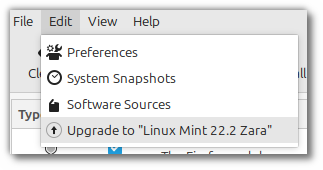
Follow the instructions on the screen.
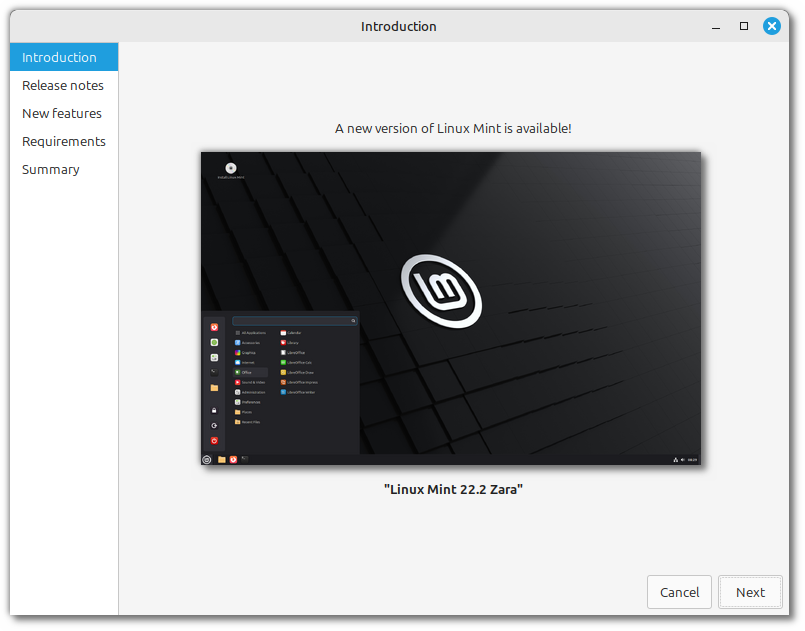
If asked whether to keep or replace configuration files, choose to replace them.
4. Reboot the computer
Once the upgrade is finished, reboot your computer.
Commonly asked questions
- If the upgrade is not available to you, check that you have the latest version of mint-upgrade-info (1.2.9 or higher) and restart the Update Manager by launching it again from the applications menu.
- If the latest version of mint-upgrade-info is not yet available in your mirror, switch to the default repositories.
- This happens rarely, but if you ever got locked and were unable to log back in, switch to console with CTRL+ALT+F2, log in, and type “killall cinnamon-screensaver” (or “killall mate-screensaver” in MATE). Use CTRL+ALT+F7 to get back to your session.
Thank you for releasing this upgrade path on same day as the ISO release.
Congratulation on new release. Just upgraded to 22.2. However, the kernel is stuck at 6.8, didn’t update itself to 6.14. Is there any particular instruction regarding this issue?
I read something that said if you updated from an older version, you’ll retain the 6.8 kernel – but if you install fresh then you’ll have 6.14. You should be able to still switch from 6.8 to 6.14 post-upgrade though.
You can update the kernel through the update manager.
Yeah, this hit me too. Going to update manager now.
if i stick with the 6.8 kernel, will that be updated?
Same phenomen on my side. It has to do with NVIDIA graficc ard drivers. I use an GeForce G1030 card and the only driver who is working is based on 550.163.xxx. There are sone issues with Kernel 6.18 and driver 570.xxx I think.
Upgrade went like a breeze. From 22.1 Xia to 22.2 Zara in 4 minutes up and running.
Thank you Clem, really appreciate the work of a great OS!
The upgrade went well. Thanks for the great work.
Is it intentional that the new HWE kernel is not installed?
As far as I remember Linux Mint does not automatically switch to a different kernel series when upgrading Mint versions. But you can get the newer kernel through the update manager.
Please make me smart…
I do not have the “Upgrade to Linux Mint 22.2 Zara” option, and I can’t figure out what needs to be done to add it.
Thanks!!
Same here, cption is not there
Upgrade from 22.1 — 22.2 was super easy ! kernel still on 6.8 – why ?
Is there a way to do the upgrade of a mint 22.1 offline ?
I have a very unstable connection, the ‘installing packages’ step has already aborted 5 times now with a check your internet connection message. Thank god it seems to continue from the point it previously downloaded, but it is not exactly smooth.
I would be nice to have a better way for my other machines/future upgrades.
Not jumping out of the upgrade process but giving a button to retry when a connection problem is detected would also already help so I don’t have to jump through the menus and check marks each time.
How to upgrade via command line?
Thanks for the update! this is my first major update since i installed this OS and it went smoother than i thought
Greetings, thanks a lot for the update
I saw a video on the new features and it noted that there was an increase on the blue hue for some grays on the UI so that the entire desktop would coordinate colors better with the gnome apps that are in use with this update, in the video I didn’t notice a difference however after doing the update the dark mode of mint-Y feels quite nice and more readable at night, again thanks for the update.
I’m still on an unsupported Mint 19.3 because upgrading is such a PIA. I started off as a newbie and didn’t expect that Linux upgrades were such a PIA.
Eventually I’ll get around to upgrading and try and do it right from the get go. I’m looking at doing LTS and separating my /home. I’ll also have to review FDE. My understanding is that by separating “/” and “/home” I have to do some extra work on encryption for both partitions. Sheesh…
Of course, despite all of this… I’ll have to backup my data somewhere. I’ve used tons of OSes in my life and upgrading was always an afterthought.
Love Linux but absolutely despise this upgrade nightmare. We’ve all seen the stats. Percentage of users using old versions of their fav Linux distro. Too many are using old versions of the distro because of the upgrade nightmare. I’m still on 19.3 and it pisses me off every day because of the work involved just to prep before an upgrade.
Not your fault, Linux Mint. I’m just venting. But I still can’t believe we’re all living this nightmare.
At this point, we should all be upgrading seamlessly directly from the internet. No USB, no DVDs. Click, upgrade, continue living the life.
the only thing you need to do is Sudo apt full-upgrade
that’s literally it.
Upgrade went very smooth like butter.thank you!
Thanks for the info. I am a new Linux Mint user and was having a rough time following installation directions from another site. I stumbled on your site and BINGO! The easy to follow directions had me up and running in no time!
I *am* on default mirrors, like https://packages.linuxmint.com and updated everything but the latest mint-upgrade-info version is 1.2.6 not 1.2.9
Any comments on this?
From http://packages.linuxmint.com/dists/virginia/main/binary-amd64/Packages
I only do get mint-upgrade-info 1.2.6
Why?
tengo el problema con 22.1 xia que no actualiza mi tarjeta grafica integrada y me da la resolucion de 1024×768 y mi monitor es 1600×900, mi pc es un lenovo thinkcentre core 2 duo 2.80 ghz y 4 gb de ram, la nueva actulizacion zara resuelve este problema que tengo?
Awesome as always! As of 9/6 Saturday afternoon in the US, many are still have issues with updating the linux-firmware portion of the latest Update. More at Linux Mint sub Reddit.
I upgrade the system but the upgrade doesn’t lift to Kernel to 6.14.xxx and NVIDIA driver to 570.xxxxx.. The system use old Kernel 6.8.xxx and old NVIDIA driver 550.xxx.. Reason? Kind regards. Frank located in Germany.
Is it possible to use a mirror? The packages are coming down at 200kBps.
Odd issue with upgrading my desktop. Already on 21.1. Update manager sources indicates my base is Jammy not noble (which is wrong as 22.0 onwards is noble). Upgrade manager refuses to upgrade me as it’s trying to upgrade me to wilma (even though it says i am on xia). Done APT upgrades, updates, cleans, rebooted etc but nothing made any difference.
I do not want the HWE kernel. Things like VirtualBox want kernel series used by Ubuntu LTS versions, not whatever they come up with for the short-term support ones.
Having tried it on a spare PC, I can see that doing an upgrade from 22.1 to 22.2 doesn’t change kernel series (good) but is it *guaranteed* not to change until there’s a version based on Ubuntu 26.04?
I have Mint on an old Surface Pro and the update went very smoothly and I was using again in under 5 minutes. Thanks for the instructions which simple and supportive.
Just upgraded today, a painless process.
I read all the notes first and will stick with the old kernel for now because I want Virtual Box.
Hopefully, there will be a fix so that I (we) can update to the newer kernel.
What happened to my comment? There was nothing derogatory or offensive in there, quite the opposite.
This happened on the last upgrade as well, I posted a comment that just disappeared.
(This won’t stop me using Mint though 🙂 )
The default repositories are unavailable in my organization due to security reasons (recent attacks…). Is there a way to perform the release upgrade with other repositories (some of them are available) than the ones chosen by default ? Besides, the work (that I have tried on my laptop updated at home) is great !
Best.
Hello,
is there a way to start the update via ssh?
I tried to start the update via xrdp session but the password prompt doesn’t show up so the update fails every time.
Greetings
Kyrus86
Hey
I have a problem while updating. The Apt-Puffer can not be comleted at the end it shows : Error – Return code: 100
What do I do with it?
Sorry I am a bit lost
I can’t get 22.2 to install using Update Manager at all. I use the update manager. refresh. edit/update 22.2. Click, and nothing happens. Any advice?
Same issue, screen grays out, but nothing happens.
As of 10/19 I have not received the drop down link to upgrade to 22.2. I am in the US with Virginia as my mirror site. Any help would be appreciated.
Thanks,
Pat C.
Update was easy. But why the selected mirror servers has been changed? And why Synaptic has been uninstalled?
Hi. I have done everything, but cannot find the option under edit. I find Preferences. System Snapshots. Software Sources.
Avec la version Linux 22.2 Zara, puis-je migrer pour une meilleure version^