
Many thanks to all of you for your donations and your amazing support.
Please note that the features presented in this blog post are a preview. They’re still being worked on and are planned for the next version of Linux Mint.
Release Strategy and Development Cycle
This is the first time we’ve taken a full year to develop Linux Mint. Going from a 6-month release schedule to a yearly one was a tough decision to make, but we’re really starting to see it pay off. We’re taking on projects and implementing changes which would previously have been considered too large or ambitious. We’ve got time. We don’t feel rushed. Development feels solid and the OS keeps getting better.
I’ve been working on Linux Mint for more than 20 years now. I don’t think I’ve ever seen so many changes and new features implemented for a single release. It’s really exciting and it scares me a little bit because that also means we’re going to be very busy during the beta phase 🙂
Aside from new features, we’ve been fixing a huge number of bugs. We’ve also been working on Wayland compatibility, improving our processes and internal tools, and prototyping new editions.
Linux Mint 27 “Adrien”
Our next release is scheduled for Christmas, and it will be called Linux Mint 27 “Adrien”.
I’ve really enjoyed using girls’ names since 2006. They gave each release an identity and made it feel much warmer than just a number. From “Ada” at the very start to “Zena” last year, we’ve now reached the end of the alphabet. It’s funny how this happened just as we’re moving to a new release schedule. I want to continue this tradition with the new series. This time we’re using boys’ names 🙂
As you can see, the release number represents the upcoming year. We’ll no longer use point releases, so the release after that will be 28. You’ll upgrade from 27 to 28 to 29, and so on.
Linux Mint 27 “Adrien” will be based on Ubuntu 26.04. It will be available in at least three editions: Cinnamon, Xfce and MATE.
Alarms
Alongside the new calendar, we’ve developed an application to manage alarms.
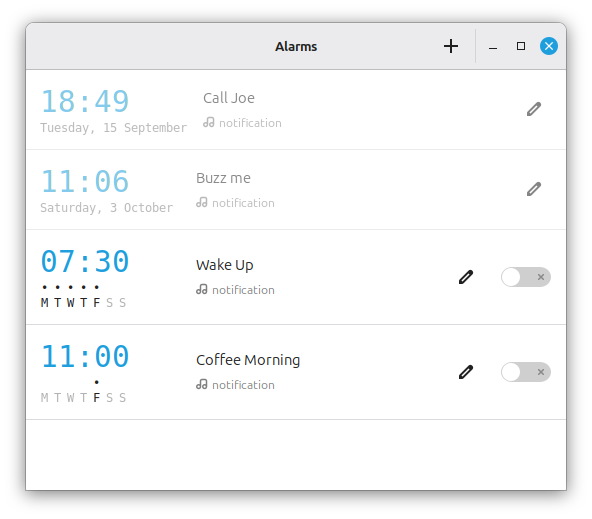
The application takes inspiration from Android, both in its interface and how it works.
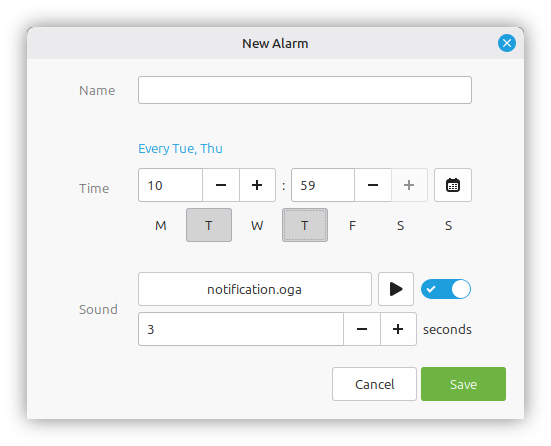
It’s intuitive and really easy to use.
You can set recurring alarms, choose custom sounds, and receive notifications even when the application isn’t running.
This application is called “Clocks”. It is part of the Clockenstein project.
Alarm notifications are handled by the Clockenstein daemon and notification agent.
Other News
There’s a lot going on behind the scenes.
We’ve been working hard on three other projects, and we’re putting the finishing touches on them.
Next month we’ll talk about Superlight, Unfold, and Velocitty.
Sponsorships:
Linux Mint is proudly sponsored by:
Gold Sponsors:  Silver Sponsors:     |
Bronze Sponsors:         |
Donations in August:
A total of $13,824 were raised thanks to the generous contributions of 443 donors:
 $580 (2nd donation), Christian S.
 $250, Douglas R. $232, Thorsten G. aka “JETI GMBH“ $200, Ranodhi S.
 $174 (8th donation), Flavio Silva Pita Correia
 $140, CHRIS P. $140, flutttr
 $116 (9th donation), Marco van den Berg $116 (9th donation), Michael J.
 $116 (4th donation), Jean-yves B. $116 (3rd donation), Klaas M. $116, B.A.J. S.
 $116, Cristiano M.
 $116, lars S.
 $116, Radulescu V. G.
 $116, Slavomír K.
 $116, Thomas P. $116, Ulrich R.
 $104 (10th donation), Jorge R. R. $100 (23rd donation), James F. $100 (7th donation), Harrison W. $100 (4th donation), David D. $100, Chris H. $100, DOUGLAS B. C. $100, Joseph M. $100, Logan E. $100, Marcia A. $100, Robert D.
 $100, wayne G. $93, Sebastian H. $70 (6th donation), Marcus A. $68, Zdzislaw K.
 $64 (2nd donation), Mark W. $58 (15th donation), Hermann W.
 $58 (7th donation), António Salsinha – Graphic Designer $58 (3rd donation), Andre B. $58 (3rd donation), Christian G. $58 (3rd donation), Simon D. $58 (2nd donation), Dirk H. $58 (2nd donation), Guido S. $58 (2nd donation), Martin J.
 $58 (2nd donation), Michel O. $58 (2nd donation), Nima M. $58, $58, André B. $58, anonymous $58, Bernhard S. $58, Bjorn H. $58, Bodo S. $58, DIEGO I. C. $58, Emmanuel M. $58, Felix $58, Gerrit B. $58, Giacomo B. $58, Graham T. $58, HANS H. H. $58, hermann A. $58, Loic A.
 $58, Martin L. $58, Martin Z. $58, Matthias K. $58, P.Knipe aka “pk21” $58, Phil G. $58, Pierre S.
 $58, RENE G. $58, Rene W. $58, Robert S. $58, roberto L. $58, spaceghost2 $58, Stefan B. $58, Steffen K. $58, Sven G. $58, Valentin B. aka “Vale” $50 (24th donation), Mothy $50 (20th donation), Anthony C. aka “Ciak” $50 (16th donation), Robert D. aka “MacDhai“ $50 (9th donation), Derek S. aka “Corky357”
 $50 (5th donation), Benjamin aka “bglamadrid” $50 (5th donation), Mark H. $50 (5th donation), Richard H. $50 (5th donation), Sheila S. $50 (4th donation), John M. $50 (3rd donation), Michael R. $50 (3rd donation), Mitchell L. $50 (2nd donation), aka “dust788” $50 (2nd donation), Andrew M. $50 (2nd donation), Donald E. $50 (2nd donation), Peter G. $50, Alex K. $50, Allan M. $50, Doug M. $50, Fred A. M. $50, Fred M. $50, Grey $50, Harpreet S. $50, Ian M. $50, Janis A. $50, Jeremy C. $50, JOHN D. $50, kevin K. $50, kevin M. $50, Robert S. $50, Steve $50, william R. S. $50, William V. $46 (2nd donation), Brian K. $46, François L. H.
 $46, Ulrik A. $42 (2nd donation), Frank D. $40 (7th donation), Peter J, aka “Dr Peter” $40 (3rd donation), Chad B. $35 (8th donation), Andrew E. $35 (4th donation), Martin B. $35 (2nd donation), Mark G. $35, Dominique B. $35, Dr. M. S. $35, Egbert D. $35, Mark V. L. $35, Richard B. $35, Stefan S. $34 (9th donation), Olaf Bousche aka “Bushman” $34 (4th donation), CercLL d’Entraide et Réseau Coopératif Autour des Logiciels Libres (LUG of Marseille, FR) $34, Arnd W. $30 (37th donation), Aimee W. $30 (13th donation), Orlando O. $30 (5th donation), John H.
 $30, András P. $30, Brent H. $30, Javier R. P. $30, Raleigh Y. $30, Randy B. $29 (3rd donation), Ruurd T.
 $29 (2nd donation), Raul V. $29, Joe aka “BeppePass” $29, Mogg $29, mr C. C.
 $29, Myron A. S. A. $29, Vincent M. $28 (2nd donation), Paul S.
 $25 (67th donation), Linux Mint Sverige $25 (20th donation), Donna B. $25 (20th donation), John N. $25 (10th donation), Leela A.
 $25 (9th donation), Oleksandr N. $25 (7th donation), Nicholas B. $25 (5th donation), Robert W. $25 (5th donation), Theron K. $25 (4th donation), Frank F. $25, larry P. $25, Patrick D. $23 (81st donation), Bryan F. $23 (75th donation), Peter E. $23 (42nd donation), Stefan W. $23 (37th donation), Benjamin W. aka “UncleBens” $23 (15th donation), Wolfgang N.
 $23 (14th donation), Provisorisch $23 (13th donation), Joerg B. $23 (10th donation), Harold H. $23 (8th donation), Gunnar A. $23 (7th donation), Robert J. $23 (7th donation), Santiago $23 (6th donation), Emil N. P.
 $23 (6th donation), Haris A. $23 (6th donation), Henning P. $23 (6th donation), Jeff Daniels $23 (6th donation), Kiaran Smyth. $23 (5th donation), Matthias K. $23 (5th donation), Reinhard R. $23 (5th donation), Volker S. $23 (4th donation), Drew C. $23 (3rd donation), Markus S. $23 (3rd donation), Michael C. $23 (3rd donation), Sebastian M. $23 (2nd donation), Franz F. $23 (2nd donation), Klaus G. $23 (2nd donation), Marco C. $23 (2nd donation), Martin G. $23 (2nd donation), Milan M. $23 (2nd donation), Peter N. $23 (2nd donation), Rachel $23 (2nd donation), Robin Rijke aka “R²” $23 (2nd donation), Thomas K. $23, André C. $23, Andrew C. $23, Anthony K. $23, Bodo I. $23, David L. $23, David R. $23, dian I. $23, Dirk S. $23, Dr J. G. A. $23, EDM
 $23, Gediminas S. $23, Johannes S. $23, Luis D. F. C. $23, Marcel H. $23, moritz-markus U. $23, Nándor H. $23, Oliver A.
 $23, Pawel $23, Phil T. aka “archmintphil” $23, Rainer K. $23, REMI B. $23, Renaud D. $23, Rene M. $23, Roland B. $23, Rüdiger H. $23, Thomas W. $23, Timo S. $23, Urs F. $23, Vlad C. $23, Wolfgang F. $20 (122nd donation), Johann J. $20 (56th donation), Stefan M. H. $20 (32nd donation), Denis D.
 $20 (22nd donation), Arvis Lācis aka “arvislacis“ $20 (17th donation), Michel S. $20 (11th donation), Daniel V. M. $20 (11th donation), Eric H. $20 (9th donation), James N. $20 (6th donation), Timothy A. $20 (5th donation), Angel Cruz aka “Angel” $20 (5th donation), Theodore K. $20 (3rd donation), TMCC $20 (2nd donation), eric E. $20 (2nd donation), Keith S. $20 (2nd donation), Kevin P. M. $20 (2nd donation), Scott B. $20, ADEBAYO I. $20, Ali S. $20, Andre P. $20, Brian F. $20, brian M. $20, Chris P. $20, christian S. $20, David A. $20, David K. $20, Farrell P. $20, GEORGEL P. $20, Howard E. $20, iain K. $20, Jorge G. $20, Jose V. $20, Kevin H. aka “kjh7796“ $20, louis V. $20, Malcolm T. $20, Maros J. $20, Matthew B. $20, Michael M. $20, Michael R. M. $20, Michael S. $20, Monica R. $20, Pete W. $20, Richard C. $20, Sidney E. D. $20, Simon K. $20, Thomas S. $20, Timothy C. $20, Tristan C. $17 (96th donation), Andreas S.
 $17 (12th donation), Ivan Stamenov $17 (5th donation), Christoph D. $17, Ivan P. I. $17, Luca D. $17, Tomasz S. $15 (2nd donation), Russell R. $15, Ashton C.
 $15, Dmitrii S. $15, Nieminen M. $14 (30th donation), aka “AsciiWolf” $14, Florian J. $14, Viktor B. $13 (22nd donation), Alessandro S. $13, Luca S. $13, Zodiac M. $12 (53rd donation), Tugaleres.com $12 (52nd donation), Thomas Rehm $12 (21st donation), Abe Z. $12 (19th donation), Artem Ignatyev aka “ZaZooBred” $12 (17th donation), Gabriele I. $12 (9th donation), Iker P. M.
 $12 (9th donation), Sergei Petrov $12 (8th donation), Lyuben R. $12 (8th donation), Marcos P. G. $12 (7th donation), Claudio A. $12 (7th donation), Kai Uwe Joppich
 $12 (6th donation), Alf-ivar O. $12 (6th donation), Olivier R.
 $12 (6th donation), Tomasz S. $12 (4th donation), Koski M. K. aka “Wintageman“ $12 (4th donation), MAH aka “Myne” $12 (4th donation), Patrick B.
 $12 (3rd donation), Bojan M. $12 (3rd donation), David K. $12 (3rd donation), Georgi P. $12 (3rd donation), Hamish M. $12 (3rd donation), Hans-peter W. $12 (3rd donation), Jarmo K. $12 (3rd donation), Jose Vicente M. $12 (3rd donation), persson M. $12 (2nd donation), Andrea Corinti aka “Xab“ $12 (2nd donation), Bartosz W. aka “barthossius” $12 (2nd donation), Fenyvesi K. $12 (2nd donation), Johann K. $12 (2nd donation), Massimo D. $12 (2nd donation), Michal L. $12 (2nd donation), Patric E. $12 (2nd donation), Viktor S. $12 (2nd donation), Vlad M. $12, Adrian Z. $12, aldo L. $12, Anders K. $12, antonello B.
 $12, ATHOS R. J. $12, Berth V. D. H. $12, Charles S. $12, Coun P. $12, Erwin G. W. $12, Fernando L. $12, Francesc J. M. M. $12, Francesco L. $12, Fredrik G. $12, Gavino G. B. $12, George W. $12, Gianni G. $12, Hartmut L. $12, J K. $12, Jacek G. $12, Jack A. $12, Jan B. $12, Joana B. $12, laas $12, Lars M. $12, Luuk D. V. $12, Marc M. $12, Mátyás H. $12, Micha S. $12, Murat Y. $12, PapelDigital $12, Paulo S. C. $12, Peter K. $12, Peter W. $12, Rauno S. $12, Reimund J. $12, Vasilis G. $12, Walter R. $12, Wojciech G. $10 (126th donation), Thomas C. $10 (67th donation), Philip Woodward $10 (21st donation), Thevirtua $10 (17th donation), Mariusz B. $10 (11th donation), Korora Solutions $10 (11th donation), Tomasz K. $10 (8th donation), Michał K. aka “PoldekPL” $10 (7th donation), Jordan S. $10 (4th donation), William P. $10 (3rd donation), Grace Faith Jack $10 (3rd donation), Saeed R. $10 (2nd donation), Ann S. $10 (2nd donation), Cephus Jones aka “Cephus” $10 (2nd donation), Clay $10 (2nd donation), MARCELO F. D. F. $10 (2nd donation), matthew V.
 $10 (2nd donation), Reynaldo M. M. $10, Caeden S. $10, Christopher Y. $10, Clinton H. E. $10, Diego F.
 $10, Hassan A. $10, Joel L.
 $10, John S.
 $10, K P. $10, Leonardo A. $10, Levente T. $10, Maome G. $10, Nikhilesh B. $10, Olivia J. $10, Pedro M. $10, Peter B. $10, sanjay S. $10, Scott K. $10, Taxestoday aka “Shafi Afridi“ $10, THOMAS K. $10, Walt B. $10, Walter G. V. $10, William W. $9, Kristýna V. $7 (2nd donation), M. B. S. aka “Meni” $7, Diego A. O. $7, Todd H.
 $197 from 51 smaller donations
If you want to help Linux Mint with a donation, please visit https://www.linuxmint.com/donors.php
Patrons:
Linux Mint is proudly supported by 2,408 patrons, for a sum of $5,227 per month.
To become a Linux Mint patron, please visit https://www.patreon.com/linux_mint
Good to see even more new features to Mint 27.
Are there any plans on developing for Mint it’s very own alternative to GNOME Disks?
Some users have expressed that working with Disks is sometimes not that intuitive and perhaps a custom alternative may help out with that?
Also I hope there has been further discussion on the Driver Manager for LMDE as mentioned in the previous blog comments with some examples coming from MX Linux’s driver manager.
Forgot to add on the topic of the driver manager, since many Nvidia users always face the issue of having bad performance when the drivers are not installed out of the box and some skip the welcome screen with instructions to open the driver manager, if the manager is reworked would it be possible to get the option to have them included in the ISO or offer the option to install them during installation from live boot?
Yes, LMDE Driver Manager is hot topic!!!
Great news to hear there will be a MATE edition of Linux Mint 27!
I’ve been following closely the new Xapps replacing gnome apps ever since clockenstein, I’m very excited to try them and to see cinnamon slowly become more independent c:
I’ve seen some users complain about the difficulty of setting up hibernation, is the team planning to do something about it?
Do we have any dates for when the beta gets released?
And is there a better way to give you info about the MX linux driver thing than in blogpost comments?
I’ve been testing Velocitty and I would like to know why it looks the way it does. Why is it libadwaita? It clashes horribly with the rest of the apps on the system. Does libadwaita have something that cannot be achieved with the usual design?
As always I’m glad to see Linux Mint going forward. Thank you for your work! Few questions important to me: 1) Was the memory leak causing whole system crash in Xviewer (when viewing large number of images) finally repaired? 2) Currently in X when custom monitor color profile is applied starting “Nvidia X server settings app” is resetting the profile without user’s notice and permission. This leads to a lot of confusion, weird behavior of graphic editors and photo viewers and possible production errors unacceptable in professional workflow. Could something be done with that behaviour? 3) Will Muffin compositor have the same (or better – would be great!) functionality considering color management on Wayland as on X? People say that GNOME’s Mutter is much worse in Wayland in that regard., so I’m a bit afraid of the future. 4) Will Wacom tablets work the same on Wayland as on X now (as far as I understand, on Wayland the Muffin should do the job that was previously distro/DE-agnostic on X)? Thank you in advance – I’m using Mint for illustration/graphic desing/photography production so those things matter to me.
If you’re on Linux I’ll assume you don’t work with the Adobe suit but if you’re not aware of it I share the news with you that an open source alternative is being created right now. Yes not yet fully done and yes done with AI but it seems very promising and in this case I’ll allow AI.
Just google for: artcraft adobe open source alternative
and have fun. I would love to listen to your feedback since you’re professionally working in this area.
Cheers.
Thanks for the update.
Will there be an upgrade path from 22.3 to 27, or is a fresh install mandatory this time?
Hello, Mint team: thank you for your dedication and for the fantastic news about the new version. I’d like to echo gflash’s question, and I look forward to your reply
Thanks to the Mint team for all the excellent work over the years!
I’m a fan of taking the time to get things reliable rather than rushing into more or less stable solutions just to have the latest whatever.
One of the biggest changes I’ve seen was the switch from PulseAudio to PipeWire, which resolved all my Bluetooth audio problems in one go.
That said, I’m curious about switching to Wayland. The snappiness of KDE and fractional scaling are tempting, along with other new features announced here.
However, one concern remains:
Are you planning to support customizable touchpad gestures under Wayland, including the ability to assign custom keyboard shortcuts or commands to specific gestures?
I’m asking because neither Touchegg nor xdotool would work natively under Wayland. Losing this functionality would pretty much be a deal-breaker for me when switching to Wayland.
I`d really appreciate it if the new, snappy Wayland cinnamon would let me to go on with my workflow.
Thanks again for all your hard work!
I’d like to make a suggestion for the XFCE version: include the “docklike” taskbar by default and use a layout similar to Cinnamon’s, since “docklike” is available in the Ubuntu 26.04 repository.
Nice to see the versioning scheme finally changing, it will be more intuitive now, referring to the year, no more looking up if this number or that is the latest version or not. KISS paradigm in action.
In relation to the Linux Mint editions, I think the most requested one I’ve seen all over the Internet (especially Reddit) is a KDE one. People REALLY want to use Linux Mint with KDE Plasma as their desktop environment. I think this would be something to think about in the future, IMO.
Thanks to the Linux Mint team for the hard work.
Yes to KDE! Cinnamon makes me feel at home but I have it tweaked in such a way over all the years and upgrades that I don’t think I’d be able to make it work the way I want and need if I go for a nuke&pave fresh reinstall. So my other alternative would be KDE and the new versions of Plasma on top of a LTS are a dependency hell, if not impossible at all. So yes KDE would be most welcome.
I hope this is actually a bit of foreshadowing – “It will be available in at least three editions: Cinnamon, Xfce and MATE.” I know there’s another poster here “rooting” for KDE Plasma. You can add me to the list of people that would be a fan of that, but even if it stays at Cinnamon, Xfce, and MATE, I’ll be happy. And, if it is being worked on, wait until it’s completely ready to go, which seems to be the history of the Mint team, especially with this release.
I do like the new alarm feature. I can always use as much help as I can get helping with my memory.
Finally, I am hoping that since this is going to be a big change to Mint with lots of new toys that the beta time frame will be longer than a few weeks, even if it pushes the release date back a bit. I think that making sure this major upgrade is as ready as it can possibly be at rollout is more important than anything else. In my perfect world, the October blog post will have an official announcement on a beta release date. I’ll keep my fingers crossed, but won’t hold my breath.
The missing edition is LMDE
Dodo, LMDE is not a different DE it’s a different distro. Linux Mint currently has 3 desktop environments (DE); Cinnamon, Xfce, and MATE. LMDE is a completely different distro that also has a Cinnamon DE.
Wait, what? I’m on 22.3. I figured the next release would be 23.0. We’re skipping 23-26? Was this a typo?
Never mind. Just read the next paragraph.
Thanks for all the work you guys are doing!
This is greatly appreciated!
Merci beaucoup!
Hatsoff to you and the team for all the hard work during the whole year. Will we have an HWE version similar to the one offered now? I would like to use it and get the latest kernel that’s higher than 26.04. Also any updates in regards to HDR / VRR that would be appreciated thank you.
You can always just upgrade to the HWE kernel even if Mint 27 doesn’t officially release an HWE ISO.
My only concern with the new release numbering is that it seems like it’ll be much more ambiguous to tell which versions are based on which version of Ubuntu or the like. Furthermore, if the numbering reflects the upcoming year (2027) rather than the past year (2026), this would get rather confusing with a theoretical Linux Mint 28 not in fact being based on Ubuntu 28.04 would it not?
If the release number simply reflected the past year instead, this would help solve both issues.
hello
Will there be all these novelties carried under LMDE7 or will it have to wait for us LMDE8 (or LMDE 27 if you take the same type of numbering as mint ubuntu)?
thank for your work
Con ganas de ver las nuevas aplicaciones que habéis desarrollado.
Is the X account dead? I missed this update because there was no post on X.
Nice to see the jump to 27. Coincidentally, the numbers align with the alphabet again 🙂 (26 Z -> 27 A) (petition to name 30 Daan). I wonder if the beta testing period will be longer given the large size of this update?
I’ve been looking into LMDE recently, but it’s a real bummer that the MATE edition got discontinued. The Mint menu, update manager, and software manager are all Mint-specific, so they are non-trivial to put in Debian (or any other distro) yourself. Especially the software manager could be a real win to package for other distros, as a lightweight alternative to GNOME Software and KDE Discover.
I was also thinking about the driver manager. I know you struggled with it for LMDE. I wonder if there’s anything to learn from PikaOS’s approach? I think they’re a small team, so perhaps there’s something in their approach that makes it maintainable?
Mint 30 should be named Barry. Tagline: “Can’t Get Enough of Your Love, Mint.”
Oh, wait… “B” has to go to Mint 28. You can have yours, Daan. :))
Clem, in the following sentence:
“We’ve also been working on Wayland compatibility, improving our processes and internal tools, and prototyping new editions.”
About that last part, did you mean “additions” and that was a typo (it’s not a secret that you guys are working on a new system monitor (Superlight), terminal emulator (Velocitty) and archive utility (Unfold))? Or that wasn’t a typo and you mean that you’re working on other Linux Mint “editions” with other desktop environments? Can you comment about that? Thanks. 😅
I would certainly love an LXDE edition again. 🙂 It’s GTK-based, in line with the current Mint tools, and it’s great for older hardware.
Thanks for the update Clem. Your not the only one slightly nervous about such a big upgrade. Due to the reliability of LM over the years (and l have been using LM for close to 20 years) l have used it for my all my computers – it is not just the odd 2 or 3 either.
Please keep the good work up.
Moving forward, will Linux Mint be committed to the December-ish release target? From my user experience perspective, the most significant change of the new release strategy is that upgrading to a new LTS version has become a longer wait compared to what used to be around 2-3 months delay after Ubuntu releases theirs. I’m surprised that the person bringing this concern to the table turns out to be me, because generally I’m not in a hurry to jump to new versions as long as everything is working. But apparently, one of the apps I’m using (yt-dlp) has run out of updates on Ubuntu Noble/LM 22.3. I don’t need it so badly that I’m willing to resort to Flatpak/Snap/AppImage, but at the same time, I’d really appreciate it if I can upgrade my system soon.
Considering there has been upgrade tools for every Major releases and there will no longer be any point releases. Are we going to continue having the upgrade tools for every versions going forward?
As per my understanding, every major release used to have an upgrade tools. every point releases used to be with in the update manager. considering that will be no more pointlesses and only major laces every year, will it be rolled out through an upgrade tool?
Overall, thank you for LM. But…
Messing around with release numbers is the stupidest thing you can do. The entire history of product numbering proves this. What was wrong with 23? Was it not the “right” year? SO WHAT? WHAT KIND OF PSYCHOPATH CARES ABOUT THAT? At least it made the product’s evolution clear. What comes next? 2028? Or 360? Or 36.7°C?
Sure, release numbers are just a whim. But they do help people follow the product’s development. It’s not the year that determines a product’s relevance.
I’ve been an LM user since version 18.3. Not since March 2018—I mean version 18.3!
Let’s get straight to the point: the Windows XP taskbar was one of the best. You could rearrange open programs in whatever order *you*—the user—wanted. It wasn’t dictated by how the icons were arranged or the sequence in which the applications were opened. It was exactly how *I* wanted it! That was one of the major reasons I left Windows—just one of them. They, too, tried to dictate how I should work. F*** Microsoft.
Now, LM has started doing the same thing—trying to teach me how to “live the right way.” For now, I can still do things the way I like—and that’s essential! Don’t ruin this. I suspect many others feel the same way. This could easily become a major reason to look for a different Linux distribution.
Overall, thank you for LM.
Talk about an over reaction!!! ‘A major reason to look for a different Linux distribution’ just because of a version number relating to a year.
Here I have to agree regarding the Cinnamon’s taskbar. I have my system being upgraded from Mint 17 or 18 or so, and I have my taskbar the way I want, XP-ish style. When I boot using a Live ISO I can’t make it look and feel and work the way I want. Have some ways of doing things been deprecated? Is it just me?
If someday I have to nuke&pave and start all over again and can’t make my taskbar work the way I want Cinnamon, that currently makes me feel at home, will no longer work for me and I’ll have to give another shot to KDE. And I *love* the Ubuntu Mint base, but it doesn’t support the latest version of Plasma, it’ll be a dependency hell, if even possible at all to install it.
Like they used to say on the Linux Luddites podcast, not all change is progress. I personally don’t want more and new stuff, I just want my OS’s rough edges being filed and polished each new version.
I have no idea what you mean with the windows taskbar thing.
I think you’ll find that there are A LOT of psychopaths that care about that, me included 😅. You’re overreacting a bit about such a minor thing, calm down…
And as others say, I don’t have the slightest idea about what you mean with the taskbar thing. Are you sure you’re OK?
You obviously haven’t been around on Mint for very long. They’ve changed versioning schemes at least once or twice before, and it all worked out perfectly fine. There really isn’t anything to get so worked up about here.
Regarding your comment: ‘I suspect many others feel the same way…’ – that is merely an assumption and, at least as far as I’m concerned, an incorrect one. Stay calm, use Linux (Mint) and have fun
I do not see how the name has any bearing on the functionality. At no point, as far as I am aware, have the Mint team suggested altering the way the taskbar works. (I too have it arranged in an order that suits me as, imagine, most people do). I can see arguments for both incrementing the numbering scheme by one as before and for aligning it with the year of “use”. Whilst I personally think that as it is now an annual release, aligning it with the year makes more sense, ultimately it does not matter to me what it is called. It works brilliantly for me, and I am confident that will continue, and the name does not affect that in any way.
Time to touch grass.
lol touch mint
Chill, Bro. Chill.
Hi Clem! If you’re working on a new terminal, could you please add a “Bookmarks” feature? It would allow users to store frequently used commands so they don’t have to recall and retype them every single time. I’ve seen this in the Deepin Linux terminal.
What about using .bash_history
You can use aliases for this.
A nice way to handle that is to create a “bin” directory in your home directory, name a new file as you want, and add your command in there. Save and close the file, then right-click it, go to Preferences -> Permissions, and check the box “Allow executing file as program”.
Once you do that, you’ll be able to run the new command by writing the filename you chose. It’s a simple way to handle this, and you can execute those commands from any terminal. And if you have more users on your system who would like to run the same command, you can either do the same for each user who wants it, or allow everyone to run it if you copy that tiny file into /usr/local/bin (with sudo, of course).
So, are you suggesting that a simple tab in the window header—where you could just type in any commands—is less convenient than the solution you recommended to me?
Give Ctrl+R a try. You can search your bash command history via this hotkey.
Some more detail: https://unix.stackexchange.com/questions/73498/how-to-cycle-through-reverse-i-search-in-bash
It would also be a good idea to enable Ctrl+C – Ctrl+V support in the terminal.
In the terminal – just hit the up arrow key. (i.e. Utilise .bash_history as mentioned by “French77”. Simples!
It’s amazing how everyone is in a hurry to give an answer to the wrong question! Example. From time to time, I need to send a magic package to wake up the network server. Following your advice, I open the terminal, press Ctrl+R, and…? I see the required command there, seriously? No! I have to copy the command by opening my text file with commands and paste it into the terminal (Ctrl+V doesn’t work!). Is this convenient? Will bash history help me?
Hi Clem, did you see this? https://onlineservices.epicgames.com/news/introducing-easy-anti-cheat-linux-v2
Is Linux Mint working on supporting EAC v2? This is a big deal for many people who want to switch to Linux but are held back by anticheat games. Hopefully there still is enough time to implement this for Mint 27 rather than push this right by at least a year. Most of this should already be ready to go through the Ubuntu base, I think.
The good thing is, since it’s a kernel-level anti-cheat, anything with a Linux kernel that supports it should support it (unless I’m misunderstanding, which is possible). That’s up to Ubuntu, or up to the user to install a more up-to-date kernel (mainline, Xanmod, Liquorix, etc.). I believe the Mint team really has nothing to do with that.
please update the look of the os with this new chapter in Mint. the current xp style ui is pretty dated. i know we can change it to our liking and i have, but at least update it for new comers. let the os aesthetically belong to 2026. this is my single biggest pain point with mint.
No no no…. A large part of the XP style being still in use is that it is one of the few things M$ got right. ‘Modern’ is just fashion. A year or two in the future there will be a new ‘modern’, and eventually the wheel will turn again and the XP style will be back in fashion. If the menu and taskbar appearance matter that much to you, there are many distro’s doing it differently.
Mint has it right, though there is one change I always make, move the ‘corner bar’ next to the menu button, and add the spacer applet to reduce the number of times I roll over the menu button when switching to a different app.
Or just use a distro with GNOME
I like Cinnamon. It is perfect for me, but I would like a little more consistency. All-rounded corners. Maybe, an All-in-one applet. Simpler menus. Some things in Gnome look rather good, and ‘Modern’ is not just a fashion. Appearance matter. You do not have to fight every single change. Clem, and the team are carefully crafting the future of Mint. I am confident that they will do a good job combining aesthetics, maintability, and the Mint heritage.
Harrison, where are you getting that?! The default doesn’t look anything like XP. If anything, it looks more like Windows 10.
If you want it to look different, there are lots of themes, applets, extensions, etc. that will give you something less “dated”, if that’s what you want to call it. But in reality, what does “dated” mean exactly? It likely means that it doesn’t look like something else that you think looks cool, which probably comes from a major company that sells your brain on what cool things should look like so you spend money on them.
I still tend to use Mint-X theme and must say it looks gorgeous. Mint-Y is nice as well, though IMO skeuomorphic themes are hard to beat.
Just wondering, will Mint 27 come with the GNU core utilities, or uutils? I hope we’ll get the GNU ones, just to be safe. However good uutils turn out to be in the future, they’re very young and not 100% drop-in replacements.
As a sysadmin, I care about predictability, and all kinds of scripts rely on the functionality provided by the existing tools. When uutils will gain the same features, it will be worth looking at them to see if they offer advantages justifying the replacement of what has worked well for so long.
uutils, it was already touched upon in a previous blog.post
You decision to change the numbering system to release year is valid. Boys names is another logical choice, “L” will probably be the best version yet. When will we get more control for our AMD drivers? Thank you to the Linux Mint team for all you do.
Hi Clem
You mention “We’ve been working hard on three other projects, and we’re putting the finishing touches on them. Next month we’ll talk about Superlight, Unfold, and Velocitty”.
Will these eventually be available to be installed & used in LM22.3 zena?
I have built all 3 on a zena desktop, the first two seem to work nicely but velocitty won’t run, generates errors.
Yes superlight_1.0.2_all.deb last modified 2026-Oct-26 08:31:30
https://fastly.linuxmint.io/pool/main/s/superlight/
unfold_1.0.3_all.deb 2026-Oct-26 14:39:33
https://fastly.linuxmint.io/pool/main/u/unfold/
velocitty_1.0.4_all.deb 2026-Oct-26
https://fastly.linuxmint.io/pool/main/v/velocitty/
Do you plan to release bug fixes and adjustments to the apps asynchronously with the annual releases? Mint has its own repository base + Ubuntu LTS, meaning that synchronization with the new LTS will only happen at the end of each year, or do you plan to reorganize to release on a different date?
Hello Clem & the Mint Team,
Its nice to see that Linux Mint is still being actively developed in a positive way & always in consideration of the users who actually use it. I say this in contrast to Microsoft who have totally wrecked Windows and now Windows 11 is a disaster & a total dogs breakfast. YES! how to completely alienate your once loyal user base. The truth is in my opinion that “Linux Mint” OS completely knocks the socks off Windows. I love my machine running Linux Mint its like a dear best friend I use with great pleasure every day. As for Windows 11 it should just sink below the waves like the Titanic never to be seen or heard of ever again. Linux Mint is a wonderful OS and I really appreciate it. Thank you for all your hard work.
Hi, I was wondering what will be the future of remote desktopn sharing with v27 and higher. Ubuntu has switched to Wayland/RDP. Is there any plan for Linux Mint? Will there be anything out of the box, either VNC or RDP?
Thank you for your great work!
Andrea
I had some reservations about the recent changes in the Mint release schedule, one per year, but now I think it seems a brilliant decision. Given the amount and importance of the stuff coming, will Beta be released earlier than two weeks before the final release of Adrien? BTW, would it be possible to have an accessibility feature – black system font or the previous system font (before the thin font from Ubuntu came), perhaps called “Mint legacy font” available for those who can’t see well?
Hi, as the current release frequency has been reduced, is it possible to bring KDE desktop environment back? Thanks.
Weird idea to make a yearly naming with a base using a version launched every 2 years
Mint 27 will be based on Ubuntu 26.04 LTS
Mint 28 will be based on Ubuntu 26.04 LTS –AS WELL– (as Ubuntu 28.04 will be launched in April 2028, after Mint 28)
And so on.
Yes making 2 Point Releases per year may have been painful, but in the other hand, it has been useless from the beginning. Indeed, a simple upgrade bring all the changes anyway and a re-install is not necessary.
The only important thing is to release regularly new HWE iso with new kernel for people using unsupported new hardware.
What about using the year of the ubuntu base in Mint naming instead ?
Mint 26 based on Ubuntu 26.04 LTS
(Mint 27 does not exist)
Mint 28 based on Ubuntu 28.04 LTS
and so on
And rolling update for Cinnamon, Xapps, etc
Honestly who care about using Mint 26 in 2027, as the base will be Ubuntu 26 LTS anyway ?
I think it misleads the user into believing, in 2027, that they are using an Ubuntu 27-based system, when that is not the case.
I wanted to say that we need to bring back monochrome icons for the Mint-Y and L icon themes in Linux Mint 27 “Adrian”.
Seriously, the outdated icons from the mid‑2000s spoil the modern interface and look terrible.
I also recently noticed that in the Exaile audio player, the outdated multimedia icons are barely noticeable in the modern interface design — that is, light gray icons on a white background — it’s just awful and ridiculous.
Therefore, it’s worth removing the legacy icons to bring back the monochrome icons — this way, they’ll look familiar and decent.
Someone will tell me to use other icon themes, but! But I love the Mint‑Y icon themes — they’re very beautiful, and I’ve grown fond of those icons, so I’d like you to be able to remove the legacy from the modern icon theme.
P.S. Why do Mint‑X icon themes look unique? Well, that’s just my opinion…
I support this and agree! The colored icons look pathetic!
Color icons have their place. Visual thinkers use color to instinctively distinct between icons, it’s part of visual ergonomics. For those people, when all icons are monochrome everything looks flat, dull and “the same” and it can be much much harder to navigate through the desktop environment.
Is there a place for monochrome icons? Sure, for those who like it and chose to use it. But there’s also a place for color and our modern GPUs have colossal power like we didn’t have decades ago and we were already using color.
Apologies for having “hacked” the “official repositories list” in apt/get etc etc to adrien and resolute, but I note that the Applet “Classic Menu” does not hold. You get a flash and nothing shows. Shame, as I really don’t like the new menu. No doubt this sort of “bug” will be fixed in due course. (And yes, I appreciate this is the wrong place to mention it, but the beta testing is not in the wild yet!)
That’s a good use for a.i, Cinnamenu is also broke in the new cinnamon version, but claude fixed it for me.
Hi Clem and the Mint team.
Congratulations for these news, many thanks to build, maintain and enhance this great distro.
When will be an preliminary iso available to test options of Adrien install.
Today, only upgrade from zena is available so we cannot test options of Adrien install, like BTRFS and LUKS ones, or OEM ones.
The sooner we can test the sooner we can give feedback and discuss about it.
Waiting for beta to let us test options is a late delivery way, beta means most of the things are freezed, only details could be fixed.
I feel more alpha delivery could let us talk sooner of the trend of the choices, without expecting beta quality of the deliveries.
Best Regards.
Peng
Using Linux Mint now for 20 years from 2006 2.0 ‘Barbara’
The reason I started with LM was that in Ubuntu I always had troubless with the wifi drivers and in LM it simply worked.
Test different distro from time to time but never looked back.
Now always with Mate desktop and for that reason I have one copy of Ubuntu Mate that I don’t use a lot simply to have an escape route when Linux Mint ever stops with Mate.
I really don’t like the Cinnamon desktop, have a copy of LMDE 7 running just to see what it is.