
Hello everyone,
Before we start with the news, I’d like to thank all the people who support this project. Your help is greatly appreciated. Thank you.
As always, please note that the features presented below are a preview. They’re still being worked on and are planned for the next version of Linux Mint.
Sleep Modes
When you close the lid of your laptop, it goes into a sleep mode called “Suspend”. This mode is very useful. It’s well supported, fast and reliable, but it has a major limitation: It uses power.
A good laptop with a full battery can sleep for 2 or 3 days, but eventually the battery runs out. When it does, the outcome is worse than a normal shutdown. The session is gone, and the battery is empty.
Unfortunately, this happens often because the typical use case for Suspend is that you’re done using the laptop and you want to go and do something else. Closing the lid is fast. Looking for the power cable isn’t. And the computer looks like it’s OFF, so you might not even think about it.
This is where “Hibernation” comes into play. Hibernation saves the session to disk and completely shuts down the computer. No power is used. When you reopen the lid, the session is as it was and so is the battery.
Unlike Suspend, though, Hibernation is slow. It can take longer than a reboot to hibernate and resume the computer.
Hibernation is also hard to set up. It doesn’t work out of the box and requires a large amount of swap space on disk. Ubuntu actually decided to remove it from the available sleep modes, so it was usually not available in Linux Mint.
We’re bringing it back.
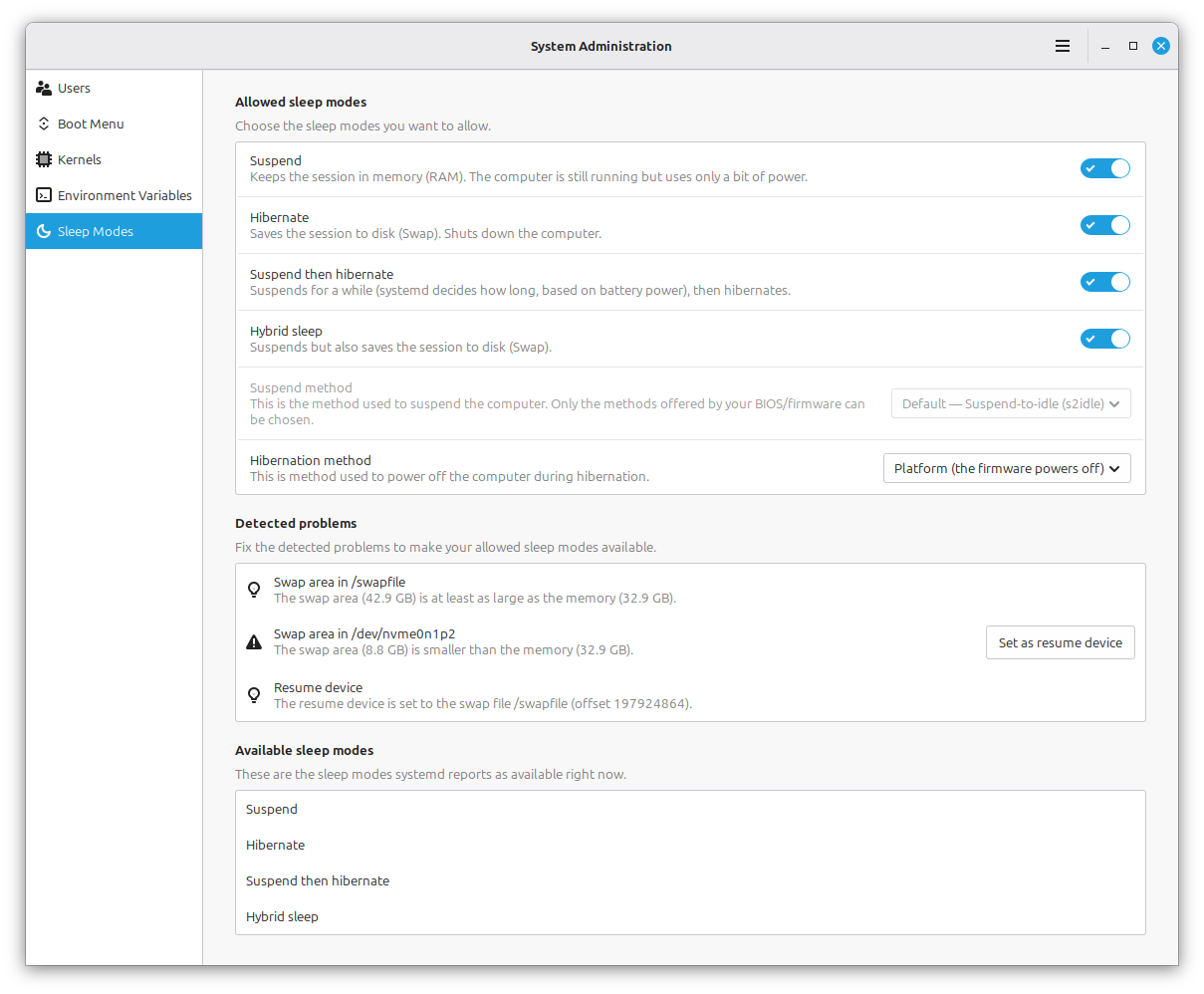
We added a page in the System Administration tool dedicated to Sleep Modes.
This page makes it easy to enable Hibernation and to set it up correctly.
We also took the opportunity to add support for Hybrid Sleep and Suspend-then-Hibernate.
Hybrid Sleep suspends the computer but also saves the session to disk. If the battery runs out, you need to find the power cable, but you can resume the session.
As the name suggests, Suspend-then-Hibernate suspends the computer but when the battery level goes critical, it hibernates it.
Nemo Preview Pane
The file manager got a preview pane.
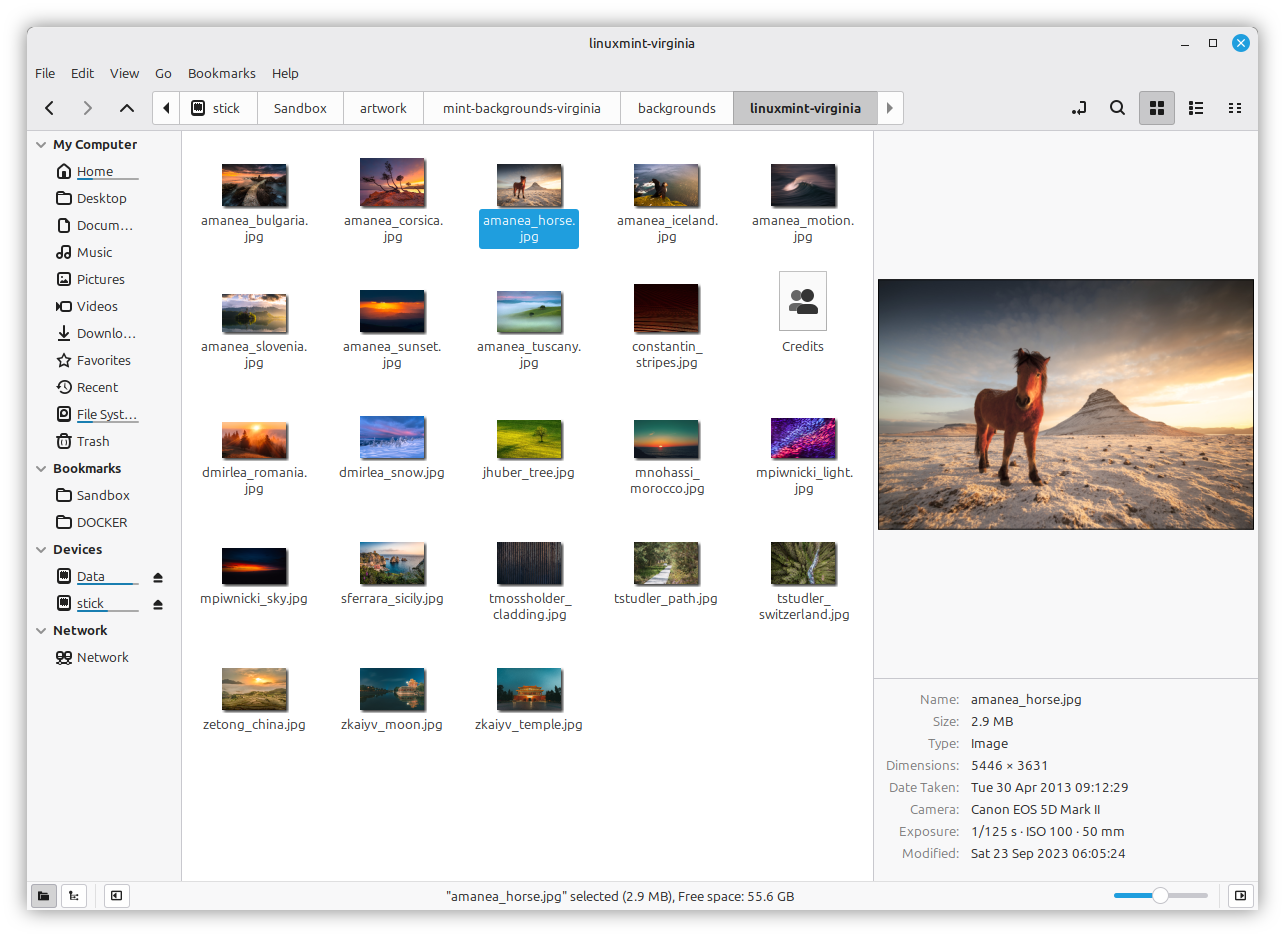
You can toggle it with F7 or by clicking the button in the status bar.
The preview pane supports audio, pictures and videos.
It also shows information about the selected media. For instance, in the screenshot above you can see when the picture was taken, and with which camera.
Superlight
Superlight is a new application whose purpose is to monitor the state of the system.
It shows graphs for CPU and RAM usage, but also SWAP, GPU, Network, Disk I/O, Temperature and Fan Speed.
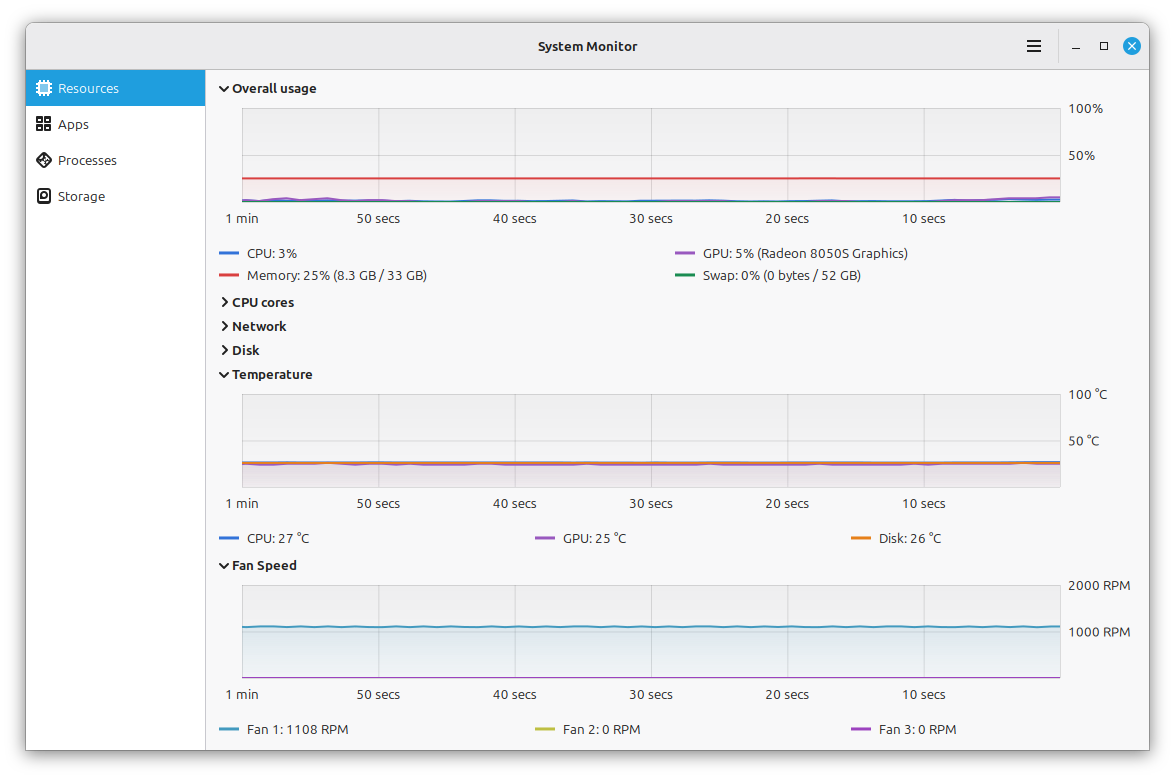
On its App page, you can see what’s running on the computer and how much of the system’s resources each application is using.
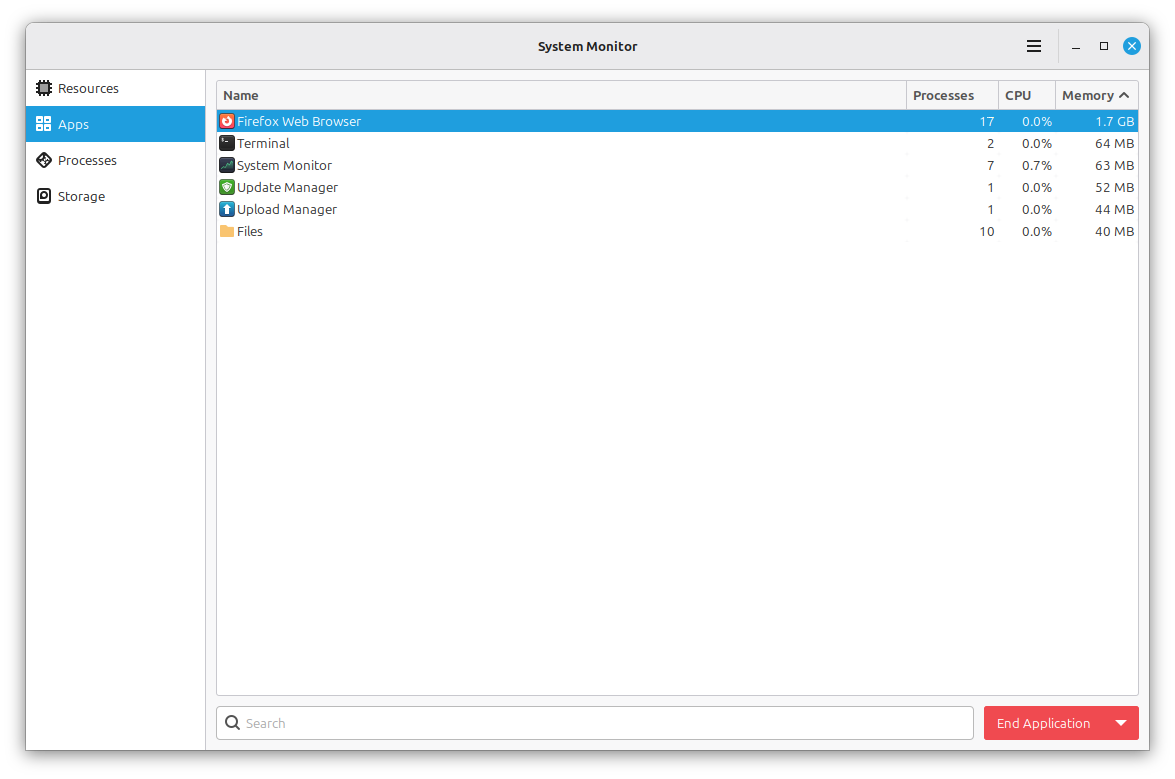
You can also see the same data for all the running processes.
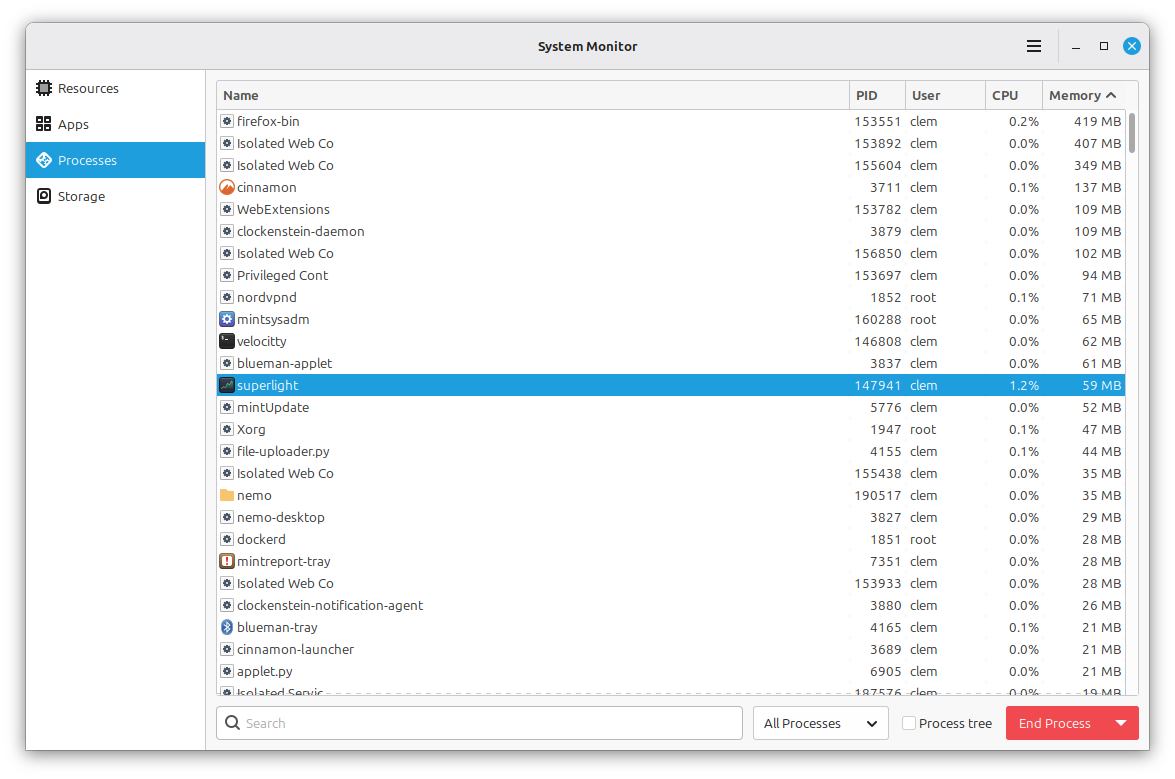
You can choose from a large variety of columns, and sort them or reorder them any way you like. All of this is remembered by Superlight.
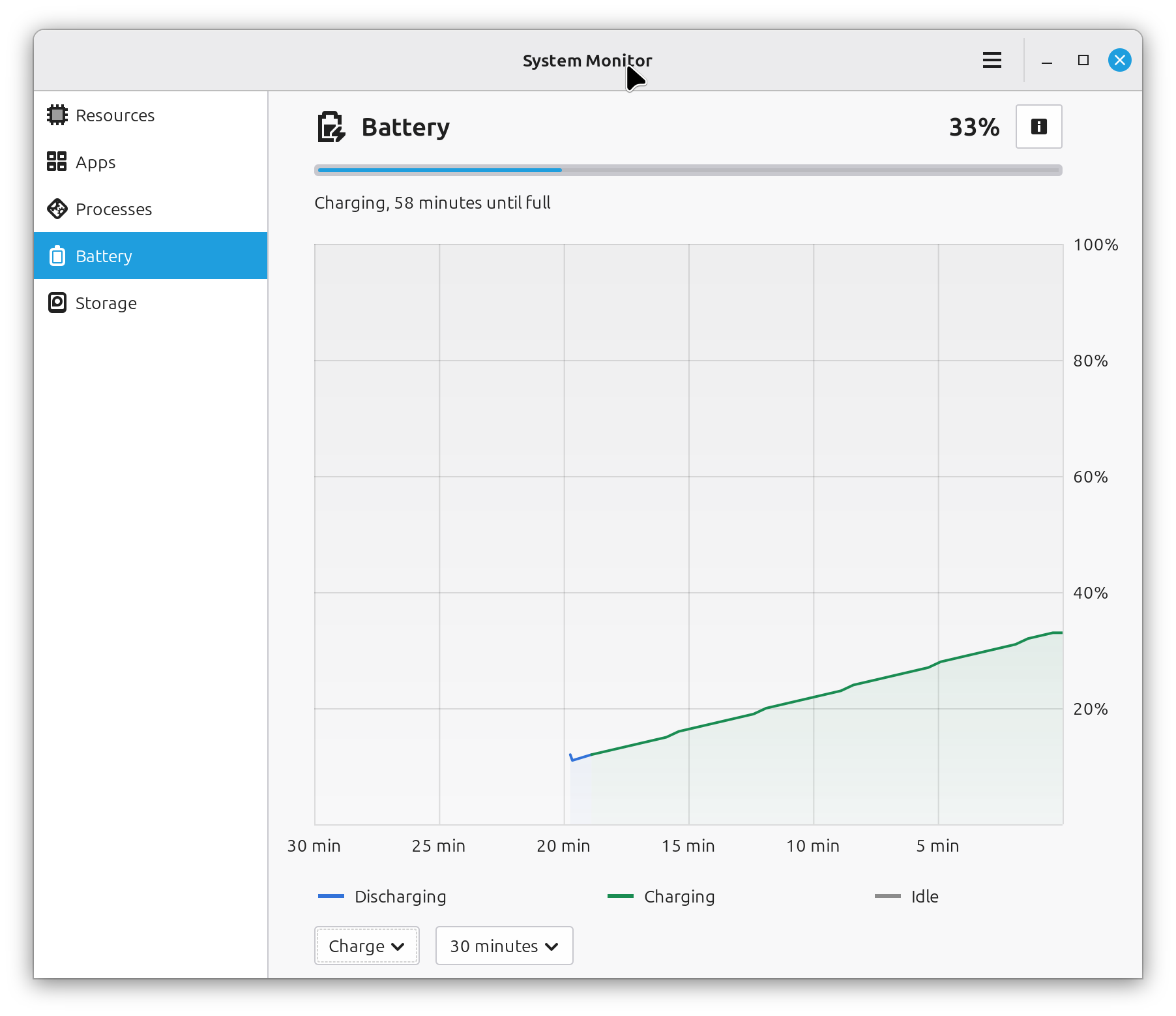
If you have a battery, you can see its status, all the information related to it, and a history of charge level and power input/output.
The Storage page shows how much space is used on your disks and what’s using it.
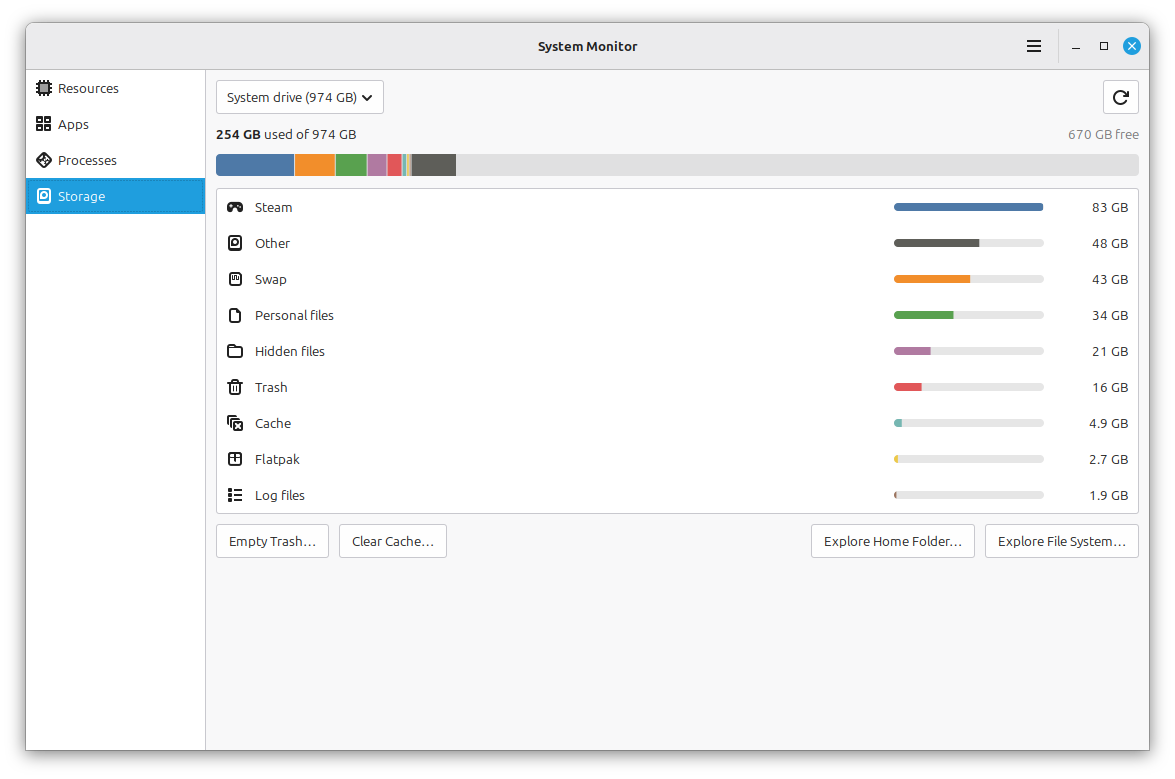
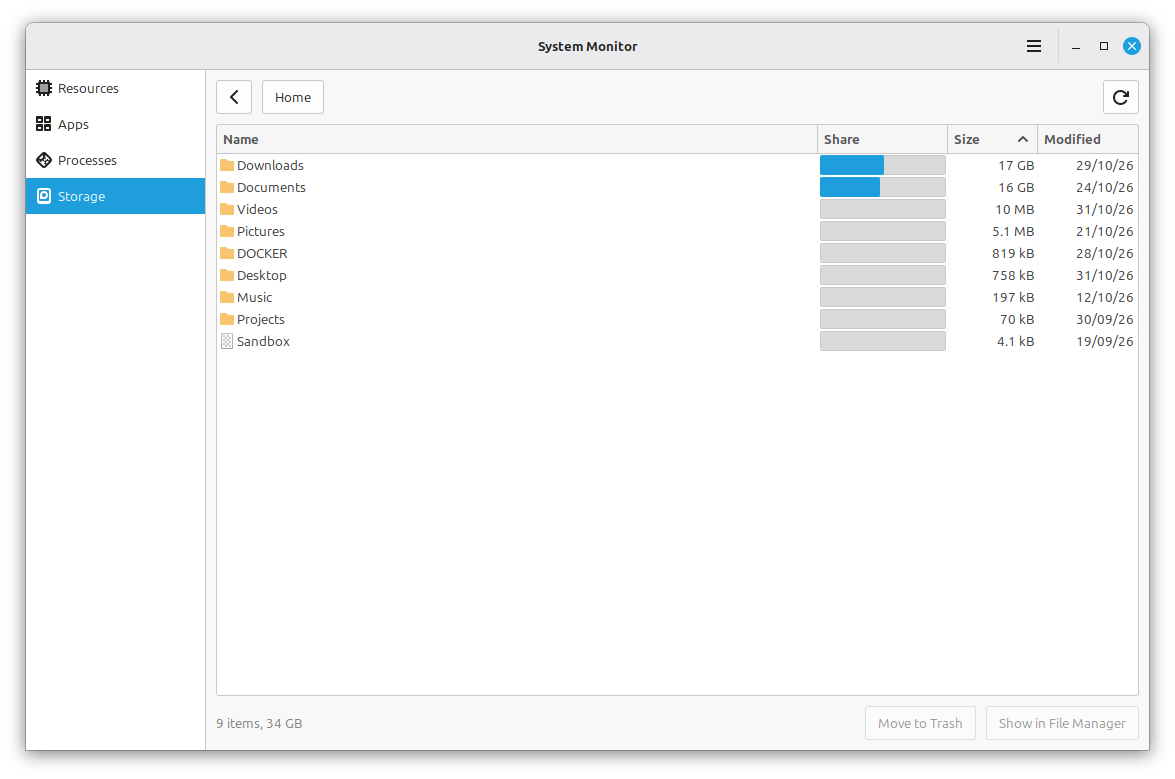
You start with a general breakdown. If you click on Files, you can browse and see which folders and files take up the most space.
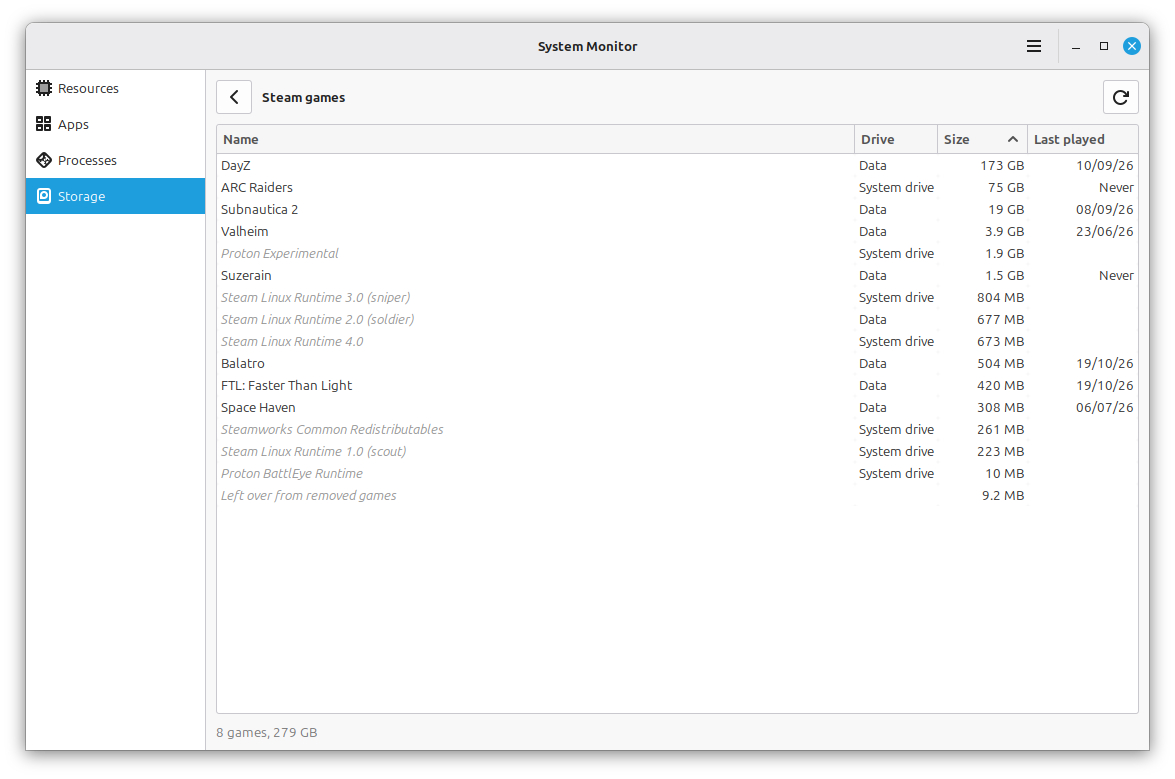
If you click on Steam, Superlight shows you which games take up space.
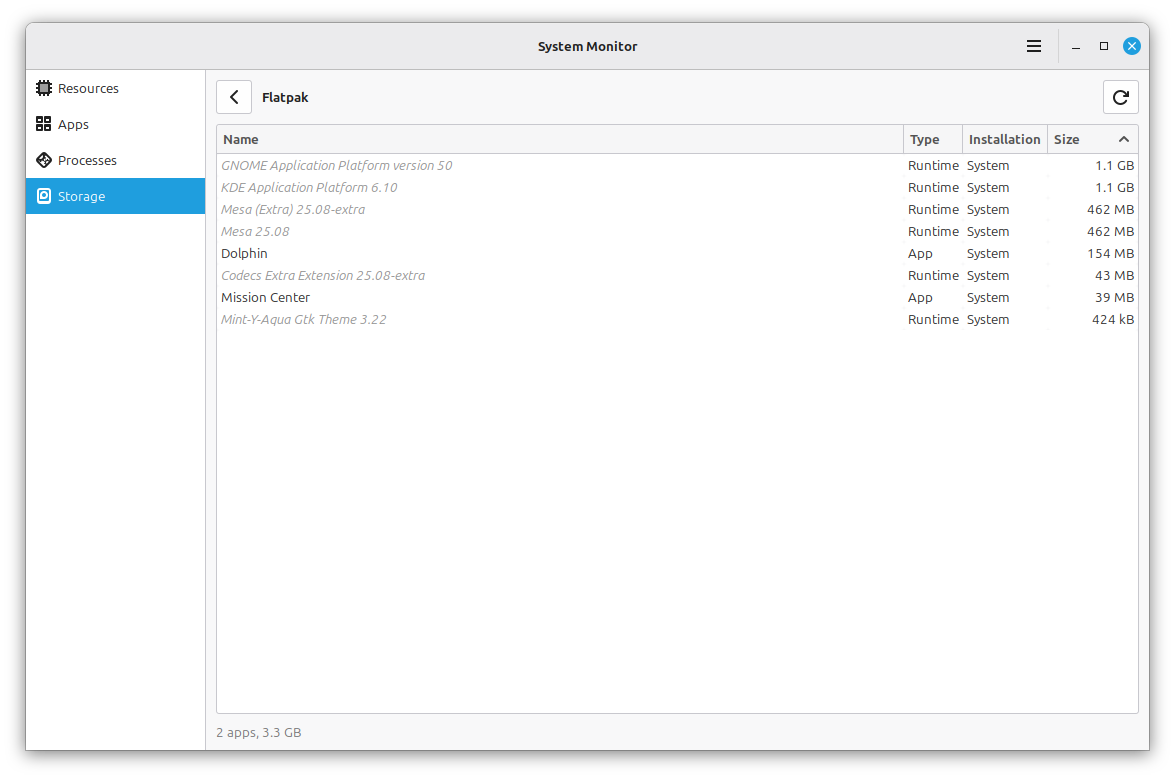
And the same goes for Flatpak.
Superlight makes it easy to see what’s taking up resources on your computer.
Velocitty
Velocitty is a new terminal application. It’s really simple to use and packed with great features.
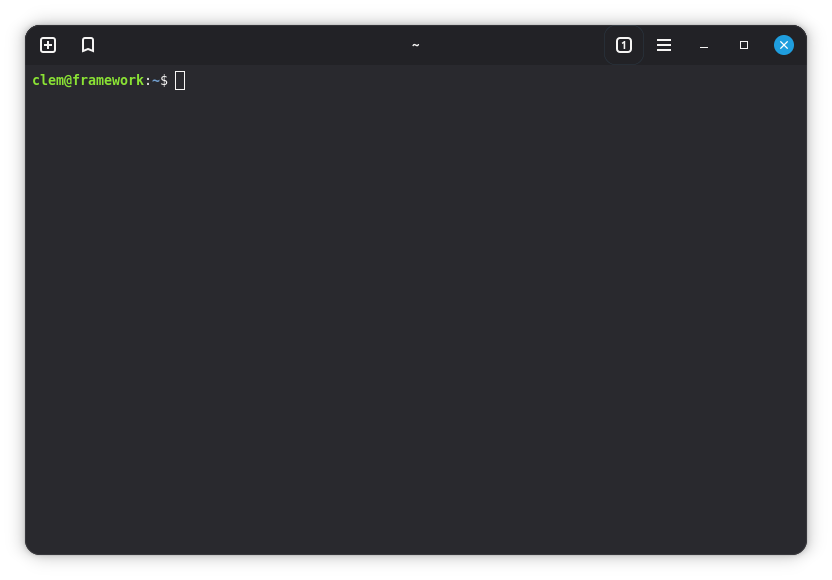
Like Ghostty and Ptyxis, it comes with a tab overview:
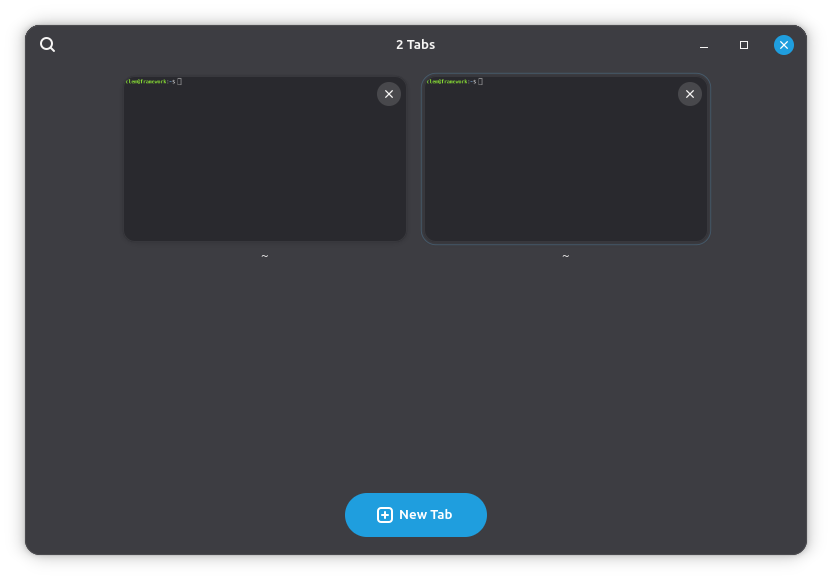
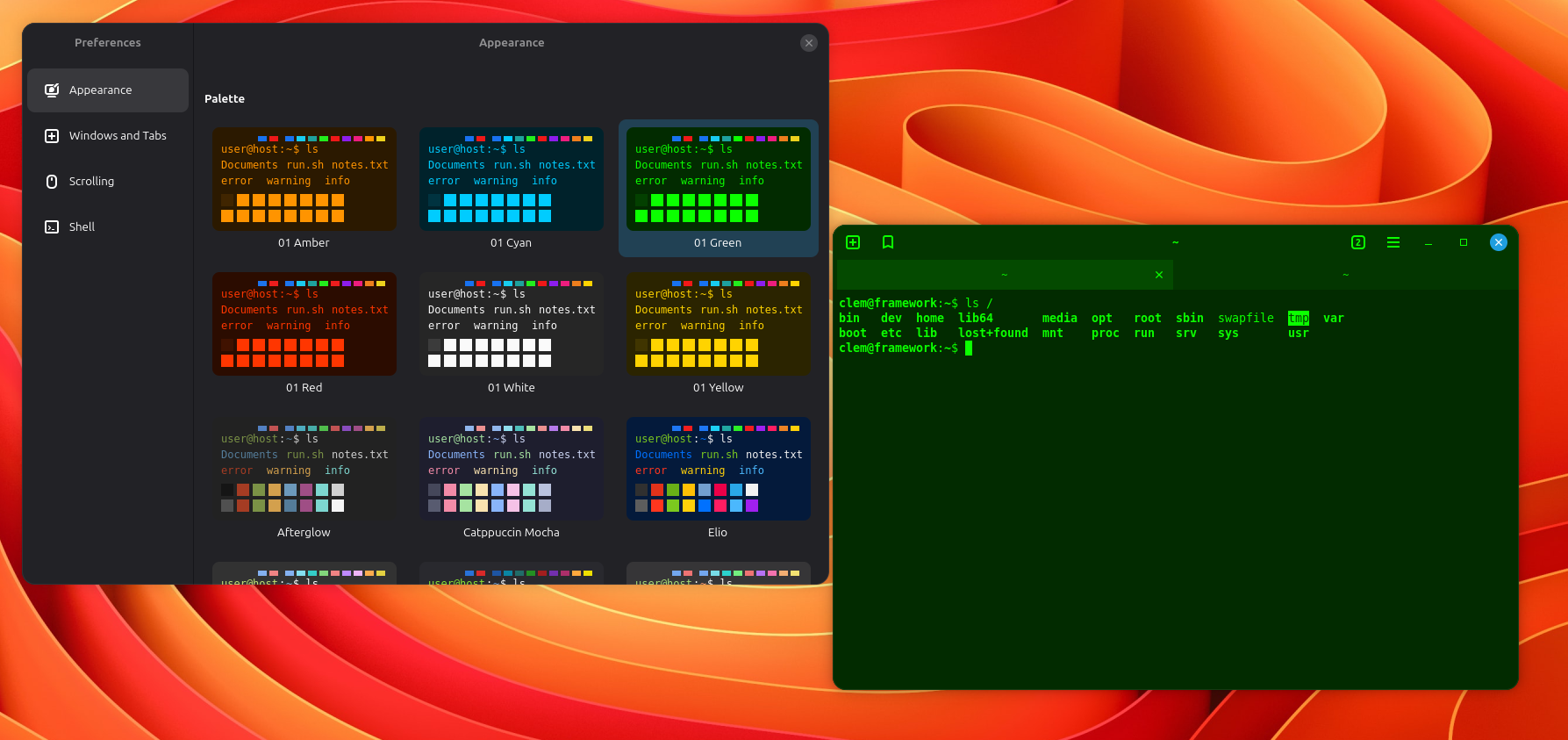
And it can be themed with palettes:
Just like in Firefox, you can reorder tabs within a window, move them from one terminal window to another, or even detach a tab into a new window.
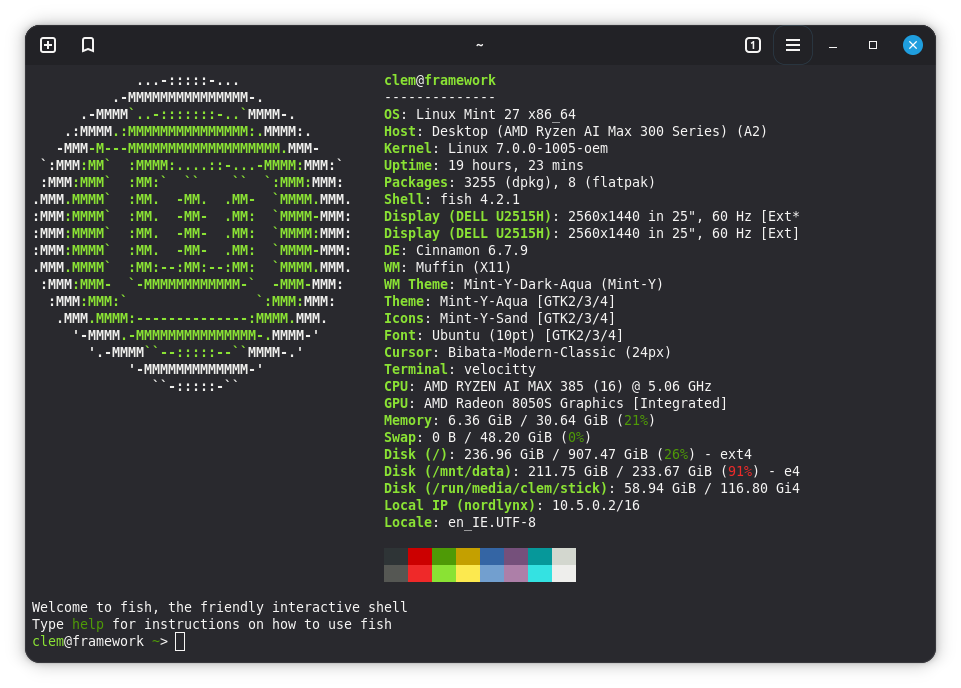
You can choose which shell to run and specify a startup command. Here’s Velocitty configured to use fish and run fastfetch at startup:
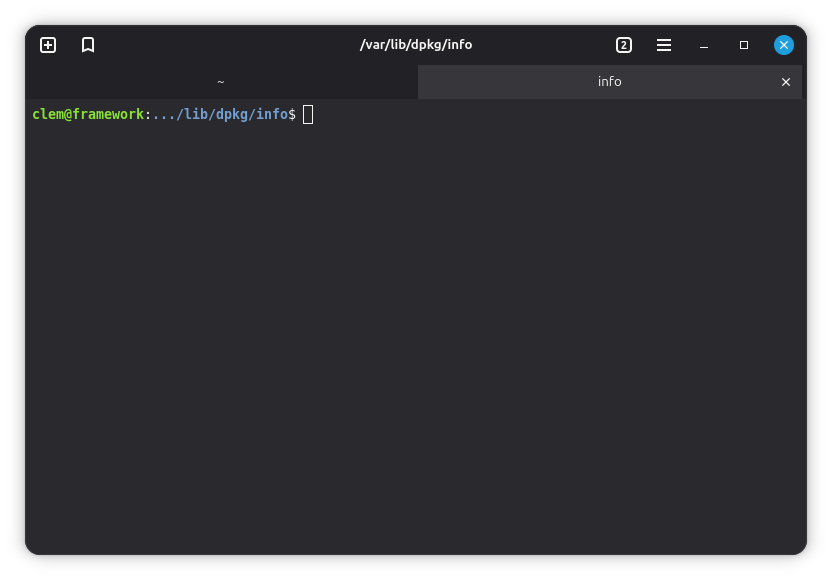
Paths can be shortened in the preferences. For instance, here’s /var/lib/dpkg/info shortened to just info in the tab name and …/lib/dpkg/info in the prompt.
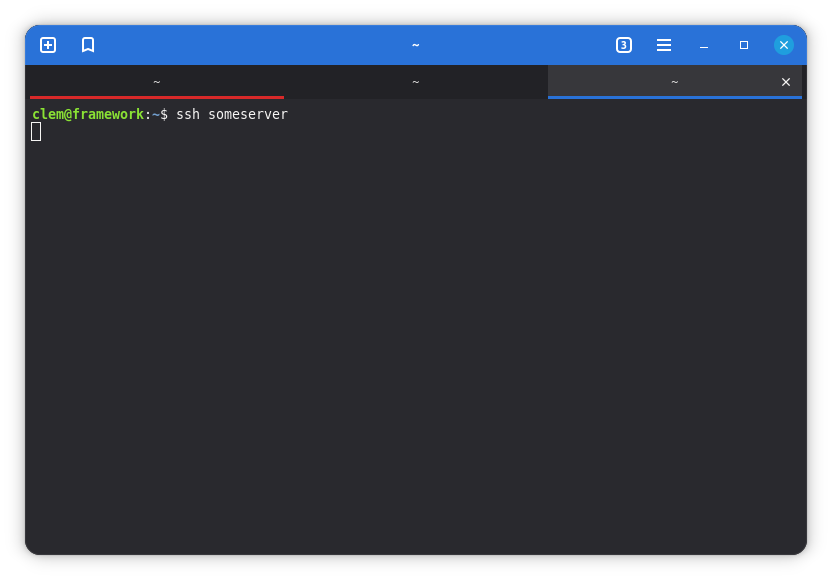
The color of the tab changes when something is going on. Red for superuser (root, sudo, pkexec, etc.), blue for remote sessions (ssh, sftp, etc.), and a lighter shade for running processes.
And tabs can be customized. You can give them a name, a color, a command to run and decide if you want them to automatically open when you launch Velocitty.
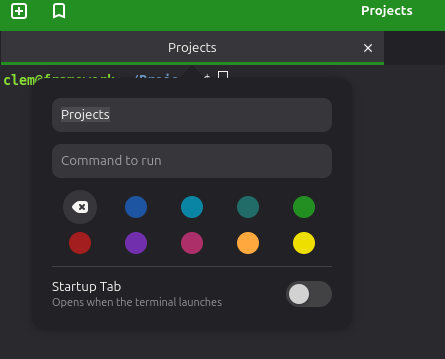
Clicking the little bookmark icon opens up all your custom tabs.
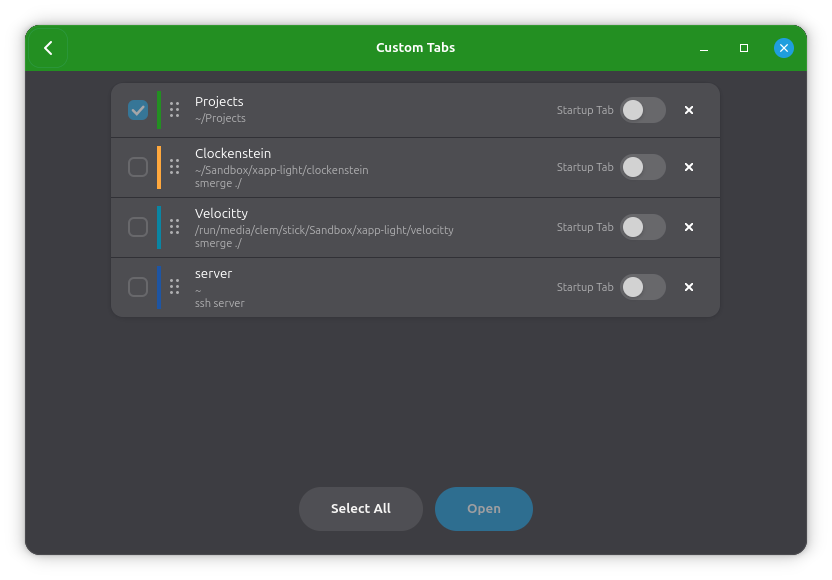
So whatever you’re working on, your projects and SSH sessions are always really easy to access.
Unfold
Unfold is a small archive manager designed to be as simple and easy to use as possible.
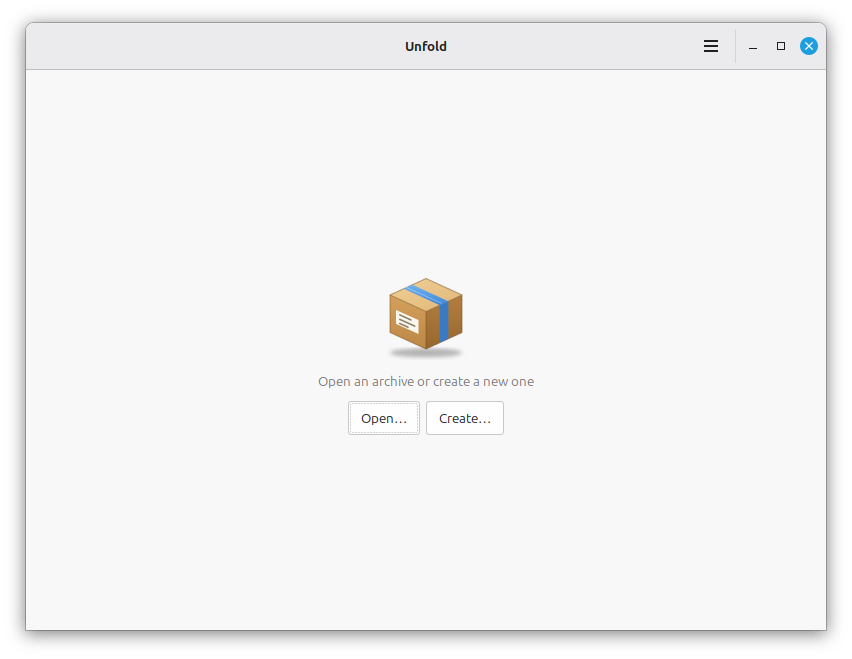
It supports basic operations such as viewing, creating and extracting archives.
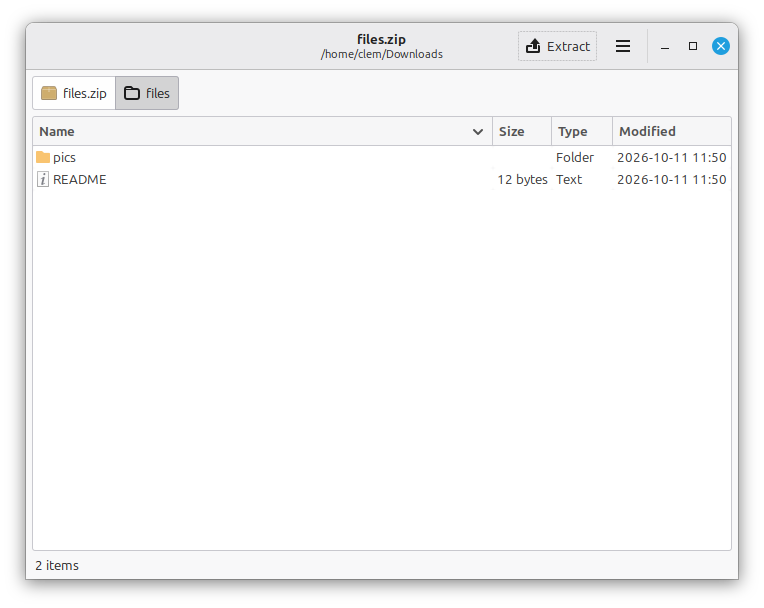
It uses 7zip and 7zip-RAR and it’s compatible with all the encryption formats they support, including password-protected ones.
Other News
Xenity is a fork of Zenity 3.44 (GTK3), with the same features, the same look and the same syntax. It was added to the Mint 22.x and LMDE 7 repositories, and all Cinnamon spices which used Zenity were migrated to Xenity.
The Community Website was written years ago. It used PHP and allowed people to create accounts with a login and password. Following the recent discovery of critical vulnerabilities in PHP, we decided to rewrite it from scratch and reduce the amount of sensitive data stored in our database. It no longer uses PHP and it no longer stores or uses passwords. Authentication is now handled by GitHub. When you sign in, the Community Website gets the following data from GitHub: your username, your email address, and your avatar. If your email address matches the email associated with an existing account, that account is merged into the new one.
Sponsorships:
Linux Mint is proudly sponsored by:
Gold Sponsors:  Silver Sponsors:     |
Bronze Sponsors:         |
Donations in September:
A total of $13,824 were raised thanks to the generous contributions of 443 donors:
 $580 (2nd donation), Christian S.
 $250, Douglas R. $232, Thorsten G. aka “JETI GMBH“ $200, Ranodhi S.
 $174 (8th donation), Flavio Silva Pita Correia
 $140, CHRIS P. $140, flutttr
 $116 (9th donation), Marco van den Berg $116 (9th donation), Michael J.
 $116 (4th donation), Jean-yves B. $116 (3rd donation), Klaas M. $116, B.A.J. S.
 $116, Cristiano M.
 $116, lars S.
 $116, Radulescu V. G.
 $116, Slavomír K.
 $116, Thomas P. $116, Ulrich R.
 $104 (10th donation), Jorge R. R. $100 (23rd donation), James F. $100 (7th donation), Harrison W. $100 (4th donation), David D. $100, Chris H. $100, DOUGLAS B. C. $100, Joseph M. $100, Logan E. $100, Marcia A. $100, Robert D.
 $100, wayne G. $93, Sebastian H. $70 (6th donation), Marcus A. $68, Zdzislaw K.
 $64 (2nd donation), Mark W. $58 (15th donation), Hermann W.
 $58 (7th donation), António Salsinha – Graphic Designer $58 (3rd donation), Andre B. $58 (3rd donation), Christian G. $58 (3rd donation), Simon D. $58 (2nd donation), Dirk H. $58 (2nd donation), Guido S. $58 (2nd donation), Martin J.
 $58 (2nd donation), Michel O. $58 (2nd donation), Nima M. $58, $58, André B. $58, anonymous $58, Bernhard S. $58, Bjorn H. $58, Bodo S. $58, DIEGO I. C. $58, Emmanuel M. $58, Felix $58, Gerrit B. $58, Giacomo B. $58, Graham T. $58, HANS H. H. $58, hermann A. $58, Loic A.
 $58, Martin L. $58, Martin Z. $58, Matthias K. $58, P.Knipe aka “pk21” $58, Phil G. $58, Pierre S.
 $58, RENE G. $58, Rene W. $58, Robert S. $58, roberto L. $58, spaceghost2 $58, Stefan B. $58, Steffen K. $58, Sven G. $58, Valentin B. aka “Vale” $50 (24th donation), Mothy $50 (20th donation), Anthony C. aka “Ciak” $50 (16th donation), Robert D. aka “MacDhai“ $50 (9th donation), Derek S. aka “Corky357”
 $50 (5th donation), Benjamin aka “bglamadrid” $50 (5th donation), Mark H. $50 (5th donation), Richard H. $50 (5th donation), Sheila S. $50 (4th donation), John M. $50 (3rd donation), Michael R. $50 (3rd donation), Mitchell L. $50 (2nd donation), aka “dust788” $50 (2nd donation), Andrew M. $50 (2nd donation), Donald E. $50 (2nd donation), Peter G. $50, Alex K. $50, Allan M. $50, Doug M. $50, Fred A. M. $50, Fred M. $50, Grey $50, Harpreet S. $50, Ian M. $50, Janis A. $50, Jeremy C. $50, JOHN D. $50, kevin K. $50, kevin M. $50, Robert S. $50, Steve $50, william R. S. $50, William V. $46 (2nd donation), Brian K. $46, François L. H.
 $46, Ulrik A. $42 (2nd donation), Frank D. $40 (7th donation), Peter J, aka “Dr Peter” $40 (3rd donation), Chad B. $35 (8th donation), Andrew E. $35 (4th donation), Martin B. $35 (2nd donation), Mark G. $35, Dominique B. $35, Dr. M. S. $35, Egbert D. $35, Mark V. L. $35, Richard B. $35, Stefan S. $34 (9th donation), Olaf Bousche aka “Bushman” $34 (4th donation), CercLL d’Entraide et Réseau Coopératif Autour des Logiciels Libres (LUG of Marseille, FR) $34, Arnd W. $30 (37th donation), Aimee W. $30 (13th donation), Orlando O. $30 (5th donation), John H.
 $30, András P. $30, Brent H. $30, Javier R. P. $30, Raleigh Y. $30, Randy B. $29 (3rd donation), Ruurd T.
 $29 (2nd donation), Raul V. $29, Joe aka “BeppePass” $29, Mogg $29, mr C. C.
 $29, Myron A. S. A. $29, Vincent M. $28 (2nd donation), Paul S.
 $25 (67th donation), Linux Mint Sverige $25 (20th donation), Donna B. $25 (20th donation), John N. $25 (10th donation), Leela A.
 $25 (9th donation), Oleksandr N. $25 (7th donation), Nicholas B. $25 (5th donation), Robert W. $25 (5th donation), Theron K. $25 (4th donation), Frank F. $25, larry P. $25, Patrick D. $23 (81st donation), Bryan F. $23 (75th donation), Peter E. $23 (42nd donation), Stefan W. $23 (37th donation), Benjamin W. aka “UncleBens” $23 (15th donation), Wolfgang N. $23 (14th donation), Fachlich+Fraglich $23 (13th donation), Joerg B. $23 (10th donation), Harold H. $23 (8th donation), Gunnar A. $23 (7th donation), Robert J. $23 (7th donation), Santiago $23 (6th donation), Emil N. P.
 $23 (6th donation), Haris A. $23 (6th donation), Henning P. $23 (6th donation), Jeff Daniels $23 (6th donation), Kiaran Smyth. $23 (5th donation), Matthias K. $23 (5th donation), Reinhard R. $23 (5th donation), Volker S. $23 (4th donation), Drew C. $23 (3rd donation), Markus S. $23 (3rd donation), Michael C. $23 (3rd donation), Sebastian M. $23 (2nd donation), Franz F. $23 (2nd donation), Klaus G. $23 (2nd donation), Marco C. $23 (2nd donation), Martin G. $23 (2nd donation), Milan M. $23 (2nd donation), Peter N. $23 (2nd donation), Rachel $23 (2nd donation), Robin Rijke aka “R²” $23 (2nd donation), Thomas Kupka $23, André C. $23, Andrew C. $23, Anthony K. $23, Bodo I. $23, David L. $23, David R. $23, dian I. $23, Dirk S. $23, Dr J. G. A. $23, EDM
 $23, Gediminas S. $23, Johannes S. $23, Luis D. F. C. $23, Marcel H. $23, moritz-markus U. $23, Nándor H. $23, Oliver A.
 $23, Pawel $23, Phil T. aka “archmintphil” $23, Rainer K. $23, REMI B. $23, Renaud D. $23, Rene M. $23, Roland B. $23, Rüdiger H. $23, Thomas W. $23, Timo S. $23, Urs F. $23, Vlad C. $23, Wolfgang F. $20 (122nd donation), Johann J. $20 (56th donation), Stefan M. H. $20 (32nd donation), Denis D.
 $20 (22nd donation), Arvis Lācis aka “arvislacis“ $20 (17th donation), Michel S. $20 (11th donation), Daniel V. M. $20 (11th donation), Eric H. $20 (9th donation), James N. $20 (6th donation), Timothy A. $20 (5th donation), Angel Cruz aka “Angel” $20 (5th donation), Theodore K. $20 (3rd donation), TMCC $20 (2nd donation), eric E. $20 (2nd donation), Keith S. $20 (2nd donation), Kevin P. M. $20 (2nd donation), Scott B. $20, ADEBAYO I. $20, Ali S. $20, Andre P. $20, Brian F. $20, brian M. $20, Chris P. $20, christian S. $20, David A. $20, David K. $20, Farrell P. $20, GEORGEL P. $20, Howard E. $20, iain K. $20, Jorge G. $20, Jose V. $20, Kevin H. aka “kjh7796“ $20, louis V. $20, Malcolm T. $20, Maros J. $20, Matthew B. $20, Michael M. $20, Michael R. M. $20, Michael S. $20, Monica R. $20, Pete W. $20, Richard C. $20, Sidney E. D. $20, Simon K. $20, Thomas S. $20, Timothy C. $20, Tristan C. $17 (96th donation), Andreas S.
 $17 (12th donation), Ivan Stamenov $17 (5th donation), Christoph D. $17, Ivan P. I. $17, Luca D. $17, Tomasz S. $15 (2nd donation), Russell R. $15, Ashton C.
 $15, Dmitrii S.
 $15, Nieminen M. $14 (30th donation), aka “AsciiWolf” $14, Florian J. $14, Viktor B. $13 (22nd donation), Alessandro S. $13, Luca S. $13, Zodiac M. $12 (53rd donation), Tugaleres.com $12 (52nd donation), Thomas Rehm $12 (21st donation), Abe Z. $12 (19th donation), Artem Ignatyev aka “ZaZooBred” $12 (17th donation), Gabriele I. $12 (9th donation), Iker P. M.
 $12 (9th donation), Sergei Petrov $12 (8th donation), Lyuben R. $12 (8th donation), Marcos P. G. $12 (7th donation), Claudio A. $12 (7th donation), Kai Uwe Joppich
 $12 (6th donation), Alf-ivar O. $12 (6th donation), Olivier R.
 $12 (6th donation), Tomasz S. $12 (4th donation), Koski M. K. aka “Wintageman“ $12 (4th donation), MAH aka “Myne” $12 (4th donation), Patrick B.
 $12 (3rd donation), Bojan M. $12 (3rd donation), David K. $12 (3rd donation), Georgi P. $12 (3rd donation), Hamish M. $12 (3rd donation), Hans-peter W. $12 (3rd donation), Jarmo K. $12 (3rd donation), Jose Vicente M. $12 (3rd donation), persson M. $12 (2nd donation), Andrea Corinti aka “Xab“ $12 (2nd donation), Bartosz W. aka “barthossius” $12 (2nd donation), Fenyvesi K. $12 (2nd donation), Johann K. $12 (2nd donation), Massimo D. $12 (2nd donation), Michal L. $12 (2nd donation), Patric E. $12 (2nd donation), Viktor S. $12 (2nd donation), Vlad M. $12, Adrian Z. $12, aldo L. $12, Anders K. $12, antonello B.
 $12, ATHOS R. J. $12, Berth V. D. H. $12, Charles S. $12, Coun P. $12, Erwin G. W. $12, Fernando L. $12, Francesc J. M. M. $12, Francesco L. $12, Fredrik G. $12, Gavino G. B. $12, George W. $12, Gianni G. $12, Hartmut L. $12, J K. $12, Jacek G. $12, Jack A. $12, Jan B. $12, Joana B. $12, laas $12, Lars M. $12, Luuk D. V. $12, Marc M. $12, Mátyás H. $12, Micha S. $12, Murat Y. $12, PapelDigital $12, Paulo S. C. $12, Peter K. $12, Peter W. $12, Rauno S. $12, Reimund J. $12, Vasilis G. $12, Walter R. $12, Wojciech G. $10 (126th donation), Thomas C. $10 (67th donation), Philip Woodward $10 (21st donation), Thevirtua $10 (17th donation), Mariusz B. $10 (11th donation), Korora Solutions $10 (11th donation), Tomasz K. $10 (8th donation), Michał K. aka “PoldekPL” $10 (7th donation), Jordan S. $10 (4th donation), William P. $10 (3rd donation), Grace Faith Jack $10 (3rd donation), Saeed R. $10 (2nd donation), Ann S. $10 (2nd donation), Cephus Jones aka “Cephus” $10 (2nd donation), Clay $10 (2nd donation), MARCELO F. D. F. $10 (2nd donation), matthew V.
 $10 (2nd donation), Reynaldo M. M. $10, Caeden S. $10, Christopher Y. $10, Clinton H. E. $10, Diego F.
 $10, Hassan A. $10, Joel L.
 $10, John S.
 $10, K P. $10, Leonardo A. $10, Levente T. $10, Maome G. $10, Nikhilesh B. $10, Olivia J. $10, Pedro M. $10, Peter B. $10, sanjay S. $10, Scott K. $10, Taxestoday aka “Shafi Afridi“ $10, THOMAS K. $10, Walt B. $10, Walter G. V. $10, William W. $9, Kristýna V. $7 (2nd donation), M. B. S. aka “Meni” $7, Diego A. O. $7, Todd H.
 $197 from 51 smaller donations
If you want to help Linux Mint with a donation, please visit https://www.linuxmint.com/donors.php
Patrons:
Linux Mint is proudly supported by 2,434 patrons, for a sum of $5,258 per month.
To become a Linux Mint patron, please visit https://www.patreon.com/linux_mint
Happy Halloween Clem and mint team c: the preview pane on Nemo is great.
I asked this in the previous blogpost, but I would like to know why was libadwaita used for velocitty.
The initial plan was to review existing terminals and to see if switching away from gnome-terminal made sense. During this review we were impressed with two terminals in particular: Ghostty and Ptyxis. We decided to drop gnome-terminal, to adopt Ptyxis and to patch it with improvements. At that stage we had a libAdwaita terminal. It integrated well, in my opinion, because of the nature of the app.
Like Celluloid, the app is mostly just a black slab, and it uses its own palettes to dictate the colors. So unlike File Roller, for instance, where the choice of toolkit really has an impact on integration, Ptyxis is able to look nice in a GTK3 environment.
There were a few problems with Ptyxis:
– It didn’t have an active development team
– We were starting to have too many patches on it, so even though it was still Ptyxis, we couldn’t really continue to call it like that
– We didn’t know who was going to take over development of Ptyxis and if these patches would ever be accepted upstream
– We still had really good ideas we wanted to implement (some of our own and some coming from Ghostty) so we were going to deviate even more
At that stage we decided to write our own terminal. We archived what we had at https://github.com/linuxmint/ptyxis-minted. That work is available for Ptyxis if they’re interested.
For the new app, we chose python and libAdwaita. Why libAdwaita now that we had the choice? Because it worked really well for Ptyxis and it made it really easy to implement the overview and the fluid tabs.
Are there any plans on adding palette editing GUI to the new terminal as gnome-terminal previously supported editing each color from your palette manually along with setting transparency without having to mess with config files?
No. Palettes are read from ~/.local/share/velocitty/palettes/ and /usr/share/velocitty/palettes though, so you just need to create your palette and choose it in the prefs.
I see, I’m not fond of the clash libadwaita has with the rest of the theme but I can live with it I guess.
I forgot to ask, do we have any dates for when the beta gets released?
I can’t give you any dates yet but we’re tagging and freezing projects right now. Most Cinnamon subprojects were tagged already.
That’s unfortunate. I prefer the Mint-X theme, and libadwaita always looks terrible with it, no matter what you do. I can’t stand flat themes, and that’s all you can really do with libadwaita without making it look even worse than it already does.
Good news about hibernate! This is a great feature that was needed. I was wondering, is fractional scaling now a solved issue on the Wayland session of Cinnamon? This is the biggest issue keeping me from recommending Cinnamon to people with high-DPI displays.
Big yes from Pavlov’s dog
fractional scaling works on the wayland session
That’s a lot of good changes, recently over at the community wiki team we had to write quite the extensive guide on setting up Hibernation so this addition is nice as it trivializes that process which was very cumbersome to setup previously.
This of course mean we will be rewriting that whole section again 😅 tho now it should be simpler.
One thing that I remembered about hibernation was there was some trouble with secure boot lockdown, have you figured out how to deal with that?
(https://mintwiki.org/wiki/Memory_Management#Disable_Secure_Boot_Shim_Signature_Validation)
P.S. We do have a PR made on GitHub for adding the wiki to the Welcome Screen if there is time before Mint 27 for that to be looked at: https://github.com/linuxmint/mintwelcome/pull/73
SecureBoot shows up in the Detected Problems when enabled.
Hi Clem and team, I’ve been a Mint user for at least a decade. I appreciate all of the work that has gone into it!
In the spirit of X-Apps, I’ve been building a GTK3 calculator in Python that follows the system theme with a classic menubar. It has Basic, Scientific, Financial, Programmer, Unit Converter, and Currency Converter modes, a clickable history that can be printed like an adding-machine tape, and draft translations into four languages. It’s GPL-3, and there’s a .deb on the releases page.
https://github.com/xlcheese/Xcalculator
I’d really welcome any feedback, from the team or from anyone who tries it.
Wesley
Hi Wesley,
I think gnome-terminal did a couple of things which would look good in your app too.
– It removed the destructive-action class from the C and back buttons. That red catches the attention a lot, too much imo.
– It moved the back button as an icon-button inside the entry.
– It gave numbers a different button shade than the others.
I like how it uses its headerbar also. I don’t like it when there’s too much in the headerbar, but in the case of gnome-calculator, I think it looks nice.
Thank you for suggesting those ideas. I think they do work well with my project. I had not realized their updates from the gnome-calculator I see in 22.3. I agree its headerbar works well. I’m working on another project that keeps a GTK.HeaderBar uncluttered by putting a whole responsive menu behind a single button. I’m calling it the Buffet Menu, but don’t tell anyone!
Here’s a version with those changes rolled into mine.
https://github.com/xlcheese/Xcalculator
Thank you! I’m so happy about the changes. The hibernation and new apps look exciting and I really like image pane in Nemo. Please make picture thumbnails in Nemo appear instantly and I won’t ask for more. Linux Mint is sanity, thank you again for your work
Preview panes is a nice feature but I’d really like thumbnails to be stored. Scrolling through my music folder or pictures folder, caching the cover arts and thumbnails every new session is something I haven’t seen since Windows 98 (!!!). So maybe it’d be nice if Nemo would remember things instead of always giving me high disk I/O because I dare to scroll a bit faster through my files…
They’re already stored – on the disk – where else could thumbnails go? They still need to be read off the disk. You’re likely seeing the on-demand loading of these thumbnails while scrolling. This behavior could maybe be revisited, as we’ve made other recent performance improvements that could make it less necessary.
So with MATE declining in support, could we see a KDE Plasma Edition of Mint in the future?
I don’t like speaking about things until they’re ready. I can’t tell you if it will happen and I can’t tell you if it will happen in time for Mint 27 but we are considering new editions. Just be aware though, if we do KDE or GNOME editions, they will be vanilla.
Or COSMIC?
The most pointless and reckless thing you could possibly do when extending the development cycle to a year is to add yet another desktop environment—especially one as complex as KDE. You might as well make it a two-year cycle; otherwise, you won’t manage to get anything done for Cinnamon, MATE, or XFCE. Or, just drop them all and focus exclusively on KDE.
Absolutely Loveeee everything new we are gonna get with mint 27, it really was a good decision to increase the development time because wow look at all these. Soo much love to our mint team ❤️❤️❤️❤️. cant wait to get my hands on mint 27
Thanks for the blog update, and happy Halloween.
Of the new features announced recently, what catches my attention the most are the new hibernate mode and the new archive manager that replaces File Roller. I usually shut down my computer when I’m not using it, but I understand that the hibernation feature has always been one of the biggest headaches in the Linux world, so I find it really interesting that you’ve developed a tool to make it easier to configure it. I’d like to know more details about how this new tool works and whether it allows users to just as easily undo the changes made to configure hibernation in case they no longer want that feature.
Regarding the new archive manager, two major flaws with File Roller are that by default it keeps a copy of extracted files in the .cache folder without deleting them (which, despite being an intentional design choice, causes large amounts of disk space to be consumed over time without the user knowing why), and that it lacks drag-and-drop functionality due to issues with its code and incompatibilities with X11 and Wayland. Even if Unfold were not to support drag-and-drop, simply not having the same cache issue as File Roller would make it a much better tool.
Cheers.
When you enable/disable sleep modes in the System Administration tool it writes into its own systemd file so it’s reversible, yes. The application detects potential problems (secureboot, lack of swap, etc..) and lets you fix them. It assists you when it comes to setting the resume device, but that’s something you can revert in the tool as well, on the Boot Menu page. And finally, it confirms what modes are available through systemd.
Unfold doesn’t keep a cache. Anything it extracts for viewing goes to a private temp folder that is deleted when you close the archive. Drag and drop is complicated. There is no solution that works both in X11 and Wayland. Ark got both working but with the help of dedicated code in Dolphin. We could do something similar and start by supporting it globally in Nemo. But for now, we don’t yet have drag and drop in Unfold.
To Clem
I hope Cinnamon won’t be too dependent on systemd and will continue to work seamlessly on other init systems. I like this desktop so much and it would be sad to see it going gnome (and maybe kde plasma in the future) route.
Best regards
Hello, Clem! Any chance of improving the xreader app? The note-taking section needs improvement especially for those that want to stick with naitive apps and not install extras like Okular. Thank you!
There’s a lot I’d like to improve in Xreader, but it will have to wait for the next development cycle.
It would be nice to have a better pdf engine in Xreader. The only good pdf font rendering on Linux is available in Firefox (pdf.js), the other readers fail. Poppler, which is the popular choice, renders blurry fonts that are often unreadable at small sizes and require some effort to read when bigger. I wonder why nobody cares about this basic functionality, comfortable reading in any reader is a must be.
@Greg SumatraPDF removed Poppler and is using https://mupdf.com
Try pdfcraft from storytold on GitHub.
Great work as always, Clem and Team.
Been working on Mint XFCE 27 since yesterday and everything works fine apart from the fact that I cannot log into the Wayland session. It briefly shows that it’s logging in but reverts to the login screen, so I have to select the default session.
Thank you Clem and the team for these great news!
I love the sleep modes, I don’t know why Hibernation got so uncommon these times, I’m happy to see it back. All the new GTK3 apps also look amazing, with UIs that are both modern and themable.
As for velocitty, I really like it’s features, but libadwaita still looks a bit out of place…
I was surprised by Xenity, I already tested it on LMDE 7 and it works well, I don’t have to rely on YAD anymore (Zenity fork that hasn’t updated to libadwaita, it’s good but the Debian package is ancient).
Are there any news regarding Xapp on MATE and Xfce?
There is talk that a beta version will be available for testing soon. Will there also be a beta for LMDE?
I think it is still too early for LMDE beta. Debian 14 will release around summer 2027 and LMDE likely around Fall 2027 like last year. The beta likely will release next summer I believe
Great work, as always. Thank you, team.
But I’m seeing duplicated functionality all around the OS now. For instance:
– Now the battery status can be seen in both power options inside Settings, and inside the new task manager
– Now storage and its contents can be seen and analyzed in both Disk Space Analyzer (baobab), and inside the new task manager
It’s not a big deal, of course, but my question is: would those redundant options be removed from the OS in the future?
Yes of course. Superlight replaces Baobab, gnome-power-manager, and gnome-system-monitor.
Since you are updating only half as often, will you also double the long life support (5 years rather than 2.5)?
It’s already 5 years, but the upstream (Ubuntu) LTS base changes every 2, which is when we stop having new releases for the older base. It still receives critical and browser updates, however – this won’t change.
I think that I have read somewhere that there are technical difficulties to have rounded corners at the bottom of windows. I would very much appreciate if someone can explain if it’s true, and why? I am very curious about the reasons.
I tested Linux Mint 27 Cinnamon with the newly added Cinnamon Spice Extension Rounded Corners (by klangman). It is new, but works well, some quirks hopefully to be fixed eventually. I tested it for five minutes, now I can’t switch back. It looks too good. My question is, why is it difficult to have rounded window corners at the bottom?
I haven’t totally given up on it yet, but I’ve tried really hard to do it earlier this year and I wasn’t happy with the result.
And there are Mickey Mouse ears in top corners when you do a window screenshot.
InfoLibre, where are the Mickey Mouse ears? I’ve not noticed that on any screenshots I’ve taken with Cinnamon Rounded Corners running. Have you reported this issue to Kevin Langman? This is something I’ve been wanting for such an incredibly long time. That and blurred transparency. I’m glad Kevin has taken both of these on and succeeded beautifully.
Ich freue mich sehr auf die neue Version mit den tollen Änderungen, ich möchte ein Kompliment für die vielen Ideen, die ich als große Verbesserung ansehe, aussprechen.
Wird Nemo im Vorschaubereich auch PDF Dateien, bestehend aus mehreren Seiten, anzeigen können, ich meine auch die Seiten 2, 3, etc.?
Ich habe bisher noch keinen Dateimanager gefunden welcher diese Funktion bietet.
Beste Grüße
Hi Sven,
I don’t speak German so I’ll answer in English. The preview pane is just a preview for media files. It doesn’t preview PDFs, archives etc.
Why are so few filetypes getting the giant size preview window in nemo?
There are other files which have useful thumbnails – such as PDF, EPUB and are already provided with thumbnailers.
These applications are above excellent, well done, you guys are amazing and class. I am on the main mint advanced hardware ISO and seriously want to switch to LMDE. Now if these updates are coming to LMDE this December, will i be able to upgrade from mint to LMDE? Also please, as gamers we need a gaming kernel based on Debian testing (not Debian sid) with proper schedulers and the latest NVIDIA drivers, that i think was resolved with distributions like for an example pikaos
It’s not possible to upgrade from Mint to LMDE, you’ll need a fresh installation. The new features will be ported into LMDE, either late in December or early in January.
Hi,
Now that libadwaita is getting used in Linux Mint first party application, will there be further development of the libadwaita fork? I mean not necessarily within the year 2026 cycle (calling the year 2026 release, based on Ubuntu 26.04, as Mint 27 still feels odd to me), but somewhere in the future. In particular, the upstream libadwaita UI assumes everyone love the sparse/low UI density. But users with more classic preference, especially Mint-X users, are likely to disagree. UI density is not entirely cosmetic. It is relevant to accessibility.
In this development cycle we rounded Mint-Y a little bit, and we tried (but failed) to implement bottom rounded corners. We also patched GTK3 to normalize dialogs and menu icons. We try to make the different toolkits look similar. If we were to adopt a platform library in the future, we’d definitely try and make it integrate as much as possible.
Will we ever see “Application Comments” removed from “Favourites” Pane in Mints MATE Menu?? – Thanks for all you do…
As great as before again! New XApps looks amazing but I’ll stick it with gnome terminal over new Velocitty as it currently blends better with the desktop and I don’t like libAdwaita (plus it’s enough for my use cases too :p)
Also I noticed something about this website. It blocks me from commenting (I’m in Türkiye) so I must use vpn to leave a comment. Any idea why?
Will Superlight be set up to start with Ctrl+Alt+Delete? 🙂
Great improvements overall, congratulations to the team!
Although I disagree with Velocitty, it looks like it was made for GNOME rather than for CInnamon.
And it seems that overall, Cinnamon and Mint are moving away from normal windows to CSD ones? So can no longer be themed to, for example, have the titlebar a separate color than the window body or replace the rounded window buttons with proper square ones?
Daniel. You can theme these Xapps which have a GTK Headerbar in place of the classic menubar to run square buttons if you’d like. There’s a recent thread on linuxmintforums discussing this.
Thank you for making Linux Mint better and better. I use it as every day driver for a longer time now side by side with Windows. Your OS is now how it should be: it always works fine and there are no technical issues causing get out of order. You created a stable and reliable OS with a sexy outfit.
I have one concern: Nemo Actions: The change from zenity to xenity breaks them due to xenity is not automatically installed.
There should be a mechanism in Mint, that xenity is automatically installed or rolled out via update before the changed Nemo Actions are updated. And it should be rolled out to ALL Mint users! Github Issue: https://github.com/xapp-project/xenity/issues/1.
Despite this I want to thank you very much for all your efforts to make Mint much better and implement the full Wayland implementation. I am looking forward to have soon the Beta version to check it out. Thanks to all contributors! 😀
Really cool changes. I hope the new System Monitor (Superlight) will be optimized for low RAM and low CPU usage. GNOME System Monitor 46 left quite a mark with how leaky it is. I hoped that their patches would be backported, but now that matters less, with Mint 27 getting close to release.
Something that I’d really like to see is a service manager. As a generalist OS, Linux Mint comes with services that not everyone needs, and turning them off would help reduce boot times and resource usage. It would especially help newbies tune their OS without caring about the terminal.
A service manager can be simple, but also have nice features that would make it easier for people to figure out what they do and how they impact their systems. For instance, a simple service name and description would make it easy to know if you need that or not. Printing is one of those things that not many need. But to take that up a notch, the service manager could also get data from “systemd-analyze blame” to show the impact of each service on the OS: “This service took X time during system startup.”
Then there are services that are questionable. On a system without LVM, the lvm2 service could be disabled automatically. Or maybe the OS shouldn’t do anything automatically, but rather inform that some services haven’t been used at all, or in a very long time, and let the user decide what to do, if anything.
Clem, I am sensitive to brightness (get floaters easily) and I cannot use some default setups without QRedshift. The barebones Night Light is not enough – it needs slideable controls for both redness and brightness for it to be usable to me. Yes, QRedshift does what I need it to but it would be better for this to be built in.
Tried Mint 27 Cinnamon and XFCE on two laptops, one with an Intel graphics card and the other with AMD Ryzen 3 3200U with Radeon Vega Mobile Gfx. Wayland performs great on both. It’s nice to finally be able to pinch and increase the size of a page using the touchpad. Great work so far.
Socrates how did you try mint 27?
@opsimath
Inside this link (https://forums.linuxmint.com/viewtopic.php?t=473507), you can see a link to a video in the initial post, and if you look just before the end of the second page of replies I posted a text version of step by step instructions that also has a link to the same YouTube video that’s in the initial post. Just make sure read all the way to the end of that initial post since some of the info in the YouTube video is out of date and not accurate. But, it’s a simple change, so the video is still very helpful.
A bit late to the party but just wanted to say I really appreciate the option for Velocitty to rename its tabs (and I also assume its windows). gnome-terminal had this removed and it saddened me a lot. Sometimes I run a lot of scripts at the same time and being able to rename each terminal would simplify my visual navigation a lot if I could just look at them at the panel and know who they were.
I also hope the ability to rename a Velocitty window or tab can be invoked from a bash script.
Kudos for this one Team! Can’t wait for Mint 27, our Xmas present.