
Hello everyone,
Many thanks to our sponsors and to all of you who support the project with your donations.
Codenames
The codenames for the next releases of Linux Mint and LMDE were chosen:
- Linux Mint 22.2 will be called “Zara”
- LMDE 7 will be called “Gigi”
PewDiePie
We have a new user!
How many of us now? We don’t count. Dozens at least, dozens! 🙂
Welcome to Linux PewDiePie!
A hint of Blue in Mint-Y
We’re adding a little bit of blue in our theme.
This is common practice in UI design. It’s done on mobile, desktop and all over the web. Grey is rarely completely grey, it usually has a little bit more blue in it than red and green.
Take your color picker and check the grey on GitHub. It’s not #f8f8f8, it’s #f6f8fa. Firefox does that well, Google docs, Trello etc..
The reason this is done is to make grey slightly more metallic looking and appear more modern. Pure grey is neutral, it can be perceived as cold or warm based on its surroundings. By bumping the blue (or in the case of github both the green and the blue) we force it to look cold.
Here’s an interesting discussion on the topic: https://www.reddit.com/r/UXDesign/comments/1cd40iz/why_apples_systemwebsite_grey_shades_always_lean/
Another reason this makes the UI look more modern is because this is done a lot nowadays but it wasn’t done so much 10 years ago. Like with all new trends, sticking to past standards can make things feel outdated.
Interestingly libAdwaita also just did this.
If you update your Flatpak libAdwaita applications you’ll see they now use #222226 for dark and #ebebed for light.
Because there are many libAdwaita apps already in Flathub and since our own theme is already quite close to it in terms of colors, we’re adapting Mint-Y to use the same colors.
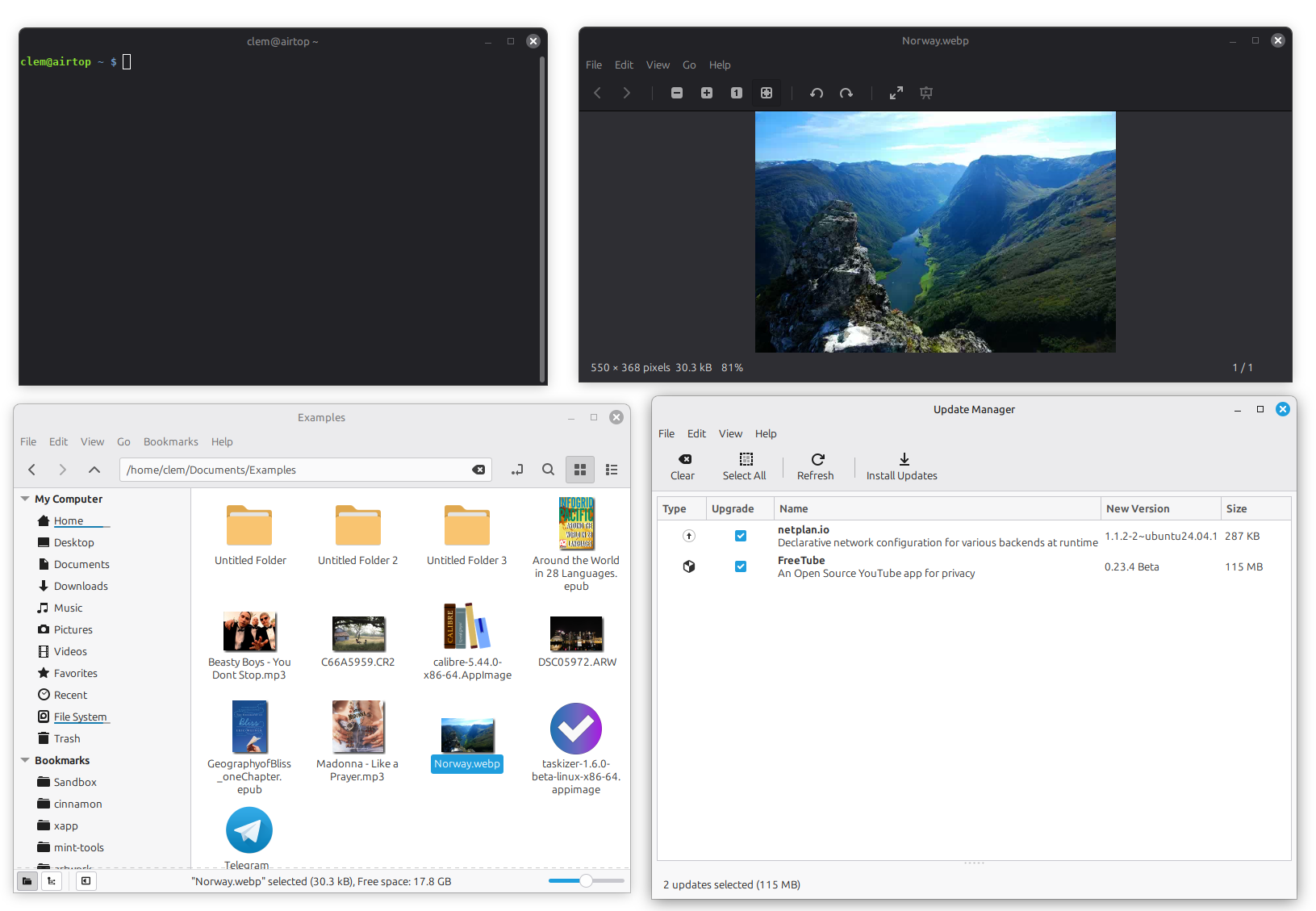
The difference in the light theme is subtle. It probably wouldn’t be noticed by someone who wasn’t told this had been done. The headers go from #e8e8e8 to #ebebed.
The difference is more visible in the dark theme, which also affects dark apps and the panel and cinnamon clutter elements in the default theme. This one is going from #2b2b2b to #222226 and #404040 to #2e2e33. It looks more modern but also much softer than before.
These changes bring the following improvements:
- The themes look more modern
- The dark theme and Cinnamon elements are softer and much nicer looking
- Flatpak libAdwaita applications fit in a little bit better since they use the same colors
Accent Colors
We made a small change to the XDG Desktop Portal XApp to support accent colors.
The XApp desktop portal simply scans the GTK theme for a named color called “accent_color”. If this color is present it provides it via the XDG Settings API.
Put simply this changes the accent color in Flatpak libAdwaita applications based on your chosen GTK theme.
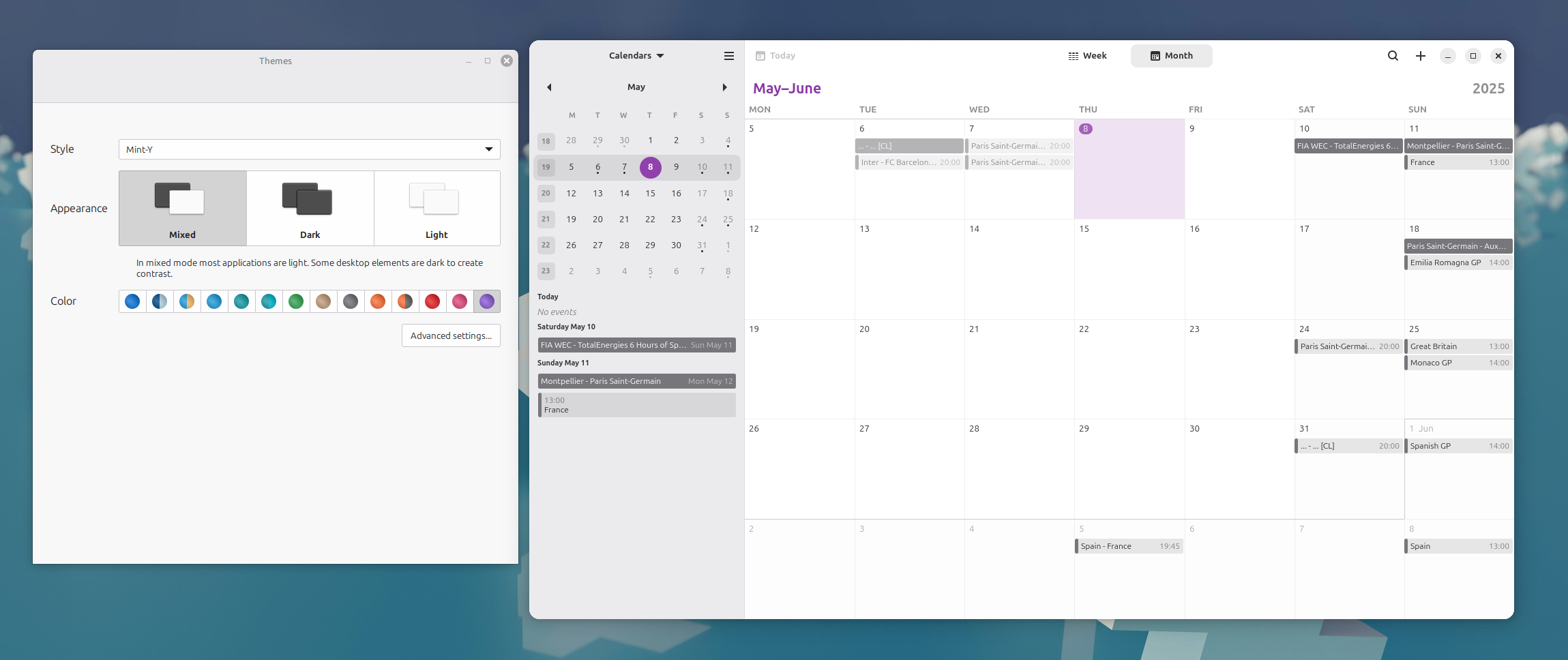
This works in Cinnamon, MATE and Xfce. All that is needed is for the theme to define its “accent_color”.
Note to theme artists: This is a one-liner in your GTK CSS.
@define-color accent_color #9ab87c;
libAdwaita
A year ago we complained about libAdwaita, not because it was bad, but because it didn’t support us. Applications made with this library only properly integrated with GNOME and broke functionality in Cinnamon, MATE and Xfce.
With the release of Linux Mint 22, GNOME Apps which used libAdwaita were downgraded back to their GTK3 versions so that they could continue to function properly in the desktop environments we support. This was a temporary solution until these applications either got replaced, removed, forked, or until we found a way to continue to use them.
I know our audience isn’t ready to let theming die. It would be extremely unpopular right now if we were to remove theme selection. And since we provide it, it has to work. We cannot ship with a desktop that provides theme selection and a core set of applications which violate it.
As shown above, we’ve updated Mint-Y to use the same colors as libAdwaita. We also made the libAdwaita accent color follow the theme. This helps the integration but it’s only a small step towards properly integrating these applications. It doesn’t solve the issue with window controls and doesn’t help with other themes.
Whether we downgrade or fork applications, I know many of the GNOME developers are as sad as we are about this fragmentation and duplication of efforts. We were talking about extracting epub support in Xreader last week and making a new app. It would take between a week and a month to achieve the level of functionality we see in something like Foliate, but what’s the point long-term? Wouldn’t it be better for Foliate to work outside of GNOME and for us to use it?
Within our XApp discussions we talk about Qt, GTK3, application alternatives, forks and rewrites. What we looked at recently is slightly different. How do we make GNOME apps continue to work outside of GNOME?
Is there anything actually wrong with them once they follow the theme and provide proper window controls?
We gave it a try. We added libAdwaita stylesheets in Mint-X and Mint-Y and made a few changes in libAdwaita to not use its own stylesheet.

As you can see, the layout and style of libAdwaita widgets is different than in traditional GTK3 applications. It’s more touch friendly with sidepanes, split navigation headerbars rather than menubars and toolbars. It works really well for some of the apps though.
In the GIF above, gnome-calendar, gnome-characters and foliate are libAdwaita applications. They integrate really well.
If we apply these patches to libAdwaita we probably won’t need to continue to downgrade the GNOME applications.
Upstream and long-term, if we continue to use libAdwaita applications we probably need an XApp platform lib similar to libAdwaita, either in the form of a soft-forks (libs and/or apps which are often rebased on upstream) or in the form of an extension library (something that extends libAdwaita, similar to libGranite).
Sponsorships:
Linux Mint is proudly sponsored by:
Gold Sponsors:  Silver Sponsors:    |
Bronze Sponsors:           |
Donations in March:
A total of $14,716 were raised thanks to the generous contributions of 523 donors:
 $500 (8th donation), Matthew P.
$250 (3rd donation), Tom K.
 $212, Daniel C.
 $159, Sylvain L.
$150, ROMAN T.
 $130 (7th donation), J aka “look but don’t touch. Thank you”
 $127, Norbert B.
 $125, Charles H. C.
$106 (2nd donation), Dennis K.
$106 (2nd donation), Thomas F.
 $106, Anonyme A.
$106, Harland F.
 $106, Jiří B.
$106, Markus H.
$106, Raiko Z.
 $106, Tero J.
 $106, Thomas J.
 $106, Tobias R.
$100 (7th donation), Jaxon L.
$100 (7th donation), Konrad W.
 $100 (7th donation), Sivaguru
$100 (6th donation), James F.
$100 (5th donation), Jamison G.
$100 (2nd donation), Thomas P.
$100, Alan F. T.
$100, Christina S.
$100, Ethan D.
$100, Jason R.
$100, Leon K.
$100, Network Informatics Inc
$100, Nigel A.
$84, Simon D.
$79 (11th donation), Jacques P.
$79, Florian S.
$76, James W.
$74 (3rd donation), Peter P.
$63 (2nd donation), David M.
$53 (8th donation), Richard H.
$53 (5th donation), Birgit B.
$53 (3rd donation), jo
$53 (3rd donation), Willem L.
 $53 (2nd donation), Anonymous
$53 (2nd donation), Joachim H.
 $53 (2nd donation), Laobhan
$53 (2nd donation), Matthijs S.
$53, Anonymous A.
$53, Baptiste C.
$53, Felix K.
$53, Frank W.
$53, Gerd W.
$53, Jakub B.
 $53, JAUME E. E. P.
 $53, Lars L.
$53, Maik T.
 $53, MALCOLM T.
$53, Marcus B.
$53, Markus N.
$53, Martin E.
$53, michael H.
$53, MICHAEL J.
$53, Nicolas O.
$53, Olaf P.
 $53, Poppy
 $53, SIMONA B.
$53, Stefan K.
$53, Thomas G.
 $53, Thomas K.
$51 (20th donation), Adam K.
$50 (19th donation), John Mc aka “Land Research Project”
$50 (6th donation), Clark R.
$50 (6th donation), Gerard S.
$50 (6th donation), Lynn H.
$50 (6th donation), Mothy
$50 (4th donation), Gregory A.
$50 (4th donation), Norman K.
$50 (3rd donation), Anthony C. aka “Ciak”
$50 (3rd donation), Beatrice G.
$50 (3rd donation), Brenda C.
$50 (3rd donation), Carlos L.
$50 (3rd donation), Donald L.
$50 (3rd donation), Frank J.
$50 (3rd donation), Robert L.
$50 (3rd donation), William E. aka “Bill”
$50 (2nd donation), Brian S.
$50 (2nd donation), Kris J.
$50 (2nd donation), Michael T.
$50 (2nd donation), Paul J. C.
$50 (2nd donation), Wade L.
 $50, Alejandro E. G. V.
$50, Declan S.
$50, Derek M.
 $50, Frank B.
$50, Gary W.
$50, Hallet B. I.
$50, James W.
$50, Jasmin K.
$50, John M.
$50, Kellee C.
$50, Kevin H.
$50, Mark P.
$50, Michael S.
 $50, Mikko-Ilkka P. H.
$50, Nancy W.
$50, Patrick O.
$50, Peter G.
$50, Peter G.
$50, Phill R.
$50, Ronald F.
$50, Shu Hai Teng
 $50, Sim%F3n Benito Stuardo Novoa
$50, suzanne E.
$50, Verne P.
$50, Wally Hale
$42 (2nd donation), F. S.
$42, Andreas N.
$42, Cazelle
 $42, Szlovak J.
$42, Tony M.
$42, Wolfgang S.
$40 (10th donation), Robert T.
$38, Fabrice D.
$37, Luka L.
$35 (17th donation), B. H. .
$35 (12th donation), John Eady
$35 (5th donation), P W E.
$33, Alexis F.
$31 (6th donation), R. Sch.
$31 (2nd donation), Fernando M.
 $31, ALEXANDROS K.
$31, CASALINI M.
$31, Emilie G.
$31, Francien V. D.
$31, Jonas K. D. L. R.
$31, Pélage
 $30 (2nd donation), Abu
$30 (2nd donation), Jonathan N.
$30, debashis B.
$30, Marco V.
$26 (70th donation), Michael R.
$26 (2nd donation), Hans-werner J.
$26, Benjamin M.
$26, Heiko P.
$26, Klaus S.
$26, Martin D.
$26, Martin W.
$26, R. O. P.
$26, Tiago N.
$25 (49th donation), Linux Mint Sverige
$25 (16th donation), Donna B.
$25 (8th donation), Mihnea Rădulescu
$25 (8th donation), Timothy L.
$25 (7th donation), Chuck G.
$25 (6th donation), Antonio John Ettorre aka “AJ”
$25 (5th donation), John N.
$25 (2nd donation), David W.
$25, Adam Y. W.
$25, Collum C. L.
$25, Colten B.
 $25, Daniel d. A.
$25, David P. G.
$25, Garry D.
$25, Matthew C.
$25, Nicholas K.
$25, RENEE A. R.
$22 (4th donation), Pj Sylvia.
$22, Tate G.
$21 (24th donation), Stefan W.
$21 (19th donation), Benjamin W. aka “UncleBens”
$21 (13th donation), Brandon W.
$21 (7th donation), Artur K.
$21 (5th donation), Juri N. aka “Electronic music connoisseur”
$21 (4th donation), Clifford C.
$21 (3rd donation), David K.
$21 (3rd donation), Declan K.
$21 (3rd donation), Dirk S.
$21 (3rd donation), Elisabeth D.
$21 (3rd donation), Giordano A.
$21 (3rd donation), John R.
$21 (3rd donation), John S.
$21 (3rd donation), Jörg B.
$21 (3rd donation), Matthias K.
$21 (3rd donation), Tim S.
$21 (3rd donation), Ulrich J.
$21 (2nd donation), Alexandre R.
$21 (2nd donation), Alexandros D.
$21 (2nd donation), Armin K.
$21 (2nd donation), Ben Coyote
$21 (2nd donation), Cyril A.
$21 (2nd donation), Denick M.
$21 (2nd donation), Ester V.
$21 (2nd donation), Gunnar H.
$21 (2nd donation), Jochen M.
$21 (2nd donation), Renato P.
$21 (2nd donation), Salvatore C.
$21, aka “Denali”
$21, Adam D.
$21, Alexander B.
$21, Andrej D.
$21, Anne-Christine U.
$21, Arthur M.
$21, Bernd E.
$21, Bruno J.
$21, CARLOS H. N.
$21, Christian K.
$21, Christoph K.
$21, Christophe C.
$21, christophe O.
$21, david G.
$21, David L.
$21, David L. V. aka “12elotro”
$21, didier B.
$21, Enrico Pitea aka “Zippex”
$21, Frazer
$21, G%FCnther H.
$21, giovanni A.
$21, Guenther K.
$21, Horst D.
$21, I%F1aki F.
$21, J M. P.
$21, James I.
$21, Jens K.
$21, Johan R.
$21, Johannes J.
$21, Jonathan S.
$21, Jose G.
$21, Kim F.
$21, Konstantin M.
$21, Lee P.
$21, LEVENTE V.
$21, M J. P.
$21, Markus F.
$21, Markus S.
$21, Martin B.
$21, Martin D.
 $21, Mateusz M.
$21, Matthew K.
$21, Michael B.
$21, Michael H.
$21, Michael W. M.
$21, Paolo Bee
$21, Patrick P.
$21, Paul G.
$21, Peter N.
 $21, Robert V. D.
$21, Roland H.
$21, Sam H.
$21, Sebastian L.
$21, sisko M.
$21, Stefan R.
$21, Stephan R.
$21, Sven T.
$21, Toms Web Solutions
$21, Wil L.
$21, Yixue W.
$20 (66th donation), Bryan F.
$20 (51st donation), Stefan M. H.
$20 (32nd donation), vagrantcow
$20 (14th donation), Carl K.
$20 (11th donation), Lamont C.
$20 (10th donation), Daniel V. M.
$20 (9th donation), Eric W. aka “powerwagon75”
$20 (8th donation), Chris B.
$20 (7th donation), Eric W.
$20 (6th donation), Alex S.
$20 (6th donation), Allen S.
$20 (6th donation), Jim W.
$20 (6th donation), Mark C.
$20 (6th donation), Wladyslaw Tom Tomkiewicz
$20 (5th donation), Cheryl Meril, Notary Public
$20 (5th donation), Keith M.
$20 (4th donation), Eric H.
$20 (4th donation), Jack H.
$20 (4th donation), Vincent D.
$20 (3rd donation), Larry G.
$20 (2nd donation), Bergis H.
$20 (2nd donation), M Jay K.
$20 (2nd donation), Orville M G.
$20 (2nd donation), Thomas T.
$20 (2nd donation), Vincent A.
 $20, Andrew
$20, Anthony C.
$20, Arjun J.
$20, Bartosz P.
$20, BK
$20, Bradley I.
$20, Chris H.
$20, Daniel R.
$20, Dean D.
$20, Ian D.
$20, Jason T.
$20, Jerry M. H.
$20, Jin Z.
$20, John K.
$20, John R.
$20, Madison W.
$20, Marc N.
$20, Mark S.
$20, matthew V.
$20, Reed Love
$20, Richard G.
$20, Stanley K.
$20, Terry D.
$20, Vernard E.
$20, Winston M.
$19, Stephen P.
$18 (4th donation), Piermarcello P.
 $18, zoomonus
$17, Christoph aka “Stoffelchris”
$16 (85th donation), Andreas S.
$15 (105th donation), Johann J.
$15 (9th donation), Alexander H.
$15 (9th donation), Florian P.
 $15, Andrej S.
$15, KENNETH W.
$15, Thaha J.
$15, Viktor S.
$12, Carsten B.
$12, Thejas L. U.
$11 (8th donation), Brian H.
$11 (4th donation), aka “mw-wonder”
$11 (4th donation), Alessandro S.
$10 (108th donation), Thomas C.
$10 (57th donation), Peter E.
$10 (52nd donation), Philip Woodward
$10 (35th donation), Tugaleres.com
$10 (17th donation), Thevirtua
$10 (16th donation), Christian B.
$10 (14th donation), Philip E.
$10 (13th donation), Karlheinz R.
$10 (12th donation), Axel R.
$10 (12th donation), Axel R. aka “Airwave”
$10 (12th donation), TONY aka “STRUZZIN ELECTRONICS”
$10 (11th donation), Michiel B. aka “Fairyland Ironwolves”
 $10 (9th donation), Donatas Dainys
$10 (9th donation), JvdB
$10 (9th donation), Tom M.
$10 (8th donation), Jacques V.
$10 (8th donation), Roy S.
$10 (7th donation), Dino G.
$10 (7th donation), Marco B. aka “Erouc”
$10 (7th donation), Michael W.
$10 (6th donation), Kjerkreit Ytre, Anders Kiær
$10 (6th donation), Daniel H.
$10 (6th donation), Erik L.
$10 (6th donation), Gary R.
$10 (6th donation), Joseph G.
$10 (6th donation), Steven L.
$10 (6th donation), Tomasz K.
$10 (5th donation), Carlo R.
$10 (5th donation), Robert S.
$10 (5th donation), Tommy H.
$10 (4th donation), Axel P.
$10 (4th donation), Dafydd F.
$10 (4th donation), David G.
$10 (4th donation), Edward G.
$10 (4th donation), Fernando A. P.
$10 (4th donation), Gene E.
$10 (4th donation), Guillaume M.
$10 (4th donation), Mario M.
$10 (4th donation), Simon M.
$10 (4th donation), Tristan V.
$10 (3rd donation), Abe Z.
$10 (3rd donation), Artem Ignatyev aka “ZaZooBred”
$10 (3rd donation), Bruno L.
$10 (3rd donation), Craig D.
$10 (3rd donation), David J.
$10 (3rd donation), Francis S.
$10 (3rd donation), George P.
$10 (3rd donation), James G.
$10 (3rd donation), M.B.
$10 (3rd donation), Mike A.
$10 (3rd donation), Timothy L.
$10 (2nd donation), Christian G.
$10 (2nd donation), Christian O.
$10 (2nd donation), Devin S.
$10 (2nd donation), Diego Moya
$10 (2nd donation), Gerhard K.
$10 (2nd donation), Gunnar A.
$10 (2nd donation), Joseph M.
$10 (2nd donation), Mauro D.
$10 (2nd donation), Michael M.
$10 (2nd donation), Terry S.
$10 (2nd donation), Umberto B.
$10 (2nd donation), Vanderlei G. D. S.
$10, aka “Mint supporter”
$10,
$10, Adam J. V. R.
$10, Adithya
$10, Adriano C.
$10, Alain C.
$10, Aldo Acquistapace aka “Aldo.acqui”
$10, Alexis G. G.
$10, Alfio G.
$10, Alfonso F. aka “alf”
$10, ALTAMIR J.
$10, Anastasios A.
 $10, andrej B.
$10, Anel S.
 $10, ARIS J. J. N.
$10, Arne J.
 $10, Askeldaja
$10, B.N. B.
$10, bartolameotti D.
$10, Bram B.
$10, bruno B.
$10, Capital Region Technology and Computer Support
$10, carlo Z.
 $10, Carlos G.
$10, Chris S.
$10, CHRISTOS T.
$10, CLAUDE V.
$10, Constantin R.
$10, Daniel A. L. H.
$10, Daniel H.
$10, Dave J.
$10, Dener L. D. S.
$10, Dennis J.
$10, Didier F.
$10, Dirk N.
$10, Edward L.
$10, Eugen S.
$10, Felix P.
$10, Frank H.
$10, Geoffrey N.
$10, Giancarlo M.
$10, Hugo P.
$10, Ingo W.
$10, John G.
$10, Juan S. G.
$10, LORENZO A.
$10, M%E1rcio F.
$10, Manfred R.
$10, Marian P.
$10, Mario M.
$10, Mario R.
$10, Marlon R.
$10, Mateusz G.
$10, Matthias E.
$10, Michaela H.
$10, Michel W.
$10, MIGUEL A. A. G.
$10, Norberto C. N.
$10, Oliver S.
$10, Patrick G.
$10, Paul R.
$10, Peter K.
$10, Rainer B.
 $10, Ramiro M.
$10, Randall R.
$10, Reinhart S.
 $10, riccardo G.
$10, Richard M.
 $10, Rodrigo C.
$10, ROMANAZZI G.
$10, Salvatore C.
$10, Salzgrotte Meissen
$10, Silvio E.
$10, Spencer D.
$10, Stefan L.
$10, Sydney C.
$10, Thomas S.
$10, Tony A.
$10, Udo S.
$10, valentino U.
$10, Vasco K. aka “Vascoder”
$10, Werner B.
$10, werner B.
$10, Yaroslav V.
$10, Yasir R.
$10, Yogerlan L. A.
 $8, Matija K.
 $196 from 51 smaller donations
If you want to help Linux Mint with a donation, please visit https://www.linuxmint.com/donors.php
Patrons:
Linux Mint is proudly supported by 1,559 patrons, for a sum of $4,149 per month.
To become a Linux Mint patron, please visit https://www.patreon.com/linux_mint
 $54 (9th donation), Stoyan
 $45 (2nd donation), Hesham A.
 $43, Lele
 $22 (19th donation), Marek S.
 $22 (7th donation), Francesc M. C.
 $22 (2nd donation), Oleksandr P.
 $22 (2nd donation), Vladimir S.
 $22, Jefferson F.
 $20 (2nd donation), Oren K.
 $13, Stefan B.
 $10, Alexander M.
 $10, Andranik S.
 $10, CHAN S. C.

 $30 (2nd donation), Petur K.
 $22, Edgars S.
 $20 (16th donation),
  $20 (10th donation),