
Hi everyone,
We’ve got a lot of exciting news this month! But first of all, let us thank everyone involved in helping our project. Many thanks for your support and your donations!
Note that the improvements and features mentioned in this blog post are planned for the next version of Linux Mint, which is scheduled for Christmas this year.
Navigation Speed in Nemo
We significantly improved the response time and navigation performance in Nemo. In Cinnamon 6.6, a delay of 200ms was used between the moment you clicked on a directory and the moment this directory started to show its content on the screen. Some directories load faster than others, but to guarantee a smooth looking render each took at least 200ms.
200ms might not seem like much, and to be honest it never really bothered us before. But once you notice it, you cannot unsee it. Nemo now uses different rendering modes depending on the situation. It now renders some directories immediately and without delay and looks much more responsive than before.
Interactive Search
Nemo supports something called Interactive Search. Open a directory and start typing to use this feature.
In Cinnamon 6.6, a little entry appeared in the bottom-right corner to show what you typed and the view jumped to the first result which matched your query. You could then use the arrow keys to jump from one result to the next.
This feature is convenient but its implementation didn’t make it obvious or comfortable. Nemo now uses a filtered view instead.
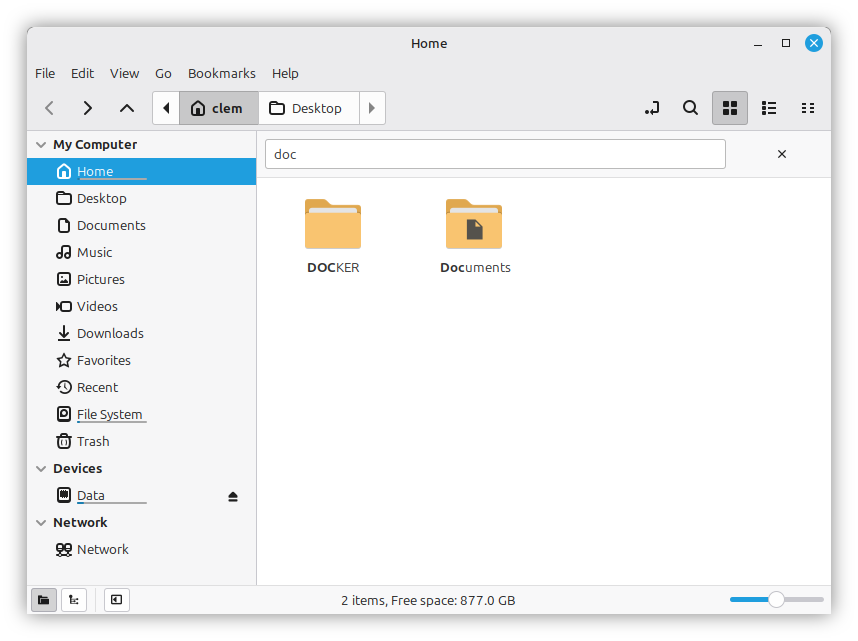
When you start typing the entry is now added to a search bar which looks much more obvious than before and doesn’t disappear when you stop typing or when you click away.
The view gets filtered to only show results so you can see them all at once and no longer need to jump without knowing where you’re going to land.
Cinnamon Screenshots
Cinnamon is getting its own screenshot tool.
The first thing you’ll notice are the new features:
- Window screenshots can be taken with or without shadows
- Screen screenshots can include all monitors or only a single one
- Screenshots can be cropped before getting copied or saved
Under the hood, many changes were made to make screenshots look cleaner and to accommodate the differences between CSD (Client Side Decoration) and SSD (Server Side Decoration) windows.
In a CSD window, the frame and shadow are rendered by the application or its toolkit (GTK). In an SSD window they are rendered by the Cinnamon window manager directly (Muffin).
In Cinnamon 6.6, there was no option to include the shadow. The screenshot interface had an option to remove the frame but that wasn’t useful, it was buggy and it wasn’t used by GNOME Screenshot.
Although window screenshots only captured the window itself, some of the shadow was visible outside of rounded corners.
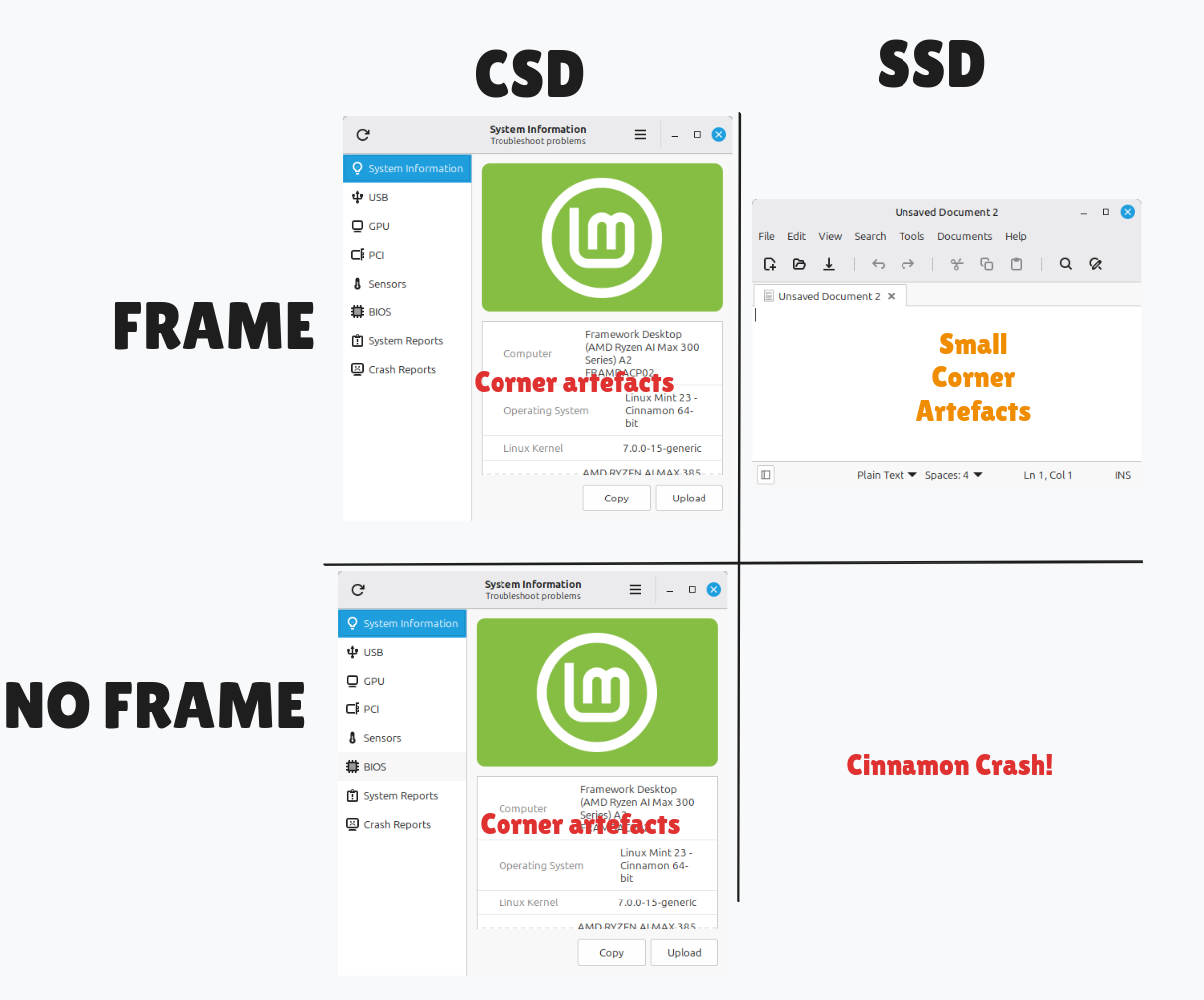
The new interface allows window screenshots to be made with or without shadow.
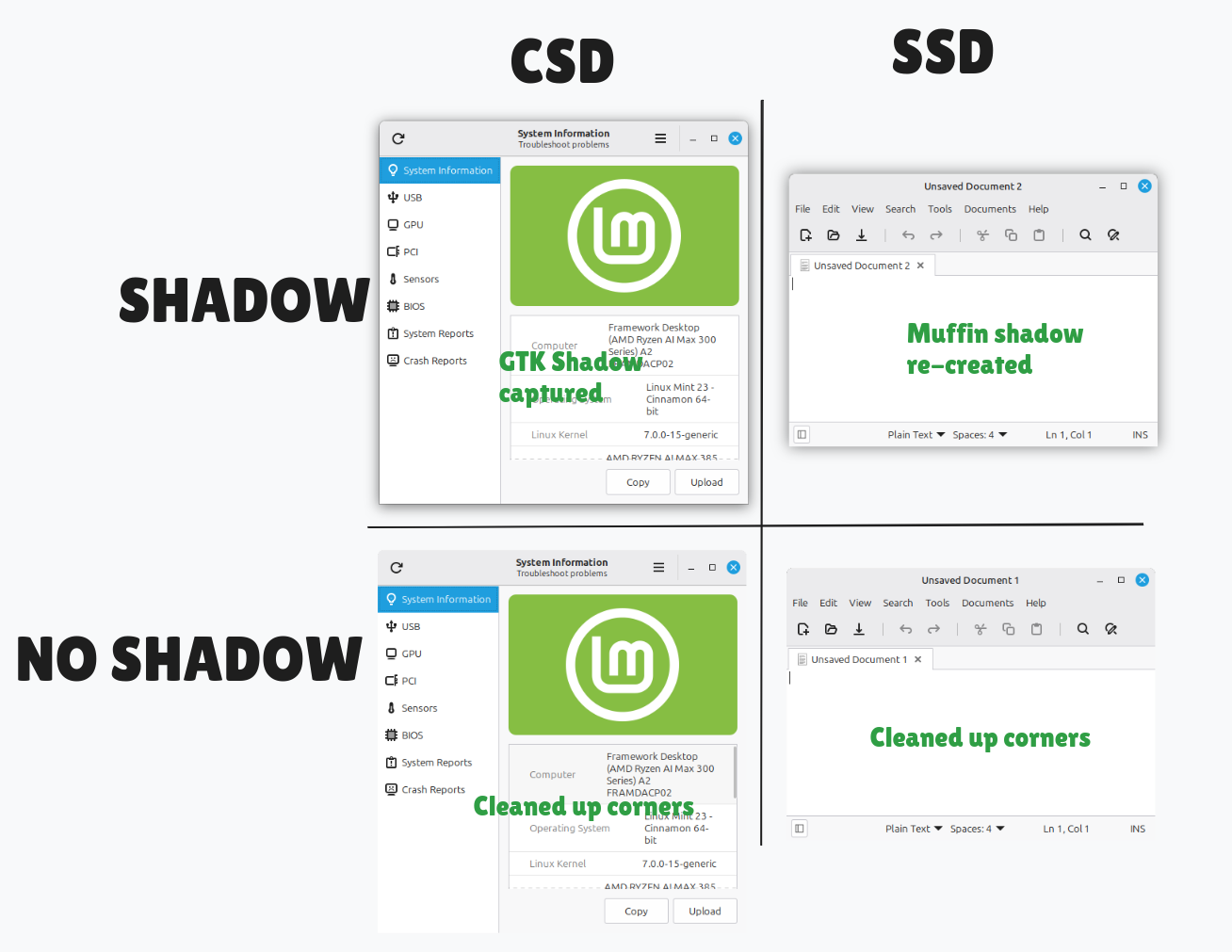
If the screenshot tool requests a shadow, this is taken into account when capturing the window. In the case of SSD, the shadow is re-created the same way as in Muffin.
If it doesn’t, the corners are cleaned up to remove any semi-transparent pixels coming from the shadow.
Dialogs
Cinnamon is now able to use draggable Clutter dialogs. They stay on top but don’t lock the screen, and can be moved around. This can be handy if you need to access something or click on an app before responding to the dialog.
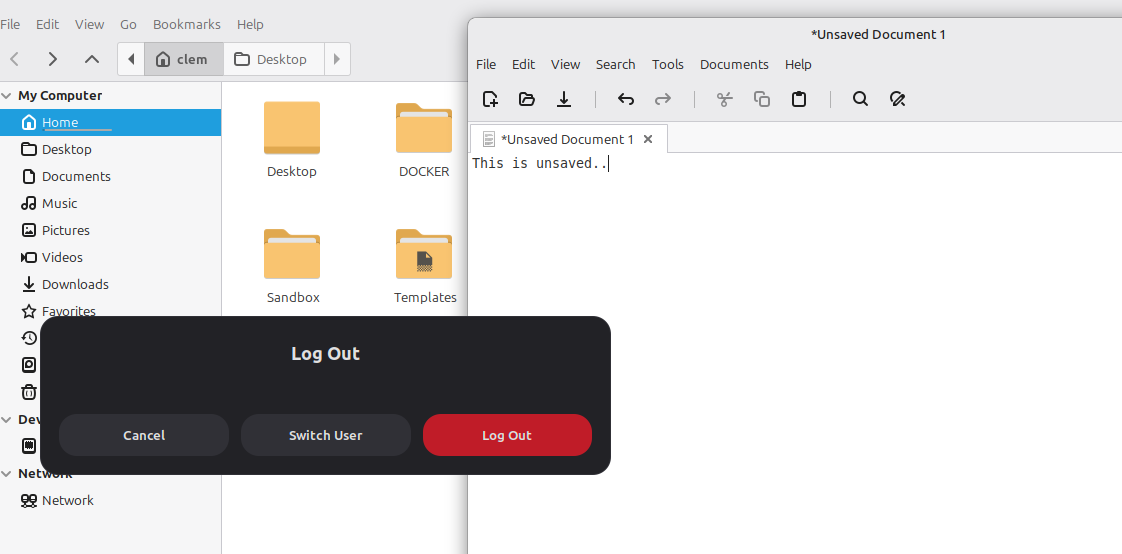
GTK3 dialogs don’t look great and this is something we’re looking into.
Here’s a question dialog for instance.
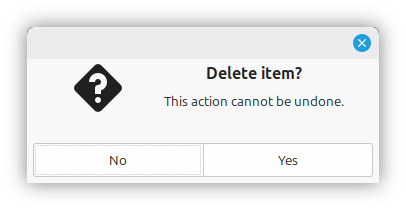
In this dialog:
- The buttons are stuck to each other (this was a style GNOME pushed for a while, and which they abandoned since)
- The title alignment is messy
- Symbolic icons look great within apps, but underwhelming in a dialog that requires the user’s attention
- The titlebar has no title so it looks empty and useless
Here’s the same dialog with these issues fixed:
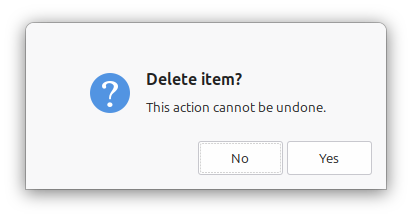
It catches the attention, puts more emphasis on the message and looks much cleaner.
Theme Improvements
The colors and contrast were improved in the dark version of the Mint-Y theme.
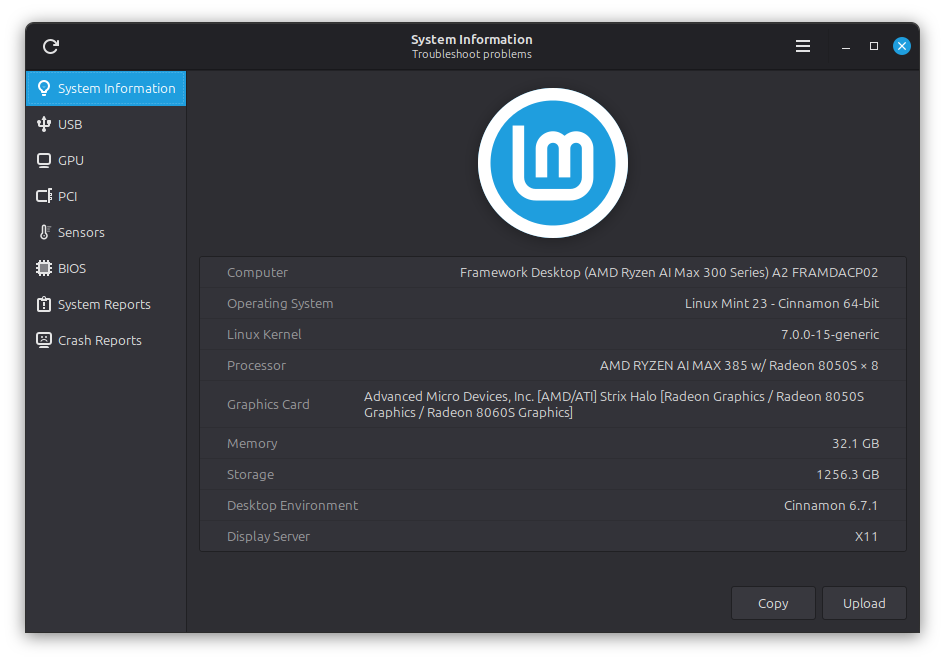
Frames and scrolled areas, which were rectangular, are now slightly rounded, like the buttons and combo boxes.
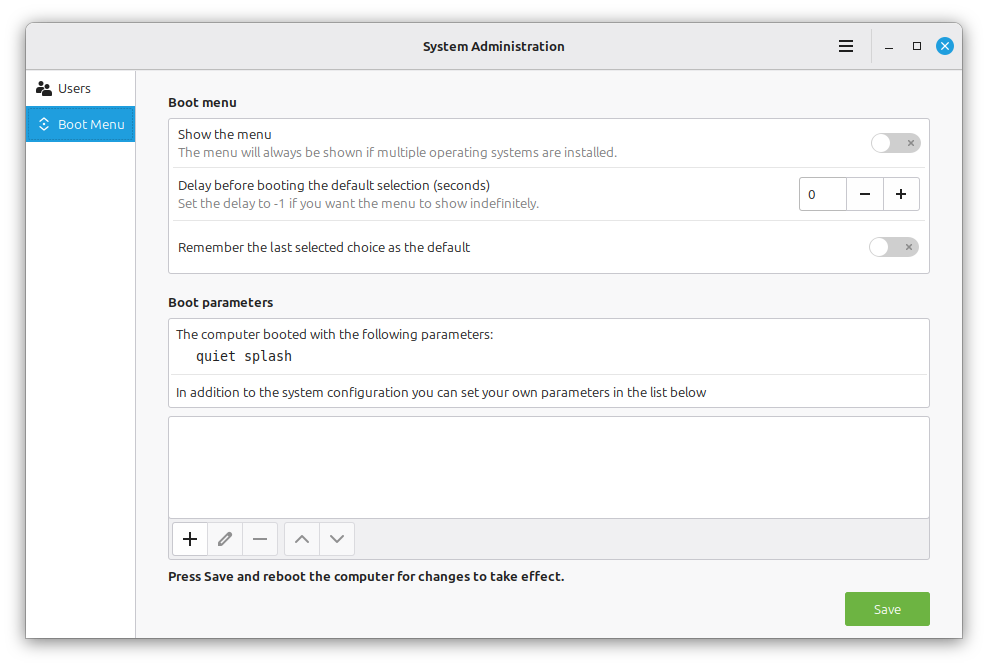
Treeviews and listviews got rounded as well.
This is a subtle change, but it makes Mint-Y slightly more polished.
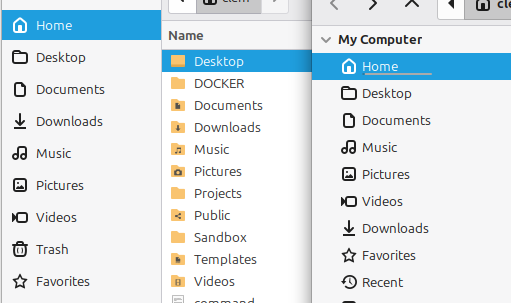
The Mint-Y, Mint-L and Mint-X themes now use XSI icons for GTK dialogs. So when you ask a GTK application (like Xed for instance) to open something, the file dialog that pops up now uses the same icons as Nemo.
Network Improvements
Cinnamon received support for WPA3 (Wi-Fi Protected Access 3) and OWE (Opportunistic Wireless Encryption).
Security Updates and Project Impersonations
A severe security flaw was found in Xreader: CVE-2026-46529.
A PDF could provide and run malicious code on your computer. All it took was for you to open it and click a link inside of it.
This is a good opportunity to remind everyone to keep up to date with security updates. This vulnerability was fixed in version 4.6.4 (and for older releases in version 3.6.7).
While we’re talking about security, I’d also like to take the opportunity to mention project impersonations.
https://www.fullstory.com/blog/inside-a-global-campaign-hijacking-open-source-project-identities/
Malicious people are making fake websites which impersonate FOSS applications. Their goal is money, whether that’s just by generating web traffic, selling personal data, or infecting you with viruses and ransomware.
Look at Warpinator.com and hypnotix.org for example. We can’t take these down. If the host cares, they get hosted somewhere else. If we take the domain down, they get a new one.
We’ve had secure and centralized repositories since the 90s, since the very start of the Debian project. I know some of you are new to Linux and coming from Windows. Despite the fact that smartphones have used centralized software stores for decades as well now, I know a lot of people who think the best way to install something is to search for a download link and click whatever comes up. This isn’t the best way to install software. This is the best way to install malware.
NEVER, ever download an application from a website you don’t fully trust. If you do, make sure to check its authenticity with the developers. It doesn’t matter if you know the software, it doesn’t matter if it’s open-source.
Sponsorships:
Linux Mint is proudly sponsored by:
Gold Sponsors:  Silver Sponsors:    |
Bronze Sponsors:        |
Donations in April:
A total of $18,746 were raised thanks to the generous contributions of 687 donors:
 $637 (5th donation), Natalya S.
 $265, Marleen V.
 $250 (3rd donation), Mark S.
 $250, Darrell L.
 $212, INDUSTRIAS P. S. P.
 $212, Norbert H. $200, Paul E. $180, Kevin M.
 $106 (19th donation), Jiří B. $106 (10th donation), Marek Stapff
 $106 (8th donation), Rhydwen V. $106 (7th donation), Bernhard M.
 $106 (3rd donation), Henri-ppc
 $106 (2nd donation), Daniel C.
 $106, Dean C. $106, Do. Z. $106, JOSE L. G. $106, Klaus B.
 $106, Lex A. B. B. $106, Martin B.
 $106, Max T. $106, Michael T. $106, Olivier M. $106, Philippe C. $100 (33rd donation), John Mc aka “Land Research Project“ $100 (19th donation), James F.
 $100 (6th donation), Felipe Amaral aka “famaral42“ $100 (2nd donation), Carl J. $100 (2nd donation), Robert J. G. $100, anonymous $100, Ben M. $100, Derrek B. $100, Hermann G. $100, John D. $100, Michael F. $100, Reece G. $100, Rolando F. aka “Roferris” $100, Thomas A. L. $100, Thomas C. S. $79, Siegfried L. $75, Michael S. $75, Michel M. $63, Jan S. $60, LEACH D. L. $60, Ryan S. $58 (2nd donation), thomas K.
 $53 (17th donation), Roland H.
 $53 (16th donation), Jyrki A. $53 (6th donation), Hannu H. $53 (6th donation), Keith H.
 $53 (6th donation), Michele M. $53 (5th donation), Uwe W. $53 (4th donation), Siegfried S. $53 (3rd donation), Ronan B. $53 (2nd donation), Andreas F. $53 (2nd donation), Jens K. $53 (2nd donation), Olivier R. $53 (2nd donation), Patrick K. $53 (2nd donation), Stefan B. $53 (2nd donation), Stephan B. $53 (2nd donation), Thomas P. $53 (2nd donation), Thomas P. $53 (2nd donation), Wuming $53, Anonymous
 $53, Antoni P. $53, Benjamin A. $53, Bill A.
 $53, Bostjan D. $53, Burkhard P.
 $53, Carlos M. $53, Chris K.
 $53, Edward N. $53, Gunther S. $53, Hannes B. $53, Herbert S. $53, Hubert K. $53, Johannes H. $53, Johannes P. $53, Josh $53, Juan S. P. $53, Jürgen H. $53, Lindsay W. $53, Ludwig B. $53, Maik T. $53, Marion B. $53, Martin E. $53, Martti K. $53, Matejas N. $53, Mathias F. $53, Max L. $53, Maximilian W. $53, Philipp B. $53, Robert D. V. $53, Roberto A. B. $53, Rodolfo M. $53, SAMUEL P. $53, Sergio D.
 $53, Slav N $53, Steffen K. $53, Steve Bartrick aka “Steve B” $53, Sven S. $53, Thomas H. $53, Thomas P. $53, Ton K. $53, Volker G. $53, Wolfgang A. $53, Wolfgang S. $52, Anonymous $50 (19th donation), Mothy $50 (17th donation), An L. $50 (15th donation), Anthony C. aka “Ciak” $50 (11th donation), Daniel M. $50 (9th donation), Charles H. $50 (9th donation), Kenneth R.
 $50 (8th donation), Khalid T. aka “k9750” $50 (7th donation), Alonzo J. $50 (7th donation), PulpKult $50 (6th donation), Jaime F. Zarama $50 (6th donation), Tim A.
 $50 (5th donation), Horacio M. $50 (5th donation), xexus.us $50 (4th donation), David N. B. $50 (4th donation), William S. $50 (3rd donation), Chris J. $50 (2nd donation), Fahri Taha C. $50 (2nd donation), George H. $50 (2nd donation), Robert B.
 $50, Amir B. $50, Andrew D. $50, Antonio D. $50, Arthur M. $50, David K. H. $50, Don D. $50, Fridolin.A $50, Gerald A. $50, Glen B. $50, HIDENOBU O. $50, Hovendra P. $50, Jerry F. $50, Jim S. $50, Juan M. A. $50, Markus L. $50, Marlon H. $50, Martina D. $50, michael P. M. $50, PATRICK M. $50, Philip L. $50, Robert S. $50, Scott N. $50, Sean G. $50, Stephen J. $50, Technition $50, Trevor B. $50, William I. $42 (4th donation), Michael R. $42, Benoit R. $40 (7th donation), Orlando O. $40 (3rd donation), maurice A. $40 (2nd donation), Angel C. $40, Hector M. $40, Peter C. $37 (2nd donation), Karl K. $37, William C. $33 (5th donation), Frank B. $33, Samir I. $33, Stojan A. $31 (24th donation), Adam K. $31 (6th donation), Matthias Versen aka “Matti” $31 (2nd donation), Klaus R. $31 (2nd donation), Rossella C. $31, Christian R. $31, Horst E. $31, Ilja P. $31, Maciej P. $31, Paul L. $31, Schule G. -. O. D. L. $31, Ursula H. $31, Victor M. $30 (13th donation), Murray C. $30 (9th donation), Frank F.
 $30 (3rd donation), VICTOR G. $30 (2nd donation), Donald K. $30 (2nd donation), Mark B. $30, GERARDO C. $30, Joseph B. $30, marumochi $27, M. P. $26 (7th donation), Keith P. $26 (6th donation), Santiago $26 (3rd donation), Andreas W. $26 (3rd donation), Eugene G. $26 (3rd donation), R. León $26 (2nd donation), Norbert T. $26, Georg N. $26, Neil K. $26, PourLeBienCommun $25 (62nd donation), Linux Mint Sverige $25 (32nd donation), Ted S. $25 (21st donation), John W. $25 (15th donation), John N.
 $25 (3rd donation), Paul G. A. $25, Akin B. $25, Fred N. $25, Jeffrey D. $25, Masters of War Productions
 $25, Robert B.
 $22, I-Ping H. $21 (70th donation), Peter E. $21 (37th donation), Stefan W. $21 (32nd donation), Benjamin W. aka “UncleBens”
 $21 (30th donation), Marek S. $21 (14th donation), Rob B. $21 (12th donation), Frank W. $21 (10th donation), Gabriele B. $21 (6th donation), Curd-Juergen S.
 $21 (6th donation), Helgi J. $21 (5th donation), Thomas B. $21 (4th donation), Antony L.
 $21 (4th donation), Arvis S. $21 (4th donation), Jean-pierre V. $21 (4th donation), Monika M. $21 (3rd donation), Andre V. $21 (3rd donation), Armin F. $21 (3rd donation), Ettore G. aka “Hanamigi“ $21 (3rd donation), Livio G. $21 (3rd donation), Luca O. $21 (3rd donation), Pawel P.
 $21 (3rd donation), Snorre L. $21 (2nd donation), Ariane R. $21 (2nd donation), Carlo S. $21 (2nd donation), Chris F. $21 (2nd donation), Elias R. $21 (2nd donation), Heinz S. aka “Heiner“ $21 (2nd donation), Helmut S. $21 (2nd donation), Joerg P. $21 (2nd donation), Laureano P. C. $21 (2nd donation), M M. K. M. $21 (2nd donation), Manuel L. G. $21 (2nd donation), Michael H.
 $21 (2nd donation), Noel V. $21 (2nd donation), Oliver K. $21 (2nd donation), Pe D. $21 (2nd donation), Peter L. $21 (2nd donation), Raphael Dieter $21 (2nd donation), Roland W. $21 (2nd donation), Steffen L. $21 (2nd donation), Werner W. $21, Adrian Y. $21, Alastair T. $21, Alexander O. $21, Alfred T. $21, Auguste M. $21, Carlos P. $21, Christoph G. $21, Daniele Fornera aka “Dany” $21, David R. $21, Dennis T. $21, Deon K. $21, Dieter P. $21, Emilie L. $21, Fabio B. $21, Fiorenzo M. $21, francesco M. $21, Frobose, S. $21, Georg L. $21, Günther F. $21, Hans J. K. $21, Hendrik B. $21, Herbert B. $21, Ian L. aka “Penfold” $21, J. Hernandez $21, James K. $21, JAMES R. $21, Johannes K. $21, Judian G. $21, Jürgen S. $21, Karl-Ernst K. $21, Kees D. $21, Keith J. $21, Marcel K. $21, Martin C. $21, martin H. $21, Mervyn A. G.
 $21, Michael D. $21, Michael H. $21, Michael J. $21, Mikel N. G. $21, Mikhael W. $21, Mr. SA $21, Paolo D. B.
 $21, Páraic Seosamh Canavan $21, Patrick U. $21, Paul H. $21, PEREZ aka “Alain” $21, Peter J.
 $21, Petros C. $21, Ronald M. $21, Salvador P. $21, Sasha P. $21, Sebastian K. $21, Viljami L. $21, Vincent A. B. $21, Willy S. $21, Winfried K. $20 (52nd donation), John D. $20 (33rd donation), Aimee W. $20 (12th donation), Antonio C. $20 (11th donation), Andreas G. $20 (11th donation), Andrew D. aka ” (Thank you for LMDE7!!!)” $20 (11th donation), Colin S. $20 (10th donation), Randall W. $20 (8th donation), Leela A. $20 (6th donation), Esteemed Ape $20 (6th donation), Michael G. $20 (6th donation), Robert A. $20 (5th donation), Clarence D. $20 (5th donation), Steven M. $20 (5th donation), Walter B. aka “Walter-CH“ $20 (4th donation), Alejandro A. $20 (4th donation), Leah M. $20 (4th donation), Matt H. $20 (4th donation), Raymond T. $20 (3rd donation), Denis V. $20 (2nd donation), Arnold L.
 $20 (2nd donation), Mohamed T. $20 (2nd donation), Nelson P. $20 (2nd donation), William B. $20, Brian H. $20, Chris M. $20, Christopher L. H. $20, Clifford A. $20, Collision Detection $20, Daniel M. $20, david C. $20, David R. $20, Derek S. $20, Dylan G. $20, Edward B. $20, George W. $20, Hilary P. $20, James K. $20, Jason B. $20, Jeffrey H. $20, JOHN I. A. $20, john O. $20, Jonobie F. $20, Jorge G. $20, Joseph K. $20, Mackenzie I. $20, Mariusz K. $20, Mark P. $20, Martin S. $20, MARYANN A. $20, Michael A. $20, PAUL G. $20, Pawe S. $20, Robert C. $20, Robert W. $20, SouthMicro $20, Stephen S. $20, Timothy D. $20, WILLIAM A. P. $20, William B. $20, William J. $17, M D. $16, Robert K. $16, Sahil $15 (91st donation), Andreas S.
 $15 (26th donation), Adian K. $15, Dr. C. M. $15, John W. $15, Marco M. $15, Rene M. $12 (42nd donation), Sami Mannila $12, Dennis Van de Poel $12, Dominik S. $11 (117th donation), Johann J. $11 (17th donation), Alessandro S. $10 (121st donation), Thomas C. $10 (63rd donation), Philip Woodward $10 (50th donation), Thomas Rehm $10 (48th donation), Tugaleres.com
 $10 (45th donation), Denys G. aka “GD Next“ $10 (30th donation), Bruce M. $10 (20th donation), Adis H. $10 (18th donation), Ronald S. $10 (16th donation), Abe Z. $10 (15th donation), Artem Ignatyev aka “ZaZooBred” $10 (14th donation), RexAlan $10 (12th donation), Mariusz B. $10 (9th donation), Wojciech S. $10 (8th donation), Augusto B. $10 (8th donation), Korora Solutions $10 (8th donation), Lars K. aka “laku3008”
 $10 (8th donation), Sergei Petrov $10 (8th donation), Steven L. $10 (7th donation), Gary R. $10 (7th donation), Gunnar A. $10 (7th donation), Ian B. $10 (6th donation), Carlos P. $10 (6th donation), Cor D. $10 (6th donation), Honest Beneve Reviews $10 (6th donation), Urszula S. $10 (6th donation), Van G. H. aka “HarryT140E” $10 (5th donation), Marc S. $10 (5th donation), Oleksandr N. $10 (5th donation), S Russo $10 (5th donation), Serge S. $10 (5th donation), Ted H. $10 (4th donation), Alexander B. $10 (4th donation), Jordan S. $10 (4th donation), Lukasz M.
 $10 (4th donation), makeup $10 (4th donation), Peter B. $10 (4th donation), ronald H.
 $10 (4th donation), Selwyn A. $10 (4th donation), Stefan B. $10 (3rd donation), Alexej S. $10 (3rd donation), Andrea C. $10 (3rd donation), Claudio B. $10 (3rd donation), Ian S. $10 (3rd donation), Jim R. aka “Images in Colour Inc.”
 $10 (3rd donation), Juan Z. $10 (3rd donation), Julio Casanova aka “JC67” $10 (3rd donation), Lyuben R. $10 (3rd donation), notar public $10 (3rd donation), Paweł $10 (3rd donation), Piotr R. aka “_PAPCIO_” $10 (3rd donation), Ricardo O. $10 (3rd donation), Thank you Linux Mint $10 (2nd donation), Bartomiej T. $10 (2nd donation), Brian K. $10 (2nd donation), Dominik S. $10 (2nd donation), Garcia J. $10 (2nd donation), Georgi P. $10 (2nd donation), Henry G. $10 (2nd donation), Jacob R. $10 (2nd donation), Joao D. $10 (2nd donation), John M. $10 (2nd donation), Jordi del Valle $10 (2nd donation), Kevin L. $10 (2nd donation), Marco E. E.
 $10 (2nd donation), MAXI G. B. $10 (2nd donation), Myne aka “Myne” $10 (2nd donation), Niklas K. $10 (2nd donation), Oliver W. $10 (2nd donation), Patrick F. $10 (2nd donation), Patty G. $10 (2nd donation), Raul Z. $10 (2nd donation), Richard W. $10 (2nd donation), Steffen G. S. R. $10 (2nd donation), Stelios Gidaris $10, $10, Aad T. $10, Adam B. aka “Neomodus” $10, Akshay B. P. $10, Andrew C. $10, Ann S. $10, Anthony D. $10, Antonio Jose Rabasco Serrano $10, Arne A $10, Augustin Winther $10, Bart Meijer $10, BM $10, Bobby H. $10, Brantley E. $10, Bryan M. $10, Cedrik P. $10, Charlie M. $10, Claudio D. C. $10, Clément P. $10, Compucall $10, con G. $10, cz $10, Daniel R. $10, Daniel W. $10, David A. E. G. $10, David R. $10, Deniz H. $10, dominik P. $10, Elia Bedendo aka “@eliabedendo_“ $10, Felix W. $10, Fidel G. M. $10, Florin M. $10, francesco P. $10, Frank V. $10, Friedrich G. $10, Fuchsiano $10, Gary B. $10, GEJM V. W. $10, Gregory S. $10, Guinle C. $10, Harry T. $10, Henning B. $10, Hichem E.
 $10, Ihar K. $10, Irmgard J. $10, J.F. V. $10, J.P.W $10, Jack J. $10, Jacques T. $10, Jan V. $10, Jean D. $10, Joep6161 aka “Oldgit” $10, Johannes R. $10, Jose D. S. L. $10, Joseph S. $10, KARAM S.
 $10, KERMAN Z. $10, Kjetil A. E. $10, Kris D. V. $10, Krzysztof O.
 $10, László D. $10, Laurent E.
 $10, Linas M. $10, Luca L. $10, Lucas J. $10, Maciej S. $10, Mario D. P. $10, Martin Kasper le Grand $10, Mathieu J. $10, Matthew G. $10, Maurice K. $10, Michael D. $10, Mubarik A. $10, Murányi és Társa Bt.
 $10, Nenad Đ. $10, Nils B. $10, Nils W. $10, Noureddine M. $10, OpaManni $10, P.H aka “Lost” $10, PALAO B. $10, Patrik T.
 $10, Pavel P. $10, peter H. $10, Peter S. $10, Quentin H. $10, Raffaele G. $10, Randy S. $10, Rasmus $10, Ricardo O. $10, Richard G. $10, Richard T. $10, Robert B. $10, Robert E. $10, Robert M. $10, Rocklyn H. $10, Rodrigo I. C. $10, Ronal P. $10, Ronald T. M. $10, Russ J. $10, Ryan M. $10, samuel T. $10, Scott P. $10, Simon P. $10, Szymon A.
 $10, T. U. I. $10, Thomas H. $10, Thomas R. P. $10, Thomas W. $10, Tim S. $10, tino R. $10, Tobias H. $10, Tony M.
 $10, Ülo P. $10, Viktor D. $10, Volker B. aka “schnoog” $10, Volker J. $10, Werner J. $10, Wesley da Guia
 $10, Xerofable X. $10, Yevhenii Bondarenko $9 (2nd donation), Roger S. $9, AM. $8, STEVEN N. $7, Dale $7, Jeff D. B. $6 (3rd donation), Alexandre M. aka “Maz”
 $272 from 104 smaller donations
If you want to help Linux Mint with a donation, please visit https://www.linuxmint.com/donors.php
Patrons:
Linux Mint is proudly supported by 2,274 patrons, for a sum of $5,297 per month.
To become a Linux Mint patron, please visit https://www.patreon.com/linux_mint
Re: “Cinnamon is now able to use draggable Clutter dialogs.” FANTASTIC! That is a much appreciated improvement.
I’m looking forward to the Linux Mint 23 alfa ISO to make it easier to test.
Wll Cristmas be for the finalized 23 release?
“…and contrast were improved…”
🤦🏻♂️
Hello. Is there a way to stop this rounding of everything?
GTR, you could always use a different theme. I personally prefer the rounding of as much as possible
Great job, as always. Thanks to the Linux Mint team for all their efforts.
Does the new screenshot tool feature annotations? Mark stuff, draw boxes and arrows, put some simple text on…
That would be awesome.
The Windoes one does this now, but it’s so slow. but i really use that on my work flow everyday.
having that on mint would be very logic for anyone who needs to work 🙂
Have a look at Flameshot. It does all this and a lot more, including automatic saving to clipboard and into defined folder. Not sure about annotations. Great screenshot tool though.
I wonder if you guys can open a beta test, like we can try out Mint 23 and provide feedbacks if we find bugs
I imagine it will have one as is usual
Mention of taking care when downloading software is apt, especially for new ex-Windows users. Use the repositories where/when possible – FIRST.
Due to the default color not being mint-green anymore, but bright blue, may I suggest renaming the OS to Linux Menthol or Linux Peppermint? I really loved the somewhat dull matte colours, these new colours are too saturated and bright compared to dark background.
I do wonder why the default colors aren’t green.
It this about the logo in the mintreport screenshot? If so, it just adapts dynamically to the theme. If you were to use a pink theme, it would look pink. The default accent color is Aqua because we think it’s the best default color and the most popular. Sure, we’re Mint. That doesn’t mean we need to default to green.
Always protect your logo, otherwise it becomes a mess. The Linux Mint Logo is green in mine opinion not blue.
Mint-X and Mint-L are still using the original colors if you want them.
Great news, a lot of good things have been done in one year in terms of the quality of work in Linux Mint. Looking back, my first version of Mint was 22 Wilma, and all the updates have really improved the operating system a lot. The end user will benefit the most from a longer development cycle because we can only get a higher quality final product, not to mention security patches, which are very important in business, especially for PDF documents. Just keep doing what you’re doing, because you’re really doing an excellent job.
Vielen Dank, für eure hervorragende Arbeit!
Ich möchte für den Dateimanager NEMO anregen, die Dateivorschau zu verbessern, welche aktuell mit der “Leertaste” aufgerufen wird.
Zum einen würde ich mir wünschen, dass die Anpassung der Ansichtgröße z. B. einer PDF- oder Bilddatei möglich wäre, evtl könnte man auch das Vorschaufenster in NEMO integrieren oder wahlweise auch als externes Fenster belassen.
Vielen Dank!
Please, add an option in Nemo for the prefix search. It is faster like that, only searches prefixes and it also gives me context with the neighbouring files. If I wanted a normal search I can press Control+F.
Yes please! Keep the type-to-filter search optional. This is a breaking UX change that, as far as I can tell, GTK or GNOME made in their file picker, and it’s annoying to no end when you have decades of muscle memory trying to jump to an item *starting* with a certain string. Filtering just for a substring anywhere in the name instead is something entirely different, and breaks things.
Chiming in to also ask that type-to-filter search is made optional. I use “jump to” search as much for navigation in folders as for searching (and I use it quite a lot, especially for folders with lots of items), and it would be awful to have it removed. If I want to search for matching files, I just use the normal search function with Ctrl+F.
On the topic of rounded corners, is there any plan on making the windows bottom corner rounded as well sometimes in the future?
That’s something we’re looking into.
That would be beautiful!
I second this.
Oh my God! It would be awesome.
I am interested what is the plan for Cinnamon’s future. GTK3 is already in maintenance mode, it won’t get any new features. What will be the future toolkit for Cinnamon? Why not use GKT4 + libadwaita, since it has now colouring support, and the standard theme of Cinnamon looks already similar to libadwaita, so developing an own theme is just wasted energy. Alternatively you could chose GTK4 without libadwaita. If I were a company and had to plan for an OS in the long term, I wouldn’t be able to choose Linux Mint at the moment because it has no technical future.
GTK3 is stable and mature. GTK4 lacks many of the widgets we use in GTK3. Very few people actually use GTK4, they either use GTK3 or GTK4+libadwaita. Libadwaita only supports theming because we patched it Linux Mint.
At some point down the road you’ll have to make the choices the Budgie team did.
Companies choose what works right now and what’s the most likely not to change in the future. We’ve proven, since 2006, that we can adapt, evolve while keeping the same familiar interface and set of features. Look at what GNOME did in the meantime and how much they experimented, they went back and forth and reinvented themselves. They’ve been a great source of innovation and inspiration but they’re unpredictable and unreliable when it comes to change. GTK4 is a good example of that. It does not replace GTK3 on its own unless you also embrace a platform library like libAdwaita, which doesn’t look or feel like GTK3 Adwaita.
What do you think is going to happen to GTK3 apps? I’ll tell you. Same thing as GTK4 apps. As some point in the future they’ll get rewritten, adapted, replaced, like any apps out there. No toolkit or technology lasts forever. We care about how we transition and what we implement. We made GTK3, GTK4 and libAdwaita look the same. Did you notice a tough transition when we moved from GTK2 to GTK3? No, because we took our time and unlike early adopters, we made it smooth. We’re very much invested in the GTK ecosystem, and it can move slightly in one direction or another. Who knows, we might use libAdwaita eventually, or complement it, or deviate from it. It doesn’t really matter. We’ve got so many options. But we’ll transition little by little, smoothly and you won’t notice it. We’ve already invested in libAdwaita, we forked it into something stable that doesn’t change, we themed it. At some stage we might add to it as well, or we might invest more into GTK3, or maybe we’ll skip GTK4 and move straight to GTK5? Or maybe we’ll use something else. I actually used Slint lately.
Under the hood it doesn’t matter as much as you think though. We might have a mix of technology at any given moment but because we prepare for these transitions, they don’t have to be rushed and you hardly notice them.
I know a lot of projects moved away from GTK3 and Xorg. I’m sure we’ll do too. When? That doesn’t matter. We’ll do it really nicely, for us and for you, and that’s what matters. We’ve been actively preparing for this for more than a year now. We looked at Qt, we talked to other projects, including Budgie, we themed libAdwaita, we experimented with libAdapta, we decided to stick with GTK and we’ve been thinking about what that might mean for our future. And we’re quite happy with where we are.
Just think about your proposition for a minute. Say we spend the coming month to migrate all our apps to GTK4. What does that achieve? Immediate short-term: Same look, loss of features (GTK4 doesn’t provide all the widgets GTK3 does). Long term: Same situation. GTK5 will show up with some newer platform lib and GTK4 will be in the same position as GTK3. From a technical point of view, there isn’t a tangible reason not to use GTK3 right now, other than the fact that it’s no longer developed. And if you think about it, from a stability point of view, that’s actually a good thing. There are bugs in GTK3, text wrapping space allocation and context menus refreshes come to mind.. frankly, they’re really not an issue.
What’s way more likely to happen is that some new technology will get popular and make GTK3 a problem. Like HiDPI compatibility with GTK2. That takes time though. Another thing that’s likely to happen is that people get used to and expect different trends. I think these trends we’re seeing in libAdwaita actually come from Mac and the Web. We embraced many of them already. What we’re lacking the most are bottom rounded corners, more generous looking widgets and card-like application layouts. This is something we need to prepare for. Look at what we just did. We made Mint-Y slightly more rounded.
libAdwaita doesn’t look bad at all. In fact I think it looks really nice. But it looked radically new and different. It’s relatively easy to migrate the technology. It’s much harder to stay consistent and transition smoothly. If you look back at MATE, which still looks the way Mint did a decade ago, you can tell we’re constantly transitioning. We’re mixing different technologies right now, titlebars, CSD headerbars but I think we’re doing a good job. Around us I see projects who seem to be “all-in” on this or all-in on that. That’s not how we operate.
I can’t tell you what toolkits and libraries we’ll be using in 5 years time but I can tell you we won’t hurt our users with sudden transitions, we’ll look both familiar and more modern. We’ve been doing that since 2006 you know? Adapting to and embracing new tech in a controlled way, when and how it suits us to provide a stable experience. If that’s not good in terms of technical future, I don’t know what to say.
Another issue is that the current version of Cinnamon is plagued by a great many critical bugs. I simply don’t understand the rush to get ahead of ourselves and push for new versions when the current one is practically unusable.
I love Mint—I’ve been using it since 2014—but lately, it has become unbearably unstable in terms of its desktop environment.
This is particularly evident when working with an external monitor. I even bought a new laptop—an ASUS M1607KA with an AMD Ryzen AI 5 340 processor—specifically for this purpose, yet the situation has only gotten worse than it was before.
What isn’t working:
– If the system goes to sleep while connected to an external display, and that external display is subsequently disconnected, the bottom panel becomes completely unresponsive to clicks; sometimes, it even stops displaying icons altogether. This is an absolutely critical bug that makes working on the system utterly unbearable.
More attention needs to be paid to bugs affecting the desktop environment.
– There are several other critical bugs as well, though I can’t recall all of them off the top of my head right now.
>> The titlebar has no title so it looks empty and useless
Title bars also indicate that the window is draggable to another location. If those dialogs can’t be moved by dragging the title bar, then by all means don’t show it. But if they can, and you still hide the title bar, you’re showing a lack of understanding of how Title Bars function. IMO of course.
They can be moved, that doesn’t change.
Second that.
Even if the dialog still “can be moved”, it is less confusing seeing a titlebar where a user can drag confidently. Not just the GTK3 dialog, I want the draggable Clutter dialog to gain a titlebar as well.
hi,
this is nice. looking forward to it.
daechir
Dialogs: does that also include password entry dialogs? I often have to check something else before triggering an action by entering the password, and the current implementation steals all input and blocks the view of everything else.
GTK 3 dialogs need to have better visual emphasis on which button is currently selected for keyboard use. Right now there’s only a tiny dashed gray-on-gray border that’s barely perceptible (you can see this in your own images above). I remember that some some old Mint themes once highlighted the selected dialog button with green color, which worked great both functionally and aesthetically.
Yes. The main reason we implemented draggable dialogs was to apply it to pkexec.
GTK3 custom dialogs support the ability to define suggested action buttons.
“GTK 3 dialogs need to have better visual emphasis on which button is currently selected for keyboard use. Right now there’s only a tiny dashed gray-on-gray border that’s barely perceptible”
I second this, Jan.
I think this is much more important than if the dialog looks a bit more or less “nice”. I don’t understand how this does not seem to matter to designers. In general the dialogs in gtk (3, at least) are so bad in this regard, since long ago (12 years at least). qt’s are much better (they highligt the background color of selected items). I think they look good, too, bat that is less important.
It would be really nice if the cinnamon screenshot tool is able to select separate elements/regions (buttons, applets, toolbars, a line of texts, …) with/without the background. Something similar to what Firefox has with their built-in screenshot tool.
It would be interesting to have a greater focus on finalizing and maturing Wayland. Currently, it’s not yet fully usable in everyday use in some scenarios.
The performance difference between Fedora KDE with Wayland and Linux Mint using Xorg is brutal, especially in games. After 6 years using Mint—which remains my favorite system—I ended up needing to migrate precisely because of the advantages of Wayland and its more native support for newer kernels and technologies.
Cinnamon works with Wayland. In Mint 22.3 there were limitations. We’re tackling them one by one. We now have support for screensaver, nemo-desktop, wallpaper, systray context menu positioning. We’re trying our best to make it work as well as with Xorg.
Cinnamon + Wayland is still unusable for me, after just a few minutes I always get a crash with a black screen.
Unfortunately that’s my experience as well. In my particular case I need to run Fender Studio Pro, which is Wayland only application, but it crashes after few minutes in Cinnamon and GNOME 46 likewise. On the other hand there are reports that it runs smoothly on latest Ubuntu with GNOME 48 or 49 in which Wayland support has been improved.
For a moment I thought ‘enough is enough’ and installed Fedora KDE. It seemed to work fine, updated things, and… something wrecked the system. Back to Mint with tail between my legs. XD
Currently, I can’t even log into a Wayland session in Cinnamon. It gives me a black screen, freezes up the computer completely, and corrupts my hard drive so that I have to fsck before it can boot again. So hopefully that problem will get resolved sometime soon, as I’d like to test out Wayland in Mint.
Thank you to Mint team, for an effort to improve Mint. Even if it’s only ‘200 ms’ different. A screenshot tool is also nice add. Looking forward for Mint 23.
Hello, dear developers! There is a problem! For some reason, on inexpensive laptops, when adjusting the brightness slider in Linux Mint, the screen brightness reacts with a slowdown. If I quickly move the slider to the beginning and end, then I can go quietly drink coffee and watch the screen slowly increase the brightness and then decrease. That’s why I’m writing about it. It’s just that there’s no such thing on Kde and Gnome, but everything happens instantly. Thank you in advance!
Thank you for your work! It’s great Nemo will be faster in some scenarios. How about loading image files? Nemo 22.3 is slow loading them and shows them according to the time the files were created, not in linear order on the screen. One image preview may appear at the top of the Nemo file pane, then another might show at the bottom, the third in the centre etc, which looks really bad. Nautilus of the latest Gnome desktop loads previews instantly and visually much better, perhaps you could use the new gnome code that does the job? I use a hard drive, if that’s relevant, and can see that Mint is slower than Gnome, KDE etc. It would be fantastic to get it some boost in performance. Improving visuals is definitely appreciated though.
Do you plan to add COSMIC desktop like in these distros: https://system76.com/cosmic/download
I already asked it but it wasn’t planned.
I’m obviously not speaking for Clem and the team, but I wouldn’t imagine this would be a priority for them at this point. I’m sure it will eventually be included in the Ubuntu repositories, like KDE is, so you could install and configure it yourself if you’d like. But Cinnamon is their primary focus, of course, and I believe MATE and XFCE will be their only other included DE’s for lighter systems for the foreseeable future, as they’ve already invested so much into making them work really well. Adding another DE would be unnecessary and add extra workload to their already busy team.
Even i had proposed a Cosmic Spin of Mint, in another blog post, a whole ago, with details. But, no response or even a reaction from devs.
Any news on Rust Coreutils and Sudo-rs? I know you want to align with Ubuntu as much as possible, but given the (im)maturity and constant changes to them, perhaps it’s worth staying on the fence for 23 and reevaluating for 24? Especially given that they’re supposed to be drop-in replacements and that Ubuntu fully supports rollbacks to GNU Coreutils and Sudo-ws, it might be worthwhile to stay on something stable and predictable. The Rust versions are currently not that, they still feel experimental and the slight differences in behaviour that some programs might rely on are a real issue. I also don’t really like the move to MIT licencing, which could hurt the ecosystem in the long run.
Now Microsoft already took the free labour on Uutils (Rust Coreutils) and put it into their competing proprietary product without contributing back.
Using MIT-licenced code directly undermines FOSS. The more distros use it, the more people will work on it, the more Microsoft can leverage it against us. Please take a stance like you did against Snaps.
The new Mint version will be based on Ubuntu 26.04, is’nt it? What’s about the system requirements of the future Linux Mint version? Today the current Linux Mint version runs well on systems with 4 GB RAM.
Same CPU/RAM usage as in 22.3.
Hi I’m surprised the WPA3 & OWE support is listed as Cinnamon-specific. Won’t this be included for MATE and Xfce?
It’s already present in “Network Connections” (even in the Cinnamon edition) which is part of Network Manager. Xfce and MATE don’t have their own network applet/settings. It was missing in Cinnamon settings (“Network Settings”).
After my many shenanigans and broken installations I have concluded that Bluetooth and networking seems to be somehow associated with Cinnamon.
Weird architecture
Everything else can be rounded but the lower corners of windows apparently.
Have got to say that corners are the last thing I look at or care about. There are far more important things than corners!
@Tony Wise you mean the lower corners only? Consistent themeing and refining of how the OS looks appears to be important, but I have tried to get an answer why are the lower corners ignored. Like is it a deiberate design choice or a technical limitation. Even now the only response I get is your “they are not important”
Clem mentioned in another comment that they are working on it.
It’s something I’d love to see, personally. That said, in my discussions with people on the Mint team, it’s not an easy fix because of the way Muffin is coded. Muffin creates a squared-off rectangular display area underneath the top bar/headerbar, which can’t be changed. If you force round corners in your GTK theming (which I’ve tried to do), you will see a black squared-off corner protruding out from your nicely rounded corner. The only way to change that with the current muffin code would be to add another bar with rounded corners beneath the display area, which (in my opinion) would look weird. Now, if you’re up to the attempt, there is a fork of Muffin out in the wild (muffin-rounded) that masks the corners to round them, but it has some other not-so-nice side effects and instabilities.
There is a possibility to have a switch which can make windows and all other elements with sharp corners?
Or maybe a mint-y variant (i really like mint-y) with sharp corners on windows and elements? Or a slider which can customize roundness?
I have searched about that and even tried it but with mixed results. Which files exactly should i modify?
However i like LM a lot and i currently use it as my main os. Keep up good work and don’t hurry! Release it when it’s ready.
Also I think green is the LM color (like a trademark) and make it green is first thing after installed it.
Thank all the team for such a good distro!
Yea, as a variant it should be in the system, not everyone loves rounded courners
agreed
If you want *EVERYTHING* to be squared off, here is something you could try. Copy the entire Mint-Y theme set from /usr/share/themes/ into ~/.themes and then in each theme in the set, open the GTK-3.0 and GTK-4.0 folders and edit gtk.css and gtk-dark.css in every folder. Find all border-radius entries and set them to “border-radius: 0”. This will remove all rounding. It’s a bit of work (you could also just do this in the specific Mint-Y variation you currently use to reduce the amount of work), but this should give you what you want. Or, if you like the way Mint-Y looks currently, you could copy it just like I described above, and not change it. Then, make a backup of it and after upgrading to the next Mint version, copy it back into ~/.themes again, and it will remain how you like it. It just won’t include any new features Mint may have added in the newer version. As with anything DIY like this, I make no guarantees of its success. The good news is, if you screw something up in the process, just remove what you did in ~/.themes and everything will return back to the defaults.
Thanks to the Linux Mint team for all their efforts
Tip for the LMDE 7 live installer (that’s destined to become the installer for Mint 23): the default keyboard layout proposal for a Dutch localized system is wrong. It should not be “Dutch”, as the true Dutch keyboard has sadly disappeared many years ago.
Instead, it should be “English, US International with dead keys”, like it has been (and rightly so) for almost two decades in both Ubiquity and mintubiquity.
It is a nice thing that Clem and the team listen to input from users, but I trust Clems vision and desire to modernize Cinnamon, and to harmonize gui and minimize maintenance as much possible to free up time for the development. Input is good and healthy, but I don’t really understand why some feel need to contest almost every change. I am so happy to be able to use the best Distro, and the best desktop, for free. It is truly an amazing thing, really.
Who needs UI changes? Right now, there is debate if window corners should be round or square. We should not need to be arguing about UI changes or look and feel, or rather, more importantly, the workflow you are already used to. Mint has turned within few years into looking something like ChromeOS with it’s dialogs and buttons which I dislike. And default color isn’t green, and the default colours are now very intense, without a way to tone them down. I would like my traditional desktop look and feel back like it was a few years ago thank you, with dull green theming that may not be available in the future. Do people love when updates to system are forced with UI changes like in Android phones? I simply want a working system with old look and feel but with latest programs, instead of having to relearn UI look and feel changes on each update. The last time I updated, I had to re-learn how to operate the menus to navigate to the shut down button with the keyboard (yeah, mouse battery died on me), as they were organized differently.
Concerned Citizen if you wish for an older looking style with desaturated accent colors, Mint-L and Mint-X are right there and very easy to set up.
Concerned Citizen, like anything else, Mint will change with time. If they didn’t, it would be rejected by a large number of people because it looks “too old”. I totally get it. My preference is for an older style (Mint-X, because I’ve never been a big fan of flat themes), but at the same time, I understand that trends and modern aesthetics are a moving target that distros have to keep up with (or set the standard for). Otherwise, they will become irrelevant, funding will drop, and they will fade into obscurity. The good thing is, Mint has built in some protections from that for people like you and me in that they’ve supported Mint-X and Mint-L (the old “Legacy” Mint-Y version) for a long time. Longer than many distros probably would have.
Mike F., do you have any objective support for your assertion that, “[If] Mint [didn’t] change with time . . . it would be rejected by a large number of people because it looks “too old”?
Because I flatly disagree with that. I HATE change. I loathe the very word change, because it is value-neutral. What I am always looking for is IMPROVEMENT, not change for change’s sake. I would much prefer an OS that retained its look for decades without ever changing, unless the change was demonstrably and uniformly considered an improvement. Why fix what isn’t broken? Here’s a single example, a case-in-point: Scrollbars. Originally they were always visible, using significant contrast, and thus, more useful. But because some designers felt like re-arranging deck chairs to make them hide and sometimes almost be unfindable with their lack of contrast, we have to suffer from lessened utility.
In the immortal words of Dirty Harry, how very “stylish.” But I hate stylish. I want functional. And once functional is achieved, why ever “change” it? Objectively improve it, or leave it alone.
I can’t be the only one who feels this way.
Does drag and drop files now work with Cinnamon on Wayland? More specifically, with Nemo?
Hello Clem, will it work accent logo of linux mint in mintreport in third-party themes like adw-gtk3, orchis or mine under development theme. Will there be API in cinnamon.css for this or something like that. Please, answer my question
Yes, it should.
Congratulations to all Linux Mint developers, you are building a future where technology is made for people! With stability, elegance, and true freedom 🐧🍃
To infinity and beyond (^o^)//
Thank you Clem and the Mint Team for all you efforts!
Any chance to have a obsolete kernel removal possibility within the Update Manager at LMDE in the near future, like it is available within the Ubuntu based versions?
That would be much welcome IMHO.
It’s on the roadmap.
This has been broken on Cinnamon for quite some time, obsolete kernels are not removed even though the automatic maintenance in the update manager is set to remove them. using 22.3 with kernel 6.17
Nigel, I am talking about the manual removal, not the automatic one.
I know y’all have your priorities elsewhere at the moment, but would it at all be possible in the future to add global menu support? Akin to MacOS, Unity, and KDE’s global menu widget, maybe with the ability to integrate the menu buttons in a top bar as well? I love the work y’all have been doing, especially recently, but would this be possible? I’m sure I’m not the only one wishing they had a global menu on Cinnamon.
Cinnamon has always been more Windows-like rather than Mac OS-like, so I doubt this’ll happen
The last few lines advise people to always use a centralized software repository, instead of downloading files. This somewhat seems a foreshadowing that some restrictions would be placed against download of executables in the future releases. I strongly discourage such philosophy. Linux is something one tinkers with, and should remain absolutely powerfull. Putting restrictions on users for their own ‘safety’ is something Microsoft would do, to turn more profits. Banning pip from installing anything directly to the central python was quite annoying. That said, Mint is quite stable and efficient, and I love it how it never tries to force updates on users.
There are no restrictions planned. It’s YOUR computer, not OURS. So you do what YOU want, and that’s precisely why we’re warning you about potential risks.
You’re way too paranoid
Advisories don’t mean anything is planned. It’s just letting you know how to safely use the OS. If you really want to download random binaries and expose yourself to who knows what in that code, feel free! It’s your computer. Use it at your own risk. That’s the Linux philosophy.
This new Cinnamon screenshot tool looks really promising!
One thing I think would be great to keep in mind during its development is the possibility of adding some of the built-in editing features that tools like Flameshot offer, such as arrows, highlights, blur/pixelation, text, simple shapes, counters, and color boxes.
Having these features directly available in Cinnamon would be extremely useful and would fit very well with what Linux Mint has always done so well: providing a complete, ready-to-use desktop experience with the tools most users need already included.
Thank you for all the work done so far!
IMHO, Cinnamon is truly what GNOME should have become. I’m really happy that you continue to work on it. Anyone saying it’s taking too long or complaining otherwise doesn’t understand how hard it is to support such a large codebase like Cinnamon. I’ll proudly continue using Mint as my primary OS and support it monthly.
Amazing job! Those are “small” changes that make an enormous difference. Thank you.
Regarding Clutter dialogs, I have difficulty to tell which button is currently focused on, especially when there’s a button with a strong background color. I tend to think the “Log Out” button is always in focus and will be triggered if I hit Enter. I guess the solid border effect that indicates which button is in focus is visually too subtle in comparison to the background color effect. Maybe a dashed border instead of a solid border would help a little.
Hi Clem, thanks for the great work on Mint.
Regarding the XFCE edition, are there plans to include Redshift (or a native night light tool) and a more complete system sound theme in upcoming versions?
I use it on a 2013 MacBook Air with 4GB of RAM, and it runs beautifully. I think these small additions would bring the XFCE edition’s “polish” closer to the Cinnamon experience without losing its lightweight advantage.
Best regards
“GTK3 dialogs don’t look great”
I disagree. Those look way better than the mutter ones.
The new GTK3 dialogs look like an unfinished window…
Most of these visual “improvements” are superfluous. I would have preferred earlier availability of the next release.
you if you wanna test it early you can try this:
http://www.youtube.com/watch?v=zipYLESD_tQ
@Victor. You use Virt-manager. Sweeet. Virt Manager is amazing. And yup, that is how you test things. Definitely don’t want to do this on your main working system for sure. That would be disastrous lol.
@A.H.
I understand you. I too tend to prioritize functionality over aesthetics, which adds nothing in terms of functional value.
@Victor. Please forgive me for not knowing, but the video you posted about testing out LM 23 Alfa, is that something the Mint team allows and/or approves of random folks trying out? I just like to make sure before I jump in and start messing with. Thanks so much.
@Dwayne W it is something that mint team is even considering to do, so people can find bugs and report them, of course, you should try it on a VM, as things can be glitchy, for an example, the wayland session the animations where all choppy when i tried, still an alfa
Hi ! Quick question: Will these changes are incorporated into LMDE as well short term ? Or will we see them in LMDE8 mid to long term ? Thx
While we’re on the topic of Nemo improvements, is there any chance we could have this memory leak bug from 2023 addressed?
https://github.com/linuxmint/nemo/issues/3330
When reading updates over your OS is fun and about improvements you realize how much damage you were from Windows were each of these were “We want more of your data, invade your privacy using your hardware and storage”.
The interactive search is probably also very cool because you don’t have to get “bumped” through a directory. (e.g. an entry is at top. Next is *bump* 25% further down. Next is *bump* another 3 rows further”.) However, PLEASE, please make thumbnails being stored. It is borderline a joke that I have to always wait for my music folders to read the embedded cover arts each and everytime and dare god I scroll through I get tons of “please wait” icons. Just be like any operating system since 25 years (XP had this in 2001) and have a local thumbnail cache for Nemo.
Really loving all these changes, You guys have done an awesome job. Are you guys planning any kind of universal launcer (e.g. Krunner or Powertoys) where I can search all my files (not just /home but external hdd as well). I am a video editor and have been using davinci on mint for almost a year now. I am just missing this feature.
Great work as always! The longer development cycle and sticking with tried-and-true technologies while iteratively implementing new technologies and improvements is really paying off. Love LM <3
The main download button on hypnotix.org just goes to https://github.com/linuxmint/hypnotix/archive/refs/heads/master.zip
It does, yes. For now. But whoever controls hypnotix.org can replace that with malware at any time. Just be aware that this site isn’t official and should not be trusted since you don’t know who operates it.
Hi everyone,
I’ve been spending a lot of time with LMDE 6 recently, and frankly, the stability and ‘clean’ feeling compared to the Ubuntu-based edition is night and day. It feels like Mint in its purest form.
However, it got me thinking about the future. We all know the industry’s direction with Snaps and the increasing overhead of underlying bases. While Cinnamon is the flagship, many of us still rely on XFCE for that ‘no-nonsense’ efficiency, especially on aging production machines where every 100MB of RAM counts for the actual workflow.
Currently, the XFCE edition is tied to the Ubuntu base. If the goal of LMDE is to provide a safety net and a truly independent Mint experience, isn’t there a strategic risk in leaving the XFCE community without a Debian-based alternative?
I’m not suggesting more work for the team—I know how thin resources can be. But has there been any internal ‘internal itch’ or discussion about eventually making LMDE the universal base for all flavors? It feels like having an LMDE XFCE version would not just be a ‘lightweight’ option, but the ultimate ‘unbreakable’ workstation.
Curious to hear if this is even on the radar or if the focus remains strictly on Cinnamon for the Debian side.
Regarding Wayland, I have a question. You prioritize a smooth technology transition and stability, which I appreciate. I have applications that require Wayland, and currently the desktop is a bit unstable in that regard, even though it’s only in specific cases. Xorg still serves me very well. Would Mint 23, with greater Wayland support, be sufficient to switch between the two screen compositors without major problems when I want to run these applications, even though it’s probably not the final version?
io voglio solo ringraziarvi per il vostro lavoro. Dopo anni in cui pensavo che i PC fossero delle noiose macchine da scrivere elettroniche, grazie a Mint sto scoprendo un mondo. Grazie ragazzi.
Do you plan to implement new Ubuntu Workshop in Mint?
Xorg is menitoned here as: we may move away (no development there), want better Wayland. OK.
There are us who want Xorg to live in form of XLibre, which is being developed,
https://github.com/X11Libre/xserver/wiki/Are-We-XLibre-Yet%3F
Thank you Linux Mint Team for all your great work. Linux Mint is my daily driver and it works very reliable. I fully support the new release schedule.
When will we see HWE ISOs with Kernel 7?
+1 Yes kernel 7 is much more better than 6.17
@Seba @Ludolph it’s already here. Make sure you’re on the default Mint mirror and it’ll show up in the Kernel Manager.
@Jacob This request is about LinutMInt_HWE iso file not about availability of kernel itself. Some new pc’s are not able to boot with kernel 6.14-6.17. So clean install on that newest machines is complicated.
I’d like to add more sound event themes, such as emptying the wastebasket.
Is libreoffice getting updated? we are still using Version 24 by default, and they are on 26.
Libre Office is packaged by Ubuntu, not Mint. It will be updated when base system switches to Ubuntu 26.04. (Mint 23). You could add PPA for Libre Office, that way it will be updated to new version.
Linux Mint 22.3 is based on Ubuntu 24.04 LTS (Noble), which ships with LibreOffice 24.2 in its standard repositories. As a result, you won’t get a newer LibreOffice version through the default Mint/Ubuntu packages.
However, there are several ways to install a newer release:
Ubuntu Noble Backports
LibreOffice Fresh/Still PPA
Flatpak
To get the latest stable version of LibreOffice, you can use the official LibreOffice Fresh PPA:
– sudo add-apt-repository ppa:libreoffice/ppa
– sudo apt update
– sudo apt upgrade
That’s exactly what Flatpak in Mint is for. The LibreOffice version in Flatpak is 26.2.4.2.
Why don’t you go to the official website to download the DEB package? Or just use OnlyOffice, it provides an AppImage package, which can keep your system clean.
Another option is to use a PPA. The ‘Still’ version (which I prefer) is currently at 25.8.7. It is at:
https://launchpad.net/~libreoffice/+archive/ubuntu/libreoffice-still?field.series_filter=
Or if you want the latest ‘Fresh’ version (Ubuntu Noble 24.04) which is currently 26.2.4, it is at:
https://launchpad.net/~libreoffice/+archive/ubuntu/ppa
If you are not familiar with PPAs, there is some info here:
https://fostips.com/add-ubuntu-ppa-linux-mint-install-updated-external-apps/
latest LibreOffice versioon is always available via PPA:
sudo add-apt-repository ppa:libreoffice/ppa
Time to use Nix and skip the PPA infrastructure.
Moreover, LMDE+Nix can aptly substitute Mint+PPA.
Hey, @Clem, some food for thought: Nix/Guix lacks a GUI for easy package/profile management. That’s a xapp with potentially big userbase waiting to happen.
I am waiting patiently for any changes regarding the support for QT applications. They look so bad on Cinnamon, and I am going to rewrite my application from QT to GTK, and I am planning to move to another desktop environment for that reason. I started to feel that you don’t care at all about QT applications. I just want to know why.
In what way do QT applications look bad? If you’re talking about QT applications following Mint’s GTK theme, I know of a couple workarounds that help…
For QT5 applications, I install the QT5 settings app (qt5ct package) and select “GTK2” as my theme, which follows the GTK2 variant of the system theme you are using. This works for the built-in Mint themes, although it may or may not work for 3rd-party themes if they don’t have GTK2 support.
For QT6 applications, I install the QT6 settings app (qt6ct package). Then I install the qt6gtk2 plugin, which doesn’t come with Mint, unfortunately. So you have to download and install from another location. Right now, I’m using a package made for MX Linux (https://ftp.tsukuba.wide.ad.jp/Linux/mxlinux/mx/repo/pool/main/q/qt6gtk2/qt6gtk2_0.4-1~mx23_amd64.deb), but you could also compile it yourself for Mint (https://github.com/trialuser02/qt6gtk2). Then in the QT6 settings app, select “qt6gtk2” as your theme. This works exactly the same way that the QT5 “gtk2” theme does. But, of course, as you’d be going outside of the Linux Mint ecosystem with this QT plugin, proceed at your own risk with this one until Ubuntu or Mint release their own solution.
Doing both of the above will adequately theme both QT5 and QT6 applications to match your Linux Mint theme as closely as possible. If you still need to tweak the theming, the QT* settings apps offer a lot of settings that let you taylor the appearance to your liking, to a certain extent. It’s obviously not going to be perfect, because QT and GTK are not the same thing, so they don’t perfectly match up 1 to 1.
Some caveats: It won’t work for QT applications that force their own theme settings. For example, Google Earth uses QT, but doesn’t obey these settings. Also, the GTK2 theme engine is slightly different than the GTK3 theme engine, so there will be some minor appearance differences. But it’s close enough that it still fits in well enough with your system theme.
It would be great if Nemo had an option to hide bookmarks or folders such as Desktop in the left-hand sidebar. A few months ago, I switched from Windows 10 to Linux Mint, though I also tried Kubuntu. But I much prefer Mint with Cinnamon. What I miss about the Dolphin file manager in Kubuntu’s KDE Plasma is the aforementioned hide function. I love to minimize and hide what I don’t need like the desktop bookmark. The desktop folder in the home folder I’ve already hidden.
On my 8 years old self built (gaming) PC Linux Mint 22.3 runs pretty stable. There are some small issues but I’m confident I can handle this. For me Linux Mint is better than windows 10. But I seem to feel the difference of menpower between these two OS.
You’ll receive a fair donation from me in a year or two if Linux Mint remains my operating system in the long term. I suspect it will.
Thanks a lot for all these news.
Just a suggestion : please allow to modify the shortcuts, and do NOT choose all for the user, just let them choose …. There is currently a terrible mess with that, mainly with the screenshots, where the current shortcut seems to be definitly binded, withut the possibimity to change them (excepted using some hack, deep in cinnamon or somewhere in some dark config file).
LMDE7 + cinnamon + kernel 6.18.34 + some personnal very recent security patches
Note : remove NOSPAM in the mail address, to make it working
I appreciate that the default kernel in the 22.3 iso is 6.14, and that some modern hardware is not supported by that version, so I wonder if an ‘edge’ iso could be created with a default version 7 kernel, ideally with as many of the updates since 22.3 release as practical.
Would this take much effort?
You can customize the ISO by installing Cubic.
As always, great update, Mint Team!
One quick question: I’m a really big fan of the Cinnamon theme. Is this the direction you plan to take Cinnamon in the future?
I mean, would it be a new default one?
it won’t have a new one, they just plan to update Mint-Y theme, at least for now
That’s even better, thanks Victor!
O Linux Mint 22.3 Cinnamon está mais incrível do que nunca, mais estável do que sempre, é um porto seguro pra usuários Linux e que vem do Windows, graças ao Mint eu tenho tirados mais pessoas do universo fechado pra um munto aberto e digo mais, não me importa se é verde pimenta hortelã rosado em pink rosa bourbom, o Lint Mint é mais que uma cor, é uma Distro que respeita o usuário e o Mundo Linux é melhor por causa dele!
#SomosTodosMint #SomosTodosLinuxMint
Obrigado Equipe Linux Mint, de um Ex-MVP da Microsoft em Windows Devices e Windows Insider, eu vivo hoje um mundo novo, há 3 anos, sempre que ligo o meu computador, eu me sinto algo que não sentia em décadas, eu sou dono do meu PC, e por mais que isso já devesse ser algo simples, ainda me sinto especial por isso!
The Cinnamon draggable dialogs improvement is a really nice touch for the upcoming 23 release. As a long-time Linux Mint user, I appreciate how the team continuously refines the desktop experience. Looking forward to testing the new features when they land.
I don’t understand why the Nvidia driver which worked fine under Linux Mint 22.3 Xfce was disabled.
It is also impossible to reinstall it!!
This prevents Obs Studio from working.
It’s a real shame.
This is something coming from Ubuntu and not from Mint
https://forums.linuxmint.com/viewtopic.php?t=469946
What do you mean by “disabled”? Are you not able to install it? Or is it installed but not functioning? Or is there some other issue?
I am not able to install it.
Some more details on the problem would be helpful. What do you see when you run the Driver Manager? Which NVIDIA GPU do you have? Which NVIDIA driver version have you used until recently?
I see “No driver required
Your computer does not need any additional driver.”
NVIDIA Corporation GK208B (GeForce GT 730).
nvidia-driver 470-256.02-0ubuntu0.24.04.5
I am not able to install ii.
No driver is required
Your computer does not need any other driver
It’s 26 june, will you guys release the next blog post soon? i’m always eager to minty news 😛
Bonjour Monsieur Lefèvre Clément,
Permettez que nous parlions dans notre langue maternelle.
Comme bon nombre de personne je suis passé à Linux, l’actuel Gouvernement français poussant vers cela.
Toutefois un très gros problème apparaît lors de l’installation si nous avons plusieurs disques durs internes.
Il faut déployer un menu déroulant pour choisir le bon.
Les gens qui comme moi, ne sont pas des adeptes de l’informatique, continue à appuyer sur suivant, installer, sans avoir compris que cela n’allait pas remplacer le disque dur principal Windows, mais s’installer sur le disque dans l’ordre alphabétique ou alphanumérique, donc sur toutes mes sauvegardes.
Définitivement perdues !
Serait-il possible qu’à la place du menu déroulant, cela affiche clairement tous les disques et pas leurs références internes, mais : c, d, e, f ou le nom que nous avons donné : système, Sauvegarde document officiel, Sauveagrde document personnel, Sauvegarde musique, etc.
Oui, l’on peut vraiment avoir plusieurs disques durs internes.
Serait-il possible que l’installation se bloque tant que nous n’avons pas choix un disque ?
Et surtout, faite en sorte de cesser les interfaces pour dépressif, s’il vous plaît, par pitié.
Soyez gentil, soyez heures, soyez gai… enfin, on s’entend, je ne vous dis pas avec qui vous devez coucher, gai = joyeux.
Liberté, Égalité, Fraternité, Indivisible, En vous remerciant.
What has happened to the update for June? Very soon it will be June no longer…
My guess is a LOT has happened behind the scenes or something really big is just about done and Clem is waiting until everything is ready to go before posting the June or in the case, the June/July post. I see this as an extension of the Linux Mint philosophy of “not until it’s ready.”
On the other hand, I could be completely wrong. In any case, I’m eagerly awaiting the next edition of the blog to see what’s been holding things up. Clem always seems to give great information and is very open about why things happen the way they do, including the reason for delays.
The news for a month usually come after the month is over (because I guess it’s a summary of the development in that month…?).
I’m so excited for the next post, tomorrow will be July so the June post should be just around the corner
Karl,
Good catch. I forgot that March was posted April 16th and April actually got posted on April 30th, then May’s post was May 23rd. Looks like he’s working back towards the post coming early the next month. So, if things return to normal, we should see the June post in the next few days.
Cadê o Informativo de Junho???
If you want to tackle a serious project for the system, I’d be super estatic if you could make a native speech recognition software work for Linux Mint. A few months back, I could make use of “Handy”, a nice project which doesn’t work anymore on LM 22.3. The author is looking for help on improving his software. Thanks !
Where june news?
Why this website is now blocking the Mullvad’s São Paulo IP? It appears a screen written “Access Denied – Sucuri Website Firewall”, “Your IP address is listed in our blacklist and blocked from completing this request.”
Anyway, i’m excited for the June post.