
APT

Here’s the quickest way to install something in Linux Mint at the moment:

  • If you know its package name: type it in the menu, and click on the install button.
  • If you don’t know its package name: use the Software Manager, Synaptic or the terminal.

Most of the time though, you have a precise idea of what you want to install, but you don’t remember the exact package name, or it’s long and tedious to type. Ideally you’d like to install it without launching any tool, but the menu requires you to know the exact package name, or else it simply doesn’t find what you’re looking for.

To solve this problem, we integrated APT into the menu and made it aware of the packages that are available on your system. So when you start typing, and the menu realizes what you’re looking for isn’t installed already, a list of packages matching what you’re typing appears in the list. Open the menu, start typing and filter through some of the 30,000+ packages that are available to you. Using the keyboard, this is really quick: Ctrl+Super, start typing, go up, press Enter.. and the package starts installing.
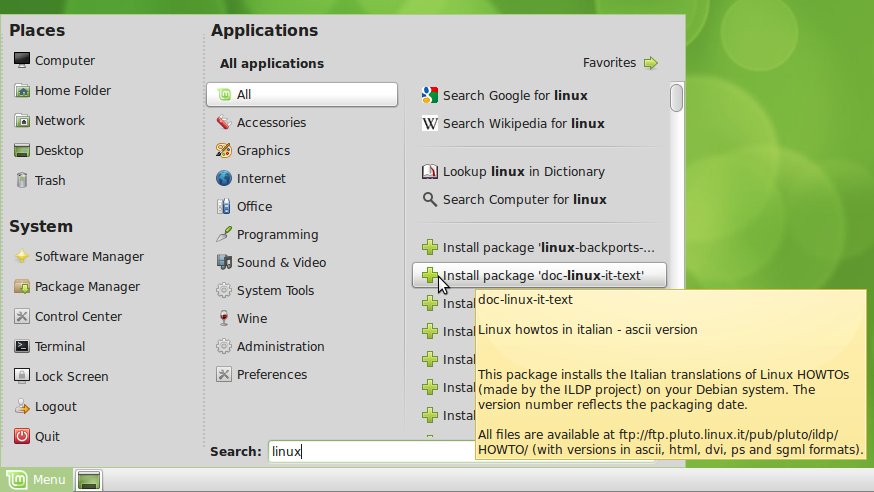
Using the menu to browse through the packages which name contains “linux”

By hovering the package names you can also see their summary and their description.

Other search engines

There’s something about Web2 and its brands that shouldn’t really go beyond the scope of the browser and land on our desktops. It’s annoying, say, for a non-Facebook user to see Facebook appear on the desktop. There are many Web2 majors that offer useful services and which are used by a huge majority of us, but among them, two are particularly popular, to the point that they became reference tools in their own right: Google and Wikipedia. You probably often launch Firefox, just so you can Google or Wikipedia something… and so we found it handy to add these features to the menu.

If you’re used to type on the keyboard and filter through your applications, you’ll soon get used to opening your menu and typing on your keyboard to install software, to Google or Wikipedia something, to search for files on your computer or to lookup something in the dictionary.

Extended search menu
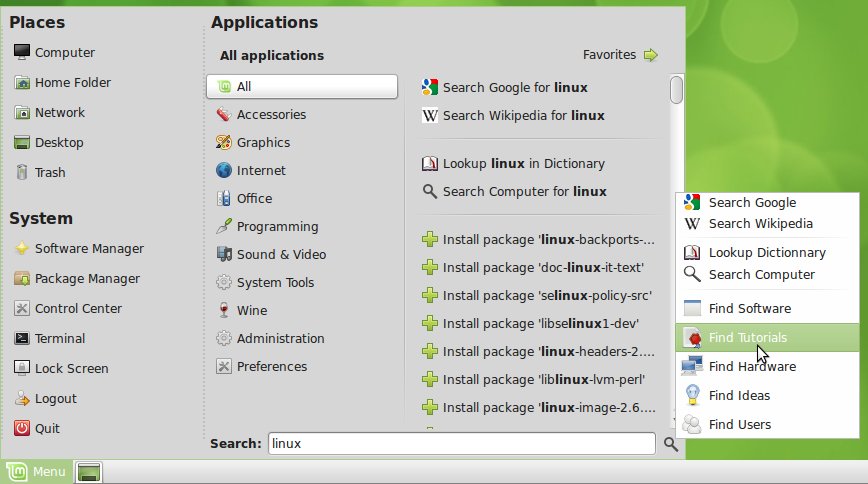
Using the extended search menu to access “linux” tutorials online

We also added a little button, next to the search entry which pops up an extended search menu. From this menu you can find software, tutorials, hardware, ideas and even Linux Mint users. So, if you’re looking for a printer that is compatible with Mint 9, or you’ve got trouble setting up something on your Vaio laptop, just type “printer” or “sony vaio” and click on “Find Hardware”. If you’re looking for information on how to use the IRC, simply type “irc” and press “Find Tutorials”… The Community website is growing every day, with information written for and by Linux Mint users, and its ideas, users, hardware devices, software reviews and tutorials are now just a click away.

How to test/install it

  • These features are part of the new mintmenu which is available in the Romeo section of LMDE: http://packages.linuxmint.com/list.php?release=Debian#romeo
  • You can also use git to overwrite your version of mintMenu with this one: In a terminal, type: “apt install git-core; cd; git-clone git://github.com/linuxmint/mintmenu.git; cd mintmenu; ./test”

Updates

The following fixes and improvements were made since this blog post was written:

  • The search is now multi-threaded, i.e. it happens in the background, with a slight delay so you can continue typing without experiencing lag. Search engines results appear immediately, APT results follow an instant later.
  • You can now search for multiple keywords so it’s even easier to find the packages you’re looking for. For instance: “linux headers 2.6” or “gnome games”…etc.
  • The annoying focus bugs in mintMenu are gone. The problem was found while debugging this feature. Whether it’s the context menu in the favorites, the trash popup in places, this new extended search menu or any popup menu used in mintMenu, the focus goes back and isn’t lost anymore. This fixes many bugs related to mintMenu, the menu not closing when the desktop is clicked, the search field not responding after using the popup menu..etc..
  • The sidepane was removed (it was confusing). Enabling/Disabling the different plugins can now be done in the preferences.
  • The UI was improved, in particular the alignments and the dotted separators on the left of the menu.
  • The default hover delay was changed to 150ms.
  • Various bugs were fixed: empty application list on first-run, mouse grab issue with package manager.
  • Newly installed applications are now highlighted in the menu (whether they’re installed from the menu itself or from another application)
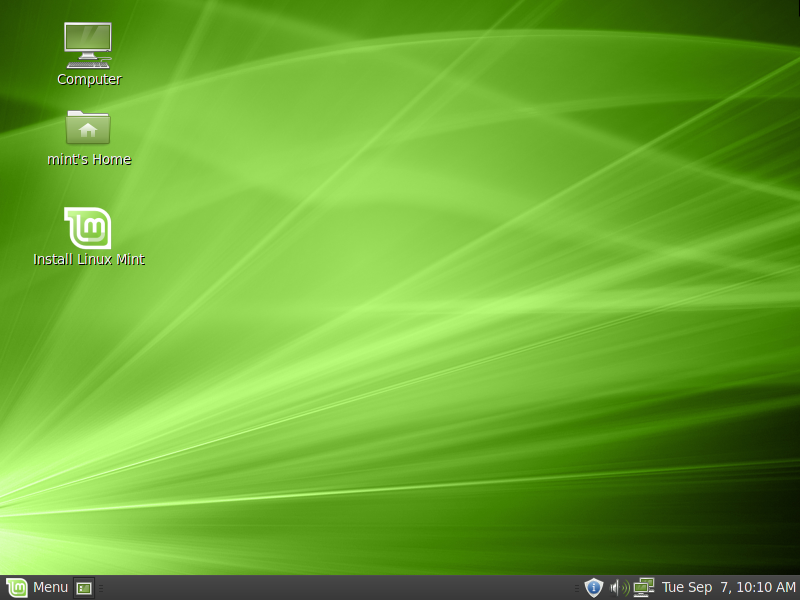
Linux Mint Debian (201009)

Today is very important for Linux Mint. It’s one day to remember in the history of our project as we’re about to maintain a new distribution, a rolling one, which promises to be faster, more responsive and on which we’re less reliant on upstream components. Linux Mint Debian Edition (LMDE) comes with a Debian base, which we transformed into a live media and on top of which we added a new installer. It’s rougher and in some aspects not as user-friendly as our other editions, it’s very young but it will improve continuously and rapidly, and it brings us one step closer to a situation where we’re fully in control of the system without being impacted by upstream decisions.

LMDE also represents an alternative, with the same desktop, the same functionality, but a different base, and a difference in hardware support and compatibility. In the scope of our distribution, and our role, which is to provide a modern and elegant operating system, it’s important to give people a choice. We did it with many upstream components. The Software Manager gives users an easy choice when it comes to selecting their favorite applications. We maintain editions for alternative desktops such as KDE, Xfce, Fluxbox and LXDE. And we also provide a choice between 32-bit and 64-bit architectures. From a technical point of view, a package base is a huge part of an operating system. It makes the system using it a derivative of the distribution maintaining it, something that is both based and fully compatible with it. From a user and project point of view though, this is yet another component, and like any other, it can be changed and replaced with alternatives. The Linux Mint desktop which you’ve come to enjoy on top of an Ubuntu base, can be ported to alternative package bases. By the past, I expressed my enthusiasm about this and my interest in experimenting with Debian, Fedora and our own independent base. Work started on Debian about 3 years ago, it was hesitant and we didn’t have the resources to make it a priority. After the release of Linux Mint 9 LTS, we decided to set some time aside for this project, and we’re now proud to announce that Linux Mint Debian Edition (LMDE) is out, and available for download!

Welcome to Linux Mint Debian. I’d like to thank all the testers and our development team, Ikey Doherty in particular, for the work that they put in it. I personally had a lot of fun working on this project, and I hope you’ll enjoy this new distribution.

Important links

LMDE in brief

  • Linux Mint Debian Edition (LMDE) is a rolling distribution based on Debian Testing.
  • At the moment, it comes as a 32-bit live DVD with a Gnome desktop.
  • The purpose of LMDE is to look identical to the main edition and to provide the same functionality while using Debian as a base.

FAQ

1. Is LMDE compatible with Ubuntu-based Linux Mint editions?

No, it is not. LMDE is compatible with Debian, which isn’t compatible with Ubuntu.

2. Is LMDE fully compatible with Debian?

Yes, 100%. LMDE is compatible with repositories designed for Debian Testing or Debian Squeeze.

3. What is a rolling distribution?

LMDE constantly receives updates. Its ISO images are updated now and then but users do not require to re-install it on their systems.

4. How does LMDE compare to the Ubuntu-based editions?

Pros:

  • You don’t need to ever re-install the system. New versions of software and updates are continuously brought to you.
  • It’s faster and more responsive than Ubuntu-based editions.

Cons:

  • Although it’s using Romeo for unstable packages, LMDE continuously changes as it receives updates and new software. Compared to a frozen version of Linux Mint which changes very little once it’s publicly released, it’s not as stable. Things are likely to break more often but fixes can also come quicker. For this reason, LMDE requires a deeper knowledge and experience with Linux, dpkg and APT.
  • Debian is a less user-friendly/desktop-ready base than Ubuntu. Expect some rough edges.
5. Will it come in 64-bit? With KDE or other desktops?

The decision wasn’t made yet. LMDE is an experiment. Although we’re quite confident it will gain in popularity, we want to get an idea of how many users will switch to a Debian base before going further with it and bringing impacts to other editions. The idea of reaching the same level of functionality without using Ubuntu is quite challenging. It means there are missing pieces in the equation, components which need to be ported or re-written, and whether the pros outweight the cons, this is something we need to assess. A 32-bit Debian-based Gnome edition allows us to work on this with the community. When it’s fully on par with the Main Edition and if there is a demand for it, further editions will come for LMDE.

Additional notes:

  • About the installer: The live installer is developed from scratch with Debian in mind. It’s configurable and it can be re-used by other Debian-based distributions. We noticed a lack in live technologies and in live Debian installers, so we’re happy to take the lead on this. If you’re a developer and you’re interested in using it, have a look at its source repository and don’t hesitate to contact us so we can help you fork it and merge upcoming changes between our two projects.
  • About bugs: Please do not use Launchpad for bug reports. We’re considering the best strategy to collaborate with upstream Debian developers. In the meantimes, we opened the following forum thread.
  • About the “wrong ISO”: We recorded that 0.3% of our user base got the wrong ISO, which was synced a few days ago. If you did, you can either download the correct one, or simply update live-installer using the update manager.
  • About the media: It comes as a liveDVD. Locales work differently in Debian and the package base requires more space. We made LMDE compatible with unetbootin though, so you can install it using a USB stick.
  • Dedicated chat room: #linuxmint-debian is open to new LMDE users on irc.spotchat.org.

The team is proud to announce the release of Linux Mint 9 Fluxbox.


Linux Mint 9 Fluxbox

New features at a glance:

For a complete overview and to see screenshots of the new features, visit: “What’s new in Linux Mint 9 Fluxbox“.

Known problems:

  • Splash screen resolution
  • Moonlight
  • Windows installer
  • Theme issues
  • Ctrl+Alt+Backspace
  • Upstream issues

To get more information about these problems and their solution, read the “Known problems” section of the release notes.

System requirements:

  • x86 processor
  • 256 MB of system memory (RAM)
  • 4 GB of disk space for installation
  • Graphics card capable of 800×600 resolution
  • CD-ROM drive or USB port

Upgrade instructions:

  • To upgrade from a previous version of Linux Mint follow these instructions.
  • To upgrade from Linux Mint 9 Fluxbox RC, simply apply any level 1 and 2 updates (if any) available in the Update Manager.

Download:

Linux Mint 9 Fluxbox is available in 32-bit as a liveCD, via Torrent and HTTP download:

Enjoy!

We look forward to receiving your feedback. Thank you for using Linux Mint and have a lot of fun with this new release!