
Hi everyone,
Before we start with the news I’d like to thank all the people who help us.
Whether it’s donations, sponsorships, bug reports, ideas, PRs, community support or even just good vibes, it’s all really appreciated! Many thanks to all of you.
Improved support for keyboard layouts and IM
The next version of Cinnamon will feature improved support for keyboard layouts and input methods.
In the past, the keyboard settings and the keyboard applet only really handled traditional layouts.
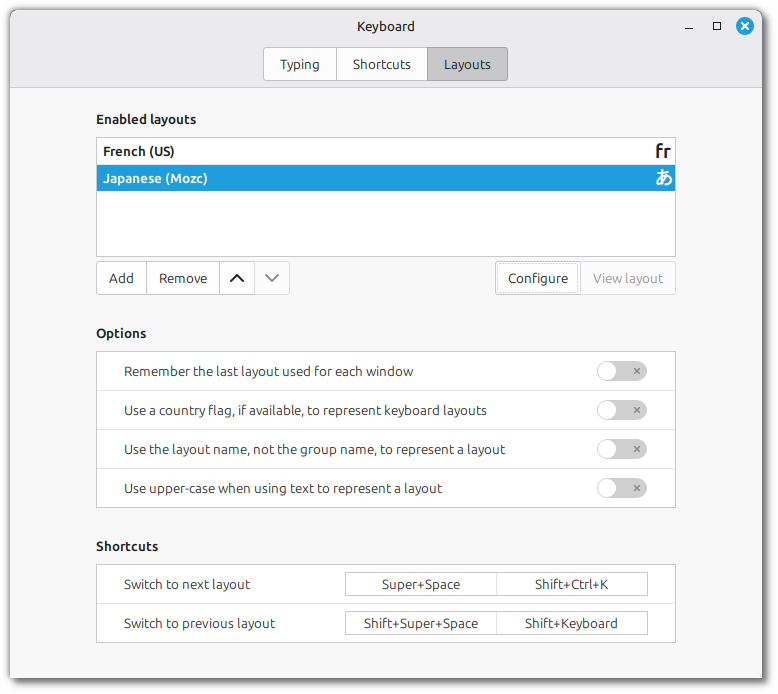
Going forward, traditional layouts and IBus input methods will be presented in the keyboard settings alongside each other, as if they were the same.
In this screenshot you can see a list of two layouts. One is a traditional XKB layout: French accents on a US ANSI layout. The other is actually an IBus input method: Japanese, using the Mozc engine.
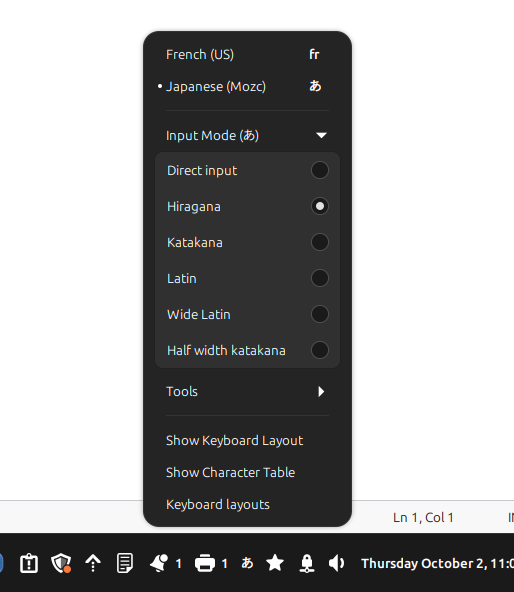
The keyboard applet also supports both types of layouts and all the features required by IBus:
Wayland support
Under the hood, the Cinnamon keyboard handling relied on libgnomekbd and only worked in Xorg.
This meant that Cinnamon under Wayland could only be used with an English (US) layout.
This new support is fully compatible with Wayland for both traditional layouts and IBus input methods.
On-screen keyboard
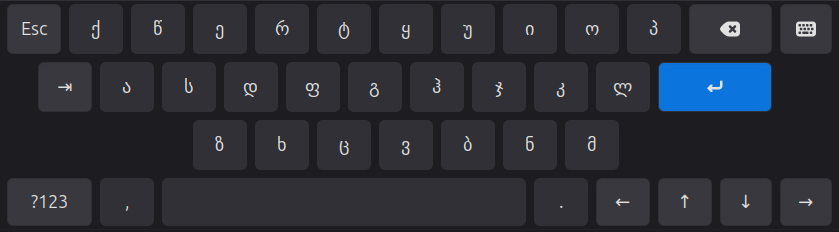
The on-screen keyboard (OSK) will no longer rely on libcaribou but be implemented natively by Cinnamon.
This brings IM support and layout switch in the OSK itself.
We took the opportunity to make it look better.
New menu
The Cinnamon application menu was redesigned and given a new layout.
It features a sidebar with sections for your avatar, places and favorite applications.
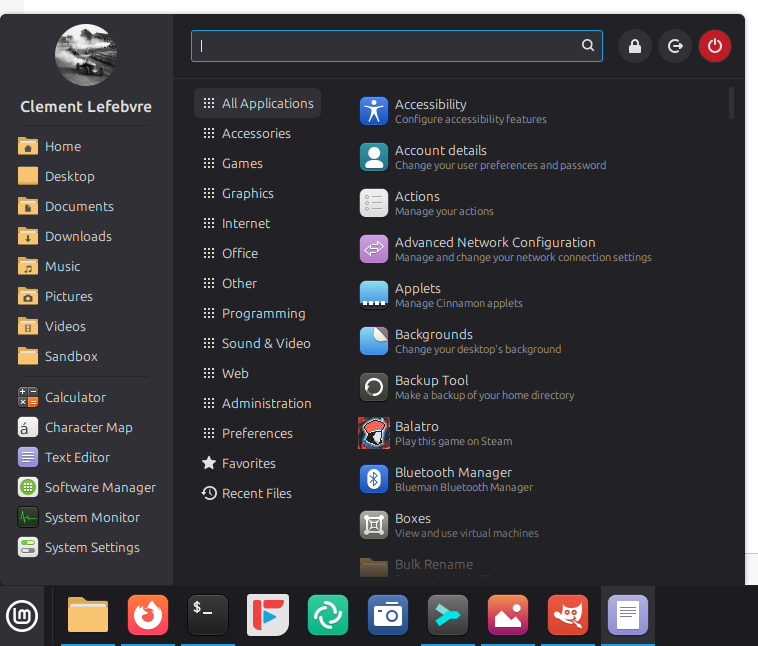
The system buttons were moved to the top on the right of the search bar.
In the applications section, the description appears underneath the app name.
The category section was made smaller and less noticeable to keep more focus on the apps.
In the preferences it is possible to hide some of the elements to make the menu smaller or to dedicate the sidebar to only show places, bookmarks or favorite apps.
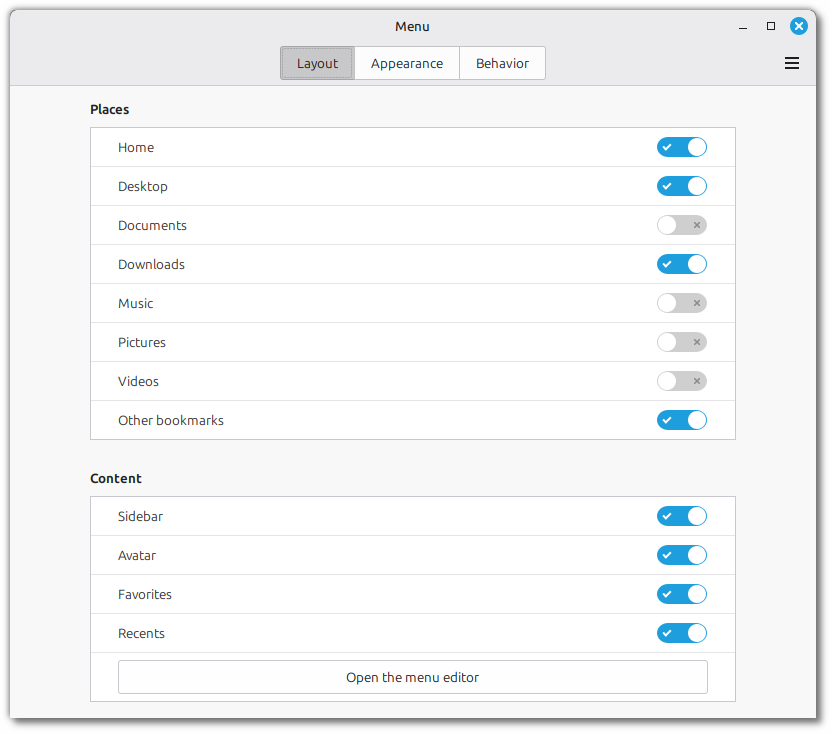
Special directories are treated individually and separately from other bookmarks.
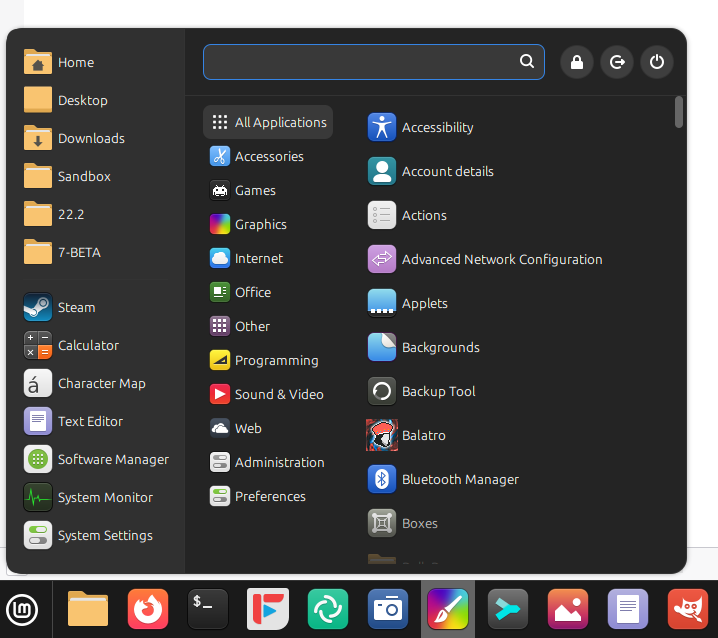
The categories can use fullcolor icons like they did in the past.
Here’s an example with larger icons in the sidebar and categories:
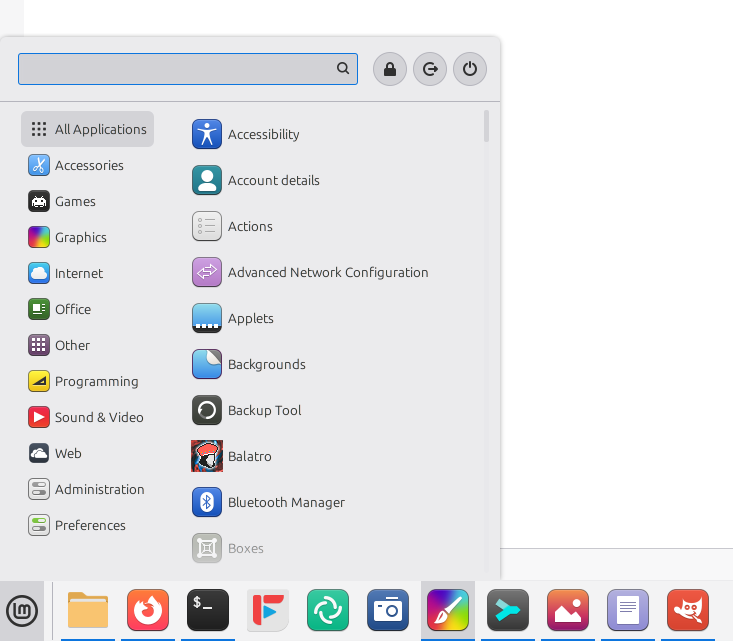
And here’s an example with no sidebar at all:
The code for the menu applet was refactored and modernized for easier maintenance.
The keyboard navigation and refresh mechanisms in particular were greatly simplified.
Sponsorships:
Linux Mint is proudly sponsored by:
Gold Sponsors:  Silver Sponsors:    |
Bronze Sponsors:        |
Donations in August:
A total of $15,669 were raised thanks to the generous contributions of 516 donors:
 $500 (7th donation), Neil V.
 $424, Andreas E. M.
 $318 (9th donation), Jiří B.
 $270, IURII M. K.
 $212 (7th donation), Michael J.
 $212 (4th donation), Ralph J. $200 (25th donation), John Mc aka “Land Research Project“ $200 (3rd donation), William P. $200, rebecca R. $159 (6th donation), Sebastian Friedrich $159 (2nd donation), $140, Anonymous $139, Alexander K.
 $127, Dimitar D.
 $127, MEDELEANU M.
 $127, VIRTANEN J. $106, Felicitas K. $106, Martin
 $106, Philip A.
 $106, Sune S.
 $101, G $100 (11th donation), James F. $100 (8th donation), Konrad W. $100 (5th donation), George C. $100 (4th donation), Kris J. $100 (3rd donation), P F H. $100, Anon O’Moose $100, Carlos R. $100, Eugene P. $100, John G. $100, Johnny R. D. $100, Karl E. $100, Kenneth H. $100, Steve P. $100, Timothy N.
 $91 (5th donation), acocorinacio aka “A. Inácio” $84 (2nd donation), Sebastian Münch
 $80, Ray L. $79 (5th donation), Marco van den Berg $75 (7th donation), David H. W. $75 (3rd donation), Logan C. $65 (2nd donation), William S. $63 (5th donation), Marcus A. $61 (74th donation), Michael R. $53 (14th donation), Hermann W. $53 (14th donation), Volker P. $53 (12th donation), Jyrki A. $53 (4th donation), David W. $53 (4th donation), Frits M. $53 (4th donation), Jan M. $53 (4th donation), Karl-günter N. $53 (2nd donation), Aer H. $53 (2nd donation), Dr Bob $53 (2nd donation), Hartmut G. $53 (2nd donation), Jens K. $53 (2nd donation), Markus D. $53 (2nd donation), Mike S. $53 (2nd donation), Paul G. $53 (2nd donation), Thomas S.
 $53, Andrew M. $53, Bjorn H.
 $53, C.
 $53, Daniel M. $53, FelixGrobe.Com $53, Frank J. $53, Graeme S. $53, Graham H. $53, Hans S. $53, Isa H.
 $53, Johan W. $53, Joop K. $53, Kamil Y. $53, Kevin E. $53, Krzysztof G. $53, Ludger J. $53, Marcel A. $53, Peter B. $53, Pierre C. $53, Stefan L. $53, Steffen M. $53, Tamara M. $53, Thomas V. $53, Ulrich T. $53, VTSpace GmbH $53, Ward, S. $51 (22nd donation), Adam K. $50 (25th donation), George H. $50 (11th donation), Mothy $50 (11th donation), Nate P. aka “cog_nate” $50 (8th donation), Anthony C. aka “Ciak” $50 (7th donation), Susan T $50 (4th donation), Beatrice G. $50 (3rd donation), Jack G. $50 (3rd donation), James J. aka “JimDaddy” $50 (3rd donation), Loren D. $50 (3rd donation), Marvin F. $50 (2nd donation), Back Office Geeks $50 (2nd donation), King Robert Distribution $50 (2nd donation), Peter S. $50 (2nd donation), Sarosh P. $50, Amarcy B. $50, Anton K. $50, Avery T. $50, Carl B. $50, Christoph F. $50, Douglas N. $50, E W. $50, George B. $50, George H. $50, Jim C. $50, John C.
 $50, John H. $50, Joshua C. aka “cow846” $50, Kristian S. $50, Matthew D. $50, matthew S. $50, Nicolas A. $50, Philip R. $50, Ravindra J. $50, Villeneuve V. $50, William W. $42 (16th donation), Henk van C. $42 (12th donation), Wolfgang N. $42 (3rd donation), Gerard O. $42 (3rd donation), Keith P. $35 (10th donation), P W E. $35 (7th donation), Andrew E. $31 (4th donation), Manuel López $31 (4th donation), René S.
 $31 (3rd donation), Andrea Ronchetti $31 (2nd donation), Ingo T. $31, Gregor P. $31, kaja k. $31, Terrence A. C.
 $31, Tony M. $31, Water V. G.
 $31, Łukasz F. $30 (2nd donation), Michaz P. $30, Ambrocio W. $30, Ingo L. aka “TheGo” $30, Mark A. $30, Robert M. $26 (9th donation), Johanan M. $26 (5th donation), Jens G. $26 (4th donation), Michael Schröter aka “mia“ $26 (2nd donation), Jan van der Bij
 $26, $26, David S. $26, Johannes K. $26, Rudolf M. $26, S. D. R.
 $25 (54th donation), Linux Mint Sverige $25 (16th donation), John W. $25 (13th donation), Mihnea Rădulescu $25 (7th donation), John N. $25 (4th donation), Corey P. $25 (3rd donation), Micheal $25 (3rd donation), Theron K. $25 (3rd donation), Trevor W. $25, J B. J. $22, Joe aka “lolok” $21 (110th donation), Johann J. $21 (62nd donation), Peter E. $21 (29th donation), Stefan W. $21 (24th donation), Benjamin W. aka “UncleBens”
 $21 (23rd donation), Marek S. $21 (18th donation), Janne S. $21 (11th donation), Kleiner Funk-Electronic $21 (10th donation), Martin L. $21 (6th donation), Juri N. $21 (6th donation), Raik D. $21 (5th donation), Luc F. $21 (5th donation), M.B.
 $21 (4th donation), David M. $21 (4th donation), Frank W. $21 (4th donation), Günter S. $21 (3rd donation), Daniel L. $21 (3rd donation), Michael T. $21 (3rd donation), Mili D. $21 (3rd donation), Peter P. $21 (2nd donation), Curd-Juergen S. $21 (2nd donation), Daniel M. $21 (2nd donation), Gerald E. $21 (2nd donation), HONG P. N. $21 (2nd donation), Jan B. $21 (2nd donation), Mohamed A. $21 (2nd donation), Oliver S. $21 (2nd donation), Pawel P. $21 (2nd donation), Siegmar H. $21 (2nd donation), sl1200 $21,
  $21, A L. $21, Alessandro P. $21, Ansgar M. $21, bart G. $21, Bernd R. $21, CESAR M. V. $21, Christian H. $21, D $21, Daniel G. $21, Daniel N. $21, dave C. $21, David W. $21, Didier P. $21, Frens E. $21, Henrik H. $21, Jürgen H. $21, Jens O. $21, Joel Mariteau $21, Joop V. B. $21, Jorge G. $21, Kirk K. $21, Klaus D. J. $21, Klaus G. $21, Kurt P. $21, Marianne W. $21, Mario G. $21, Michael T. $21, Michael T.
 $21, Michal F. $21, Pan $21, Pasquale P. $21, Patrick S. $21, Paul O. $21, Philippe D. $21, rafael D. N. $21, Ramon R. $21, Robin Rijke aka “R²” $21, Sandro D. B.
 $21, SEVİNÇ K. $21, Stefan N. $21, Stephanie V. H. $21, steven S. $21, TEEMU P. $21, Thomas B. $21, Thomas R. $21, Volker J. $21, Walter D. $20 (48th donation), John D. $20 (12th donation), Eric W. $20 (10th donation), Ron C. $20 (9th donation), Andrew D. $20 (5th donation), Kevin R. $20 (5th donation), Leela A. $20 (5th donation), Paul S. $20 (4th donation), Melina B. $20 (4th donation), xexus.us $20 (3rd donation), Garry H. $20 (3rd donation), Greg L. $20 (3rd donation), Invex $20 (3rd donation), Peter B. $20 (3rd donation), Randall W.
 $20 (2nd donation), Alejandro Rivadeneira B $20 (2nd donation), Daniel M. $20 (2nd donation), Peter S. $20, Anthony K. $20, Brian D. L. $20, Bryan C. $20, C T Johnson, LLC $20, Charles B. C.
 $20, Diego A. G. $20, Don G. $20, George P. $20, James S. $20, Jeffrey M. $20, John D. $20, Juan O. $20, Leland Craig $20, Mason J. $20, Michael H.
 $20, Oleksandr N. $20, Ronald V.
 $20, Saket A. $20, Ste $20, Steven L. $20, William P. $20, William S. $15 (15th donation), Fred B. $15 (3rd donation), Lars Otto N. $15 (2nd donation), Jackson M. $15 (2nd donation), mitch K. $15, Andrey G. $13 (6th donation), Cevad O. $12 (2nd donation), Glen R. $12, DAVID R. B. $11 (15th donation), Bengt Falke aka “BIOMOIB“ $11 (9th donation), Alessandro S.
 $11, Darko H. $11, Raymond M. (retired) $10 (113rd donation), Thomas C. $10 (57th donation), Philip Woodward $10 (40th donation), Tugaleres.com $10 (37th donation), Denys G. aka “GD Next“
 $10 (19th donation), Adis H. $10 (19th donation), Marc V. K. $10 (16th donation), Ronald S. $10 (14th donation), Emanuele Proietti aka “Manuermejo” $10 (12th donation), Davide A. $10 (11th donation), Antoni Aloy Torrens $10 (10th donation), David W. $10 (9th donation), Gene E. $10 (9th donation), Geoffrey P. $10 (9th donation), Joel C. $10 (9th donation), Joerg B. $10 (9th donation), Roy S. $10 (8th donation), Abe Z. $10 (7th donation), Artem Ignatyev aka “ZaZooBred” $10 (7th donation), Mario I. $10 (7th donation), Michael W. $10 (7th donation), Noël D. K. $10 (6th donation), Adrian S. $10 (6th donation), Jose J. $10 (5th donation), Benjamin L. aka “indivisual“ $10 (4th donation), Andreas H. $10 (4th donation), Blanford B. $10 (4th donation), Gregory F. $10 (4th donation), Mariusz B. $10 (4th donation), Olivier R. $10 (4th donation), Thomas K. $10 (4th donation), Tim E. $10 (4th donation), William M.
 $10 (3rd donation), Evgeny $10 (3rd donation), Fred B. $10 (3rd donation), Jivko R. $10 (3rd donation), Marc R.
 $10 (3rd donation), Marcio C. $10 (3rd donation), Marco D. $10 (3rd donation), Marek Stapff $10 (3rd donation), Mirko Z. $10 (3rd donation), Pgm R. $10 (3rd donation), Scott B. aka “Dharmabum” $10 (3rd donation), Sebastian S. $10 (3rd donation), Steve D. aka “CoachSteve“ $10 (3rd donation), Ulf W.
 $10 (2nd donation), Attila L. $10 (2nd donation), Augusto D. $10 (2nd donation), Brett A. $10 (2nd donation), Dagmar B. $10 (2nd donation), Dave J. $10 (2nd donation), Diego C. $10 (2nd donation), Edwards Mktg & Design $10 (2nd donation), Guy F. $10 (2nd donation), j.w. V. D.
 $10 (2nd donation), Jean-luc S. $10 (2nd donation), Josep C. $10 (2nd donation), Julio Abel M. $10 (2nd donation), Kamil G. $10 (2nd donation), Lukasz M. $10 (2nd donation), Martijn N. $10 (2nd donation), Matthew R.
 $10 (2nd donation), mohit K. $10 (2nd donation), Nikhil D.
 $10 (2nd donation), Philip V. S. $10 (2nd donation), Pietro L. $10 (2nd donation), ronald H. $10, ali B. $10, Alistair W. $10, Allen W. $10, Andrew S. Vaz $10, ARTHUR H. W. J. $10, Benjamin A. $10, Benjamin C. $10, Benjamin F. $10, Bernd H. $10, Bernhard W. $10, Bruno C. $10, Christian R. $10, Daniel S. $10, Daniel Z. $10, david C. $10, David M. $10, David S. $10, Delyan V.
 $10, Dusan C. $10, E D. J.
 $10, edward H. $10, Enzo Delfino Editore di Vincenzo Delfino $10, Florian S. $10, Gabriele C. $10, Georg S. D. $10, Gerhard E. $10, Giovanni G. $10, Gunar H.
 $10, Herberts M. $10, Hugh M. $10, Ian C. $10, Jürgen W. $10, Jacob M. $10, Jacques V. C. $10, JAI A. $10, james M. $10, jean F. $10, Jean-Louis D. $10, Jennifer R. $10, Jeremy P. $10, Johannes R. $10, John G. $10, John W. $10, José R. C. F. $10, Justin R. $10, K. P.
 $10, kanelef K. $10, Karen L. B. $10, Karl K. S. $10, Ken N. $10, KONSTANTINOS I. B. $10, lamberto D. C. $10, Leszek B. $10, Loïc L. $10, Lorenz M. $10, Ma A. T. S. $10, Magnus I. $10, Marc E. $10, Marcus B. $10, Mariusz L. $10, Marko P. $10, Markus O. $10, Matthias H. $10, Michael N. $10, Michael S. $10, Narcis-Ionut T. $10, Nidia C. $10, Nikita G. $10, notariat ilfov $10, Nuno M. M. G. C. $10, Olga F. $10, Pawel Z. $10, Rainer B. $10, Raymond B. $10, Raymond G. $10, Reinhard S. $10, Rob M. $10, ROBERT P. $10, Roberto N. $10, Robin D. B. $10, Shaun G. $10, Shuli K. $10, Simon P. $10, Snorre L. $10, Steffen M. $10, taeke S. $10, Thomas B. $10, Tobias N.
 $10, TU G. C. $10, Victor G. M. $10, vasile A. $10, VoiD Blackwall $10, Μιχάλης Π. $8, Pavel D. $7 (2nd donation), Jewgeni Smirnow $7, $244 from 60 smaller donations
If you want to help Linux Mint with a donation, please visit https://www.linuxmint.com/donors.php
Patrons:
Linux Mint is proudly supported by 1,756 patrons, for a sum of $4,334 per month.
To become a Linux Mint patron, please visit https://www.patreon.com/linux_mint
All of the images in the blog are showing as “Content Not Viewable In Your Region”.
I am in the UK.
They are showing ok for me. I am in the UK running linux mint mate 22.2 .
Very cool, I’m especially excited for the menu 🙂
Hey, there! 🙂 Interesting changes to the menu. But how configurable is it?
1. Does it allow placing the Quit/Logout/Lock options back on the bottom left side? It’s nice to be able to only move the mouse a little bit to shutdown/restart/logout/etc. With the side bar enabled, the three buttons could be placed as the bottom menu entry.
2. What about the old space in the bottom-right side of the menu, for the app name and description? Showing the descriptions everywhere makes the menu quite busy and distracting. I’m sure some people will like it, especially those who enjoy this feature in other DEs, but a toggle would be nice, to either show descriptions for all apps, or use the old bottom-right area to show the app details there and have a less busy menu.
3. Can all options in the menu sidebar be disabled via right-click? That would be a welcome change, given how rigid that part of the menu has been so far.
Random question: has multi-time zone for the Calendar applet been considered/prioritized in the near future? That’s very useful when traveling or when you want/have to keep track of multiple time zones (travel, family/friends, work, etc).
Hi Nick,
Thanks for the feedback. As it is now, there’s no bottom bar anymore. The buttons are indeed further away and the descriptions are smaller than before. I’ll discuss this with the team to see if this needs to be brought back as an option or not.
The menu is configurable in terms of features but not in terms of layouts. You can enable/disable pretty much anything but not move things around.
I second an option, as Nick suggested, to allow placing the Quit/Logout/Lock options back on the bottom left side if it can be made at all possible? That would be great if so, as the new menu does look very nice. Alternatively, can there be an option to keep the existing menu as is?
Another vote to be able to keep old menu, or at least not have to move the mouse so far to access reboot etc buttons. I appreciate all the hard work; sorry but I really don’t like the new menu at all from what I see at the moment.. I don’t want “file manager” directories/folder list on the Menu. Maybe time to rethink the DE I use??
I don’t see how this menu layout is an improvement. In fact, I have several issues with it:
– I don’t need the default directories on the side bar. Even if I’d use them (which I don’t because I keep my documents on a separate data partition), I could just open the file manager instead which only takes up one icon.
– The shutdown button should be immediately visible to the user when opening the menu (big, red and in the center field of vision) and not disguise itself as some unimportant control element belonging to the search bar
– I don’t need application names next to the icons of my favorites. I know their names because, well, they are my favorites.
– I don’t need the exact same icon (6 dots) next to every category. It adds no information. I’d rather have individual icons to make the menu easier to navigate or no icons to save space.
– The last one is debatable but I prefer smaller application icons with mouse-over description text over big icons with always visible description text that force me to scroll much more. I really only need this description in those rare cases when I don’t know what an application actually does, which usually aren’t ALL applications in one category…
I mean, I appreciate that we can deactivate most of these changes, but why waste time with making the menu less usable in the first place? Always remember that every change potentially disrupts the workflow of thousands of users so please consider every step carefully. Other than that keep up the good work!
And another vote to please keep the current menu at least an an available option for users to fallback on – I helped set-up Linux Mint for non-technical older people and the option to set a large shut-down button in bright red on the left side of the menu was immensely helpful. My users have been able to immediately find the correct button by its easy to find placement, size and color and have no problems using their system, and I fear that this change might be problematic for at least some of them. 🙁 On a personal level I very much like the current menu and agree with previous comments – the new design reminds me of XFCE’s whisker menu, and I think it loses a little bit of Cinnamon’s signature identity. Thank you for your hard work!
The quit / lock /logout buttons are the only parts of the menu I use every day, moving them to the top would force me to adopt menu at top of screen mode.
I really like the new menu design, but I agree that having the Quit/Logout/Lock buttons at the bottom closer to the menu icon would make using them much easier to reach.
@Clem and Team,
Please keep on innovating and moving forward but also keep the balance and please never forget the old luddites and give us fallback toggles so we can keep things as comfortable as before as much as possible.
Personally I have some low security computers where I never lock the screen or logout. I have even edited some code out, with the precious help from the folks of the Forum, to get rid of the lock screen and logout buttons. I wouldn’t like the new menu code base to mess with my menu and visual navigation habits.
As sated above, the new men looks like Whisker and I agree. The current menu is part of Cinnamon’s visual identity. I can easily identify distros by their task bar and menu, it’s their Hello World and Hello User statement.
…and if I find myself on the floor recovering from a seizure, I know I sat in front of GNOME 😀
I would dissent a bit here, granting that everyone has his habits and tastes. I personally have beeen sticking to Mate mostly becouse of the menu (and a few other details) – I am shutting down with keyboard shortcut and thus have the power options removed, leaving only 3 system items with more air. At the same time I appreciate the Mate’s more spacious Favorites as a default and the essential Places. So based on the screenshots, this looks promissing-is for me as I would like to try the Cinnamon niceties in production.
@Clem is there any timeline when this would be available (and in what manner), please? I was not able to see anything to that matter…
Just a nitpick. I’d like it if the account image was square and not circle. I also would like the power buttons in the bottom left with square icons and not circle ones.
For the people not liking the menu, maybe the “Cinnamenu” might be helpful. I use it because – with a custom .JS – it can go down symlinks which the normal menu does not. (I have my home folder’s content symlinked to another drive, hence the stock menu never searches/finds anything).
If you use imgur.com to include images in posts they will no longer be visible in the UK. Imgur.com has decided to make its site unavailable to users in the UK as a result of a dispute with UK regulatory authorities.
Imgur.com made its site unavailable to users in the UK as a result of a dispute with UK regulatory authorities. Luckily, I use a VPN, but it might be worth thinking about in future Clem
As already mentioned by Terry & Wayne, UK users are no longer able to see content hosted on imgur.com, so all that shows now is a placeholder that says “Content not viewable in your region”.
I’m sure the pictures are pretty though 🙂
Sorry about this. I had no idea imgur.com had blocked the UK, this is crazy 🙂
I edited the post. Let me know if you still have issues with the screenshots.
I love the change with descriptions everywhere in the start menu, especially recognizing the Software Manager logo caused issues for nonee technical users like my dad but could you rename it in the German translation too? The current German name (Anwendungs Verwaltung) is hard to figure out even for more technical people who are new to Mint! Not sure why you decided to remove the icons for categories, I like the idea of uncolored icons to further distinguish them from apps but without a proper replacment logo they become hard to distinguish from each other. Also, I share the concern of Nick regarding the power button placement, it’s just easier to reach at the bottom.
Thanks for all your fantastic work! Mint remains the by far best distro for Windows users and you continue to make it better with each update! 🙂
Hi,
Will it be possible to perform arithmetic operations using the menu?
When entering text in the launcher, will it prioritize the apps that are used most often? For example, if I type “music,” will it first suggest my usual audio player?
Thank you in advance for your r
It doesn’t keep track of usage or act as a calculator.
You always hit the nail on the head with your improvements. I really like the new menu.
HI UK PEOPLE!
I’ve uploaded a screenshot of this page with the images to postimg for now. Cheers.
https://postimg.cc/crKLNYwN
I don’t know if this Comments software blocks links. If it does, you want postimg dot cc slash crKLNYwN
Ununtu is now lagging. It is just not a that good a Linux OS anymore.
I feel Mint is going to be have to be based on Debian soon, so I am glad you have a Debian based Mint ready to go, if needed.
LMDE
Thank you Clem and team.
Will the new application menu’s “floating” style become the norm for other native panel applets that open menus? For example, the network and power applets open “attached” menus, with no negative space between the panel and the menu.
A consistent treatment might be nice. Just a thought!
Hi Nate,
This depends on the theme. I used different themes here in the screenshots.
For the next version: Is it maybe an idea to adjust the default applications in the grouped windows list of the menu bar?
Like:
– Add ‘Systems Settings’ and ‘Software Manager’
– Remove ‘Terminal’
That would seem a bit more intuitive for new users, at least imho. Now it sort of hints/suggests “You’re gonna need the terminal to adjust your settings and install new software”.
I already do this per default when I install Mint on computers of relatives.
Is there any chance we can get a layout per device? I use 2 keyboards, one is GB the other is USA, i’d love it if i could layout per device id!
You can switch layout with Ctrl+Space. Note that multiple keyboards can be plugged at the same time, so there’s no concept of “active” or “main” keyboard here.
Hey Clem,
It is not about “active” or “main” keyboard, but something similar to “Per-device input configuration” in
https://wayfire.org/2025/08/27/Wayfire-0-10.html
First of all thanks for amazing work.
some issues if you consider before next update:
1. when we get full(stable) wayland support?
chrome’s PWAs gets crashed in wayland session, sometimes mouse pointer stuck at fixed position when login with wayland session.
video player (celluloid) not even work in wayland.
i think any app with hardware acceleration not work properly in wayland session.
I notice that there is a substantial upgrade in Calibre for LMDE7 from 6.13 to 8.5
The associated ebook-viewer is a substantial improvement.
Thanks for making this possible.
Thank you Linux Mint Team for your great work.
I upgraded two hosts to Zara which as a smooth experience and now I am enjoying the finger printer reader. Great work. Well done!
Usually I use a German layout for correspondence and an English layout for programming. I switch between them with a keyboard shortcut. It happens that I unintentionally hit the shortcut and realize that the other layout is active when my writing gets mixed up.
Would it be possible to have a short visual indication that shows the newly selected layout? Similar to e.g. the volume and brightness indicators, that show up for a few seconds when changed.
Linux Mint has great customization options that even allow to link keyboard LEDs (Caps Lock, Scroll Lock…) particular layouts. That is what I did in the past with the wired keyboard. However, my notebook has no keyboard LEDs anymore. So this workaround is not possible anymore.
This is my first time leaving a reply on the Linux Mint blog.
I hope the new applications menu will allow for rearranging things more. I’m personally used to having the search box on the bottom, like it was in Windows Vista and 7.
Other than that, I don’t know what other changes await the new version of Cinnamon, but I have one complaint. One of my PCs is an ASUS Vivobook 16 laptop with a 1920×1200 resolution and by default everything looks tiny.
I’ve tried various options, like smaller resolution, but that looks blurry, I’ve tried Fractional Scaling, but I’ve found some inconsistencies – my cursor size varies between applications, especially Flatpak ones and I can’t even be bothered to try and fix it, another thing with Fractional Scaling is that it makes the cursor speed slower, I can adjust it, but it never feels like when scaling is 100%. The only solution I found was to just keep scaling at 100% and increase font scaling to 1.5.
I wish scaling would improve or somehow applying a lower resolution would not result in it looking blurry, I don’t know if Wayland will improve this in the future, but along with the tiny size of everything on my screen, what I notice is that window control buttons also look very small even if fonts are bigger. Without scaling that is and for that I have to use some custom themes that make the buttons bigger and I wish there was a way for a setting under “Windows” that allows to increase the size of those buttons and alternatively, some people may feel they are too big and would like to make them smaller.
Will auto login work or at least onboard keyboard keyboard for login ?
Will the new application menu scale better on multi monitor setups with different resolutions?
My laptop has a full HD resolution and my monitor 2K. The menu on the laptop screen is way to small.
Yes, please deliver a better support for monitors with higher resolutions than HD.
Thank you for your ongoing great work!
As always, it’s a pleasure to see what the LM team is working on. We appreciate your constant efforts to keep improving something that is already great.
I have a couple of questions/suggestions:
Would it be possible to add an option in Software Manager to sort search results alphabetically (by number of reviews or perhaps rating, excluding unverified flatpaks)? If I remember correctly, it was possible to do something like this in Mintinstall before. Another thing could be to improve the uninstallation of flatpak, I mean deleting caches, app data, and permissions (by running: flatpak uninstall –delete-data). Finally, Mint could also add an option with a button to repair the Flatpak installation (I mean running ‘flatpak repair’), perhaps in mintsources/mintupdate. I have had a few instances where installations fail or present problems, disabling the use of these apps.
Best regards
i like the previous design of menu from past blog post. this new one looks too wide. the looks of previous design looks cleaner with lock/logout/shutdown button on the bottom. please give us the option in the future as mention on the comment above. i could skip cinviistarkmenu if i get that menu from old blog post, it looks so much more modern and clean. heck even better if we could move around sidebar too, after all there 4 position where we could put panel so adjusting the placement of menu stuff would be a plus.
When I use Linux Mint Xfce Its default file manager SpaceDisk fills up very quickly and I have 1 terabyte of storage, even though I don’t use Timeshift, I see that it has 80 GB and after downloading Discord to my computer I see that the storage has been reduced to 56 GB. I used to use Cinnamon, but if there is No, the same problem exists there, and if auto update and auto upgrade were available in Cinnamon, it would be very beneficial.
Thanks for the great work!!!
AMAZING!
So the new menu will be touching the taskbar? By default wouldn’t there bit a bit of a gap? I think that’d make it look better. Other than this it looks great! Nice work!
Also, I’d highly recommend changing the default wallpaper to something more vibrant and colorful with a slightly visible LM logo on it.
Also it’d be great if during the first boot users could have more style/design options to choose from, not just accent colors and stuff. For example, to be able to choose if they want the taskbar + menu with blurred background, or if they want the menu in the middle of the taskbar or left side, etc..
Also do these changes to the keyboard mean that the experience of using LM on GNU/Linux tablets and phones be better? THANK YOU!
This looks amazing! Great work, Clem and team!
I suppose this will also be implemented in LMDE 7?
Cheers and much love dear Mint team!
I’d be interested in this as well
Any updates on the blur effect? I think this would be the perfect opportunity to implement it. Having menus and panels with a blur effect would look great. Since GNOME already has this feature, what would it take for Cinnamon to support it as well?
Hello Clem,
First of all, thank you for the news.
I have a few questions for you :
1. Will the on-screen keyboard be properly supported on Wayland? What level of Wayland support will there be on Linux Mint 22.3 (correct or not)? Will we have to wait for Linux Mint 23 to finally have a “stable” level of Wayland under Cinnamon?
2. There has already been a debate on this topic. But why doesn’t the official Cinnamon menu offer the same features as Cinnamenu (grid view of applications, more customization options (expanding the menu to a full-screen menu, item placement, emoji support, etc.))? Why not consider a mix of the two? Many people are switching to Cinnamenu because it offers more options than the main menu. Of course, that’s my opinion.
3. Do you think a search bar in the panel (like the one found in Windows 10 and 11 next to the Windows logo (menu button)) would be a nice addition to Linux Mint? An improved search bar that would be roughly similar to the one in Windows.
Thanks for your answers.
Regards.
Agree. Cinnamenu with grid view of applications with LARGE icons looks so much better! (out of the box).
One can distinguish apps very quickly simply by looking at the large icons.
Cinnamenu is the 2nd most popular applet.
Interesting work. I much prefer the previously proposed menu design, with the power buttons on the bottom instead of the top, which gives a much more friendly environment to those coming from Windows. Please reconsider, or at least give the option to change the menu.
In native IBus, the keyboard switching hotkey can trigger a popup and let me choose from the list of layout / input method. The list is also auto-reordered according to the last layout / input method I was using before switching.
Will Cinnamon integrated keyboard layout system allow such behaviour?
This sounds more harsh than I intend it to come across, but who would think that moving the system buttons to the top right is a good idea? When I’m wanting to power off or suspend my system, I want the quickest path possible.
Could we please get an option to retain the lock screen/logout/power buttons in the bottom left position for the new menu? Otherwise, looks nice. Thanks.
I know there is effort and time invested in the new menu, but I do not like it at all, if I compare it with the current one, the current one looks a thousand times better, it is more compact and I have just what is necessary, in the new one I see the name of the pinned applications on the left side, I see it as a waste of space and it only makes the menu look overloaded, I hope that the name of the pinned applications can be hidden
Is there any way to enable function keys in an on-screen keyboard? Without it, it is hard to do certain tasks on a touchscreen tablet that doesn’t have a keyboard. Such functionalities are available on Onboard, but sadly, Onboard does not support Wayland
Looks very nice . I’m talking to everyone about Mint . good job everyone and wish you happy days
The reason why this project is so awesome is … because Clem listens.
Thats a quality many forgot. To listen. Listen and Think. Also he believes in God.
This project is awesome, so is the community. Keep the good spirit.
Thanks to everyone.
Yours sincerely
LMDE Enjojer
What does belief in a god have to do with Linux Mint?
Also this project is a big party.
everyone us involved with what they can give and want to give.
everyone loves it so do i.
from my experience i wondered if the memory leaks in cinnamon ever got fixed or if it’s still just a timer quietly restarting it in the background. after running cinnamon for days with plenty of suspends and wakes i always felt it start dragging its feet. the lag built up slowly like a weight on the system and the only thing that truly reset it was logging out and back in again.
(linuxmint 22.2 ) and cinnamon on nixos
Thank you Linux Mint Team for your great work.
I upgraded two hosts to Zara which as a smooth experience and now I am enjoying the finger printer reader. Great work. Well done!
Regarding keyboard layouts, I use a German layout for correspondence and an English layout for programming and switch between them with my keyboard shortcut. It happens that I unintentionally hit the shortcut and realize that the other layout is active when my writing gets mixed up.
Would it be possible to have a short visual indication that shows the newly selected layout, similar to e.g. the volume and brightness indicators, that show up for a few seconds when changed?
lmde+xfce 🙂
good job team!
what about LMDE 7 stable?
what about LMDE7 stable?
I am guessing that Trixie is proving problematic. I don’t think there has been a distro release based on the latest Debian that has progressed passed the Beta stage. We will have to be patient with this one.
LMDE7 stable has been released, the news has not made it here yet. I have it running on my laptop, no issues.
Finally some work been done on OSK! I’ve had two occasions when an update left me with Onboard messing up the input language picker – tray icon gone, Super+Space having no effect. Hopefully those problems will be gone with the next version of Cinnamon.
If only that OSK could be made to work in predictive text input mode…. now, that would be perfect 🙂
Cheers!
Hi Clem, thanks for your great work. One request: could you make the current Cinnamon menu available as a desktop theme or as an app in the store so those of us who love the classic menu can use it? Your old followers would really appreciate it.
This!
Thanks Angel, your solution seems to be the best for both worlds. Want the modern one? Chose it. Still want the old one better? It’s there too. Everyone will be pleased.
sería interesante que se cambiara el enfoque a LMDE
TBH I find the categories really redundant – you always search the app by typing it in anyway. Will there be an option to turn categories off and have just favorites and then all apps?
I never search the app by typing it in. I wish there will be an option to turn the search bar off 🙂
Hi Clem!
Personally i don’t like the new Menu.
But that said, i didn’t like the old either.
For me, Cinnamenu is just perfect.
The buttons on the bottom are also better because they are easier to get to. I don’t like having to move so far just to shutdon my pc. When i’m done, i want to get on with my life as fast as possible.
Just my two cents.
I would like an option to keep the old menu, especially the power and lock options being on the left. Please keep this available as an alternate option for the menu.
Nemo falls continuously when two instances are opened to move data from one side to another.
https://termbin.com/7qd1
Malwarebytes is blocking access to Termbin.com FYI.
Did you try two tabs in one Nemo instance?
No, I always use two different windows.
Nemo works very slowly, stops for a while and then continues just as slowly and so on. It is very difficult to move data.
I hope the new menu will have the prompt fixed, so that you can change the input method within it too. A few versions ago this suddenly stopped working and many Asian users started complaining about it. So many issues open for that.
I use a menu replacement called Cinnamenu, and will likely continue to do so after the switch. For some reason, the default menu in Linus Mint never really clicked with me – coming from Windows, I prefer to see all my programs in a list, and dislike program categories. Cinnamenu allows me to turn off these categories.
Ironically, now that I’m free of Windows I’ve configured this menu to act more like the app drawer from an android phone, so it now shows all of my programs in a grid when opening my menu. I urge anyone who struggles with the new menu to give Cinnamenu a try – you may be able to configure it to act more like the older-style Mint menu.
I like this menu. Why change it?
Just out of curiosity… I have a 64 GiB pendrive FAT32 formatted. fdisk says
Disk /dev/sdc: 58,24 GiB, 62537072640 bytes, 122142720 sectors
Disk model: STORE N GO
Units: sectors of 1 * 512 = 512 bytes
Sector size (logical/physical): 512 bytes / 512 bytes
I/O size (minimum/optimal): 512 bytes / 512 bytes
I can work with it on Windows (10, 11) and on macOS but not with the current Mint 22.2 (Cinnamon) which does not mount it. Is to be expected? There are solutions? Which?
How I recovered a blocked Cinnamon.
This morning I was doing Copy/Paste texts from the internet (Firefox) to a text editor (Xed). Maybe I did some involuntary thing, with the mouse or keyboard, but suddenly everything freezed. I could move the mouse around, but nothing else worked. I could not save the Xed file, and I did not want to loose its contents.
Tried to restart Cinnamon with Alt F2 – r, but Alt F2 did not work. I tried Ctrl Alt F2, and got a text terminal, where I could login. Then I grabbed my phone to go to the net looking for solutions. After trying some suggestions that did not work, I finally found the solution:
$ pkill -HUP -f “cinnamon –replace”
(literally as above with the quotes).
I returned the graphic session (Ctrl Alt F7) and Cinnamon was working. I immediately saved my text file (that I did not want to loose), and restarted Cinnamon and afterwards the computer.
I’m posting this in case someone runs into a similar situation.
My environment: Mint 22.0, Cinnamon 6.2.9, Kernel 6.8.0-64, with all the updates installed for this Mint version.
I am eagerly awaiting Wayland support, and I hope everything will be clear.
I will plaster this everywhere in hopes that Mint team notices and takes this into account.
Dear Mint team – with the new Cinnamom application menu redesign PLEASE make sure that if the menu is placed in the middle sector of the panel, it opens centered ON THE SCREEN (Windows 11 style), and NOT ON THE BUTTON (as it is currently).
If placed in the side sections sure, center on button, align to the edge, I don’t care. But if placed in the middle, it should open in the middle of the screen. That’s why we place it there.
Thank you for coming to my TED Talk 🙇🏻♂️
Thank you for the option that the categories can use fullcolor icons like they did in the past. Very much appreciated (also for people who cannot read)
Please make the new menu capable like GNOME Shell, where you open the launcher (by pressing the Super key), type “Shut” and press Enter to select the shutdown option.
Thank you for your work.
Hello. Can you please add the most used bulgarian keyboard layout? I asked it in this topic https://forums.linuxmint.com/viewtopic.php?t=228743 many years ago. Is it not time to be added? Or tell me where to submit bug/addition request?